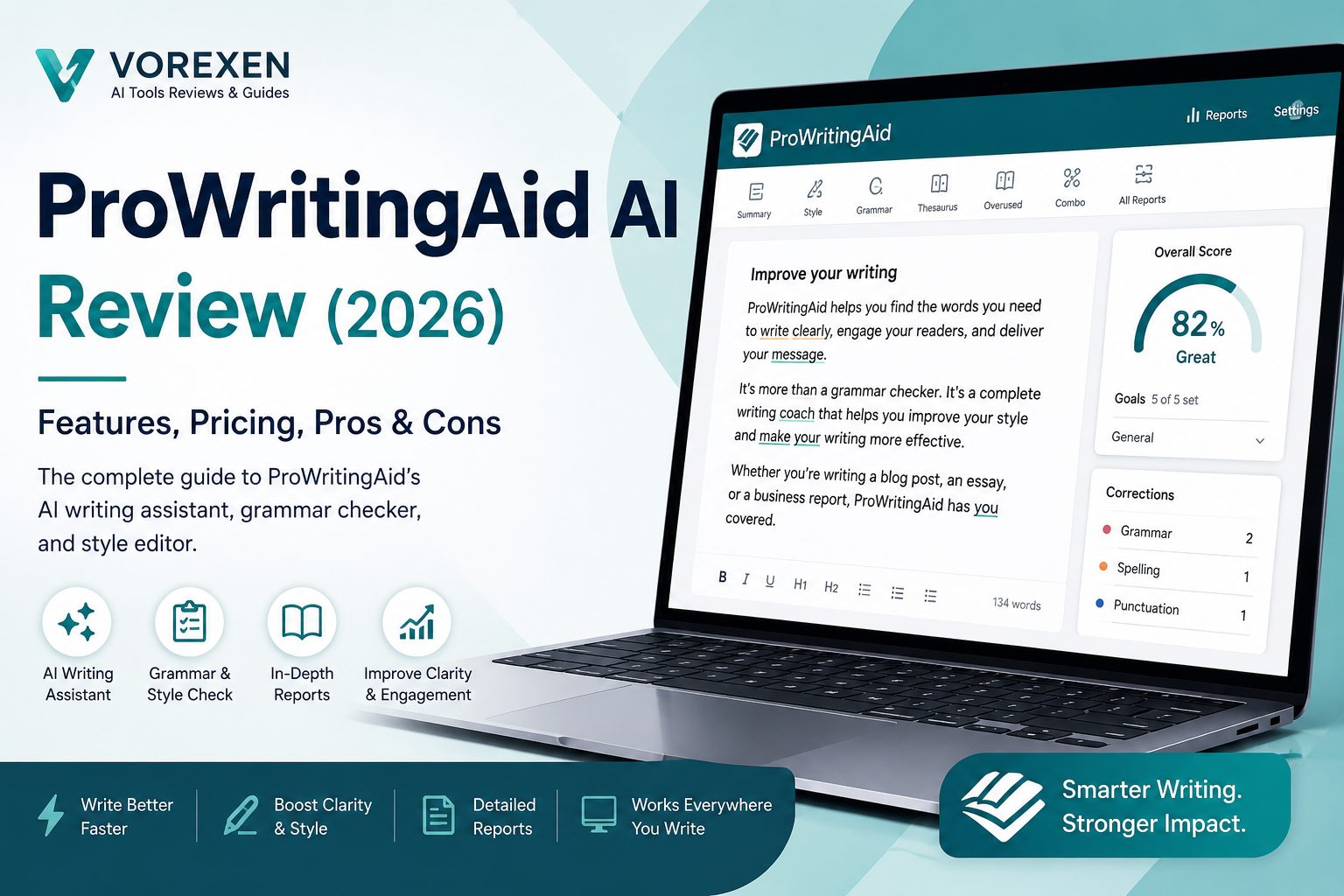
ProWritingAid Review (2026): Features, Pricing, Pros & Cons
Creating polished, engaging, and error-free content has become more important than ever. Whether you’re writing blog posts, marketing copy, business reports, academic papers, or novels, high-quality writing can improve credibility, increase reader engagement, and even boost search engine rankings. While AI writing tools have transformed content creation, many writers still need a platform dedicated to editing, grammar improvement, readability analysis, and style enhancement. That’s exactly where ProWritingAid stands out.
In this comprehensive ProWritingAid Review (2026), we’ll examine its AI-powered editing capabilities, grammar checking, readability reports, pricing plans, integrations, advantages, disadvantages, and how it compares with popular alternatives such as ChatGPT and Grammarly. By the end of this review, you’ll know whether ProWritingAid is the right writing assistant for your workflow.
Quick Verdict
- ⭐ Overall Rating: 9.4/10
- ✅ Best for writers, bloggers, students, authors, editors, and professionals
- ✅ Excellent grammar, readability, and style analysis
- ✅ Detailed writing reports with actionable suggestions
- ✅ Integrates with Microsoft Word, Google Docs, Scrivener, Chrome, and more
- ❌ Less focused on AI content generation than ChatGPT
What is ProWritingAid?
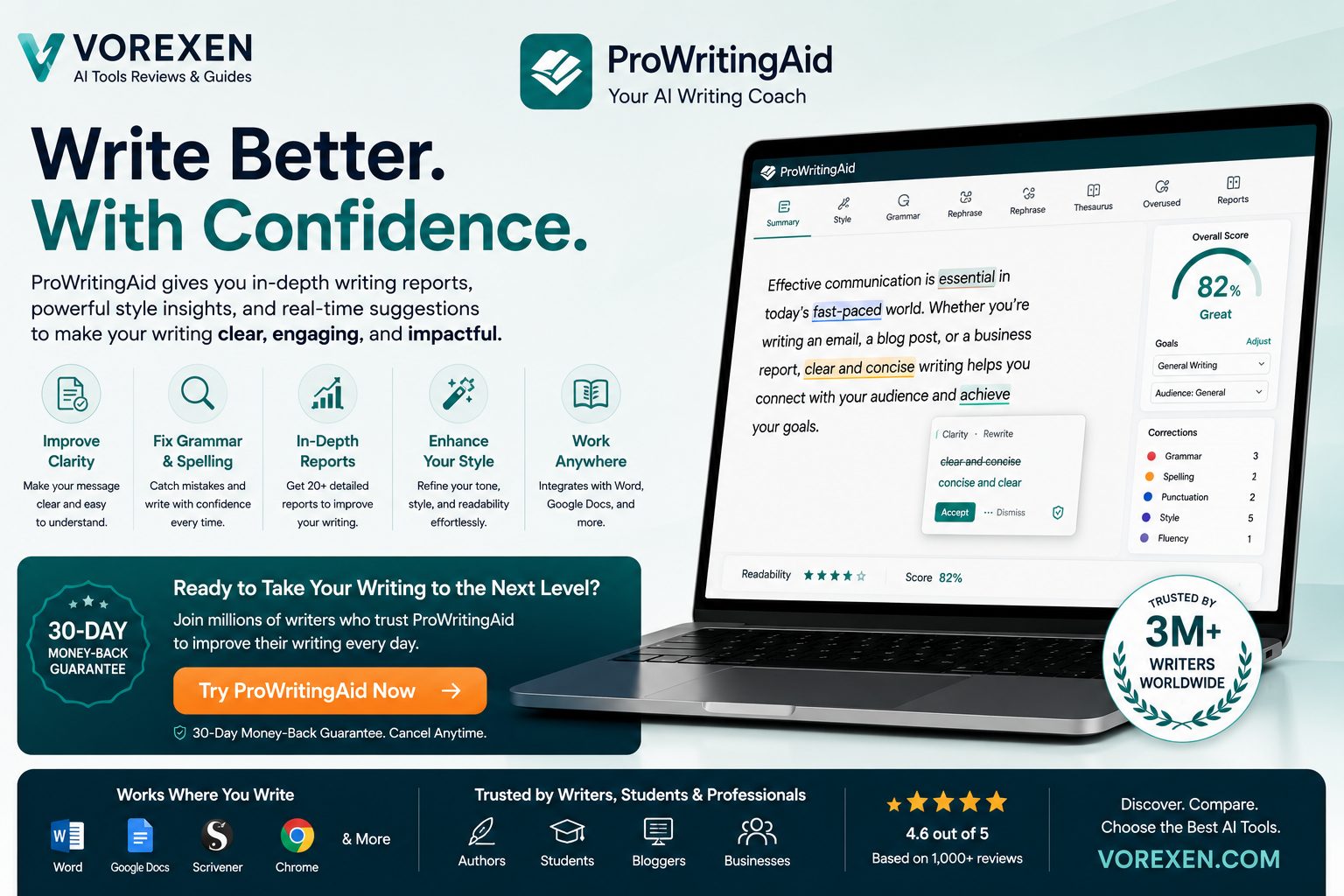
ProWritingAid is an AI-powered writing assistant designed to help users improve grammar, spelling, punctuation, clarity, sentence structure, readability, and writing style. Unlike many AI tools that primarily generate new content, ProWritingAid focuses on refining and enhancing existing writing through detailed analysis and intelligent editing suggestions.
The platform provides more than twenty in-depth writing reports covering readability, overused words, sentence variety, pacing, sticky sentences, clichés, transitions, consistency, dialogue, and many other aspects of effective writing. These insights make it a valuable tool for bloggers, copywriters, students, novelists, business professionals, and anyone who wants to communicate more clearly.
Key Highlights
- AI-powered grammar and spelling correction
- Advanced readability and style analysis
- Over 20 detailed writing reports
- Real-time editing suggestions
- Built-in rephrasing and sentence improvements
- Plagiarism checking (Premium)
- Works with Word, Google Docs, Scrivener, Chrome, and desktop apps
- Suitable for long-form articles, books, emails, academic papers, and marketing content
Who Should Use ProWritingAid?
- Bloggers publishing SEO-focused content
- Content marketers and copywriters
- Students writing essays and research papers
- Authors and novelists editing manuscripts
- Business professionals preparing reports and emails
- Freelance writers managing multiple client projects
Pros & Cons at a Glance
Pros
- Comprehensive grammar and style analysis
- Excellent readability reports
- Works across multiple writing platforms
- Helpful AI-powered editing suggestions
- Affordable compared to many competitors
- Ideal for long-form writing projects
Cons
- AI content generation is less powerful than ChatGPT
- Some advanced features require a Premium subscription
- Large reports may feel overwhelming for beginners
If you’re exploring other AI writing platforms, you may also want to read our reviews of ChatGPT, Grammarly, INK Editor, HyperWrite, Simplified AI, Writer, Jasper AI, Copy.ai, Writesonic, and our curated list of the Best AI Tools in 2026.
ProWritingAid Dashboard & User Interface
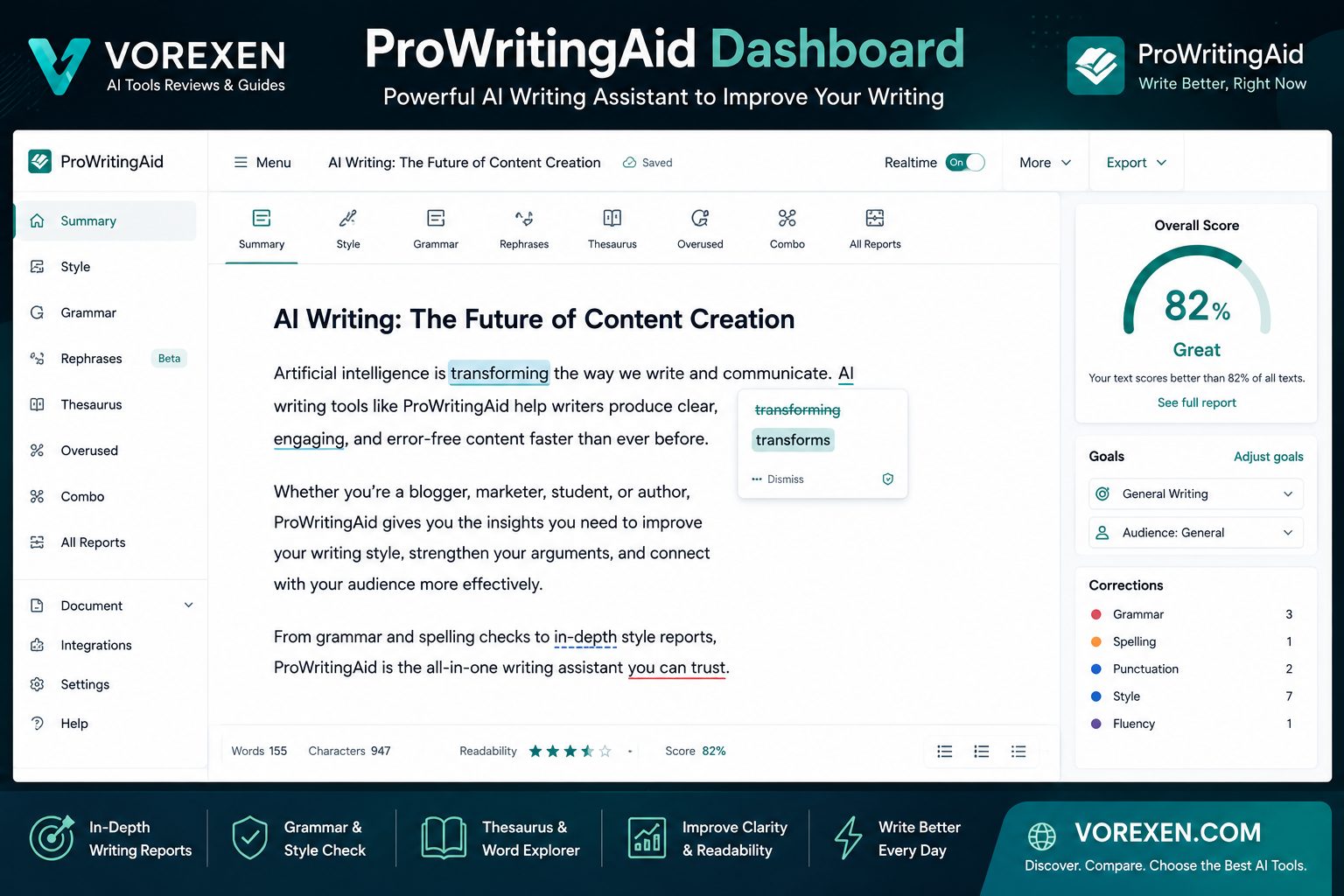
One of ProWritingAid’s biggest strengths is its clean and distraction-free interface. Instead of overwhelming users with dozens of AI tools at once, the platform focuses on improving your writing step by step. Whether you’re editing a blog post, business proposal, academic paper, or novel, every recommendation is organized into easy-to-understand reports.
The dashboard provides instant access to grammar corrections, readability analysis, style improvements, vocabulary suggestions, and AI-powered rewriting tools. Writers can review every recommendation individually, accept or reject changes, and continuously improve the quality of their documents.
Dashboard Overview
- Real-time grammar and spelling corrections
- Writing score and readability analysis
- Sentence structure recommendations
- Style enhancement suggestions
- Vocabulary improvement tools
- AI-powered paragraph rewriting
- Detailed writing reports
- Document statistics and progress tracking
- Plagiarism checker (Premium)
- Cloud synchronization across devices
Key Features
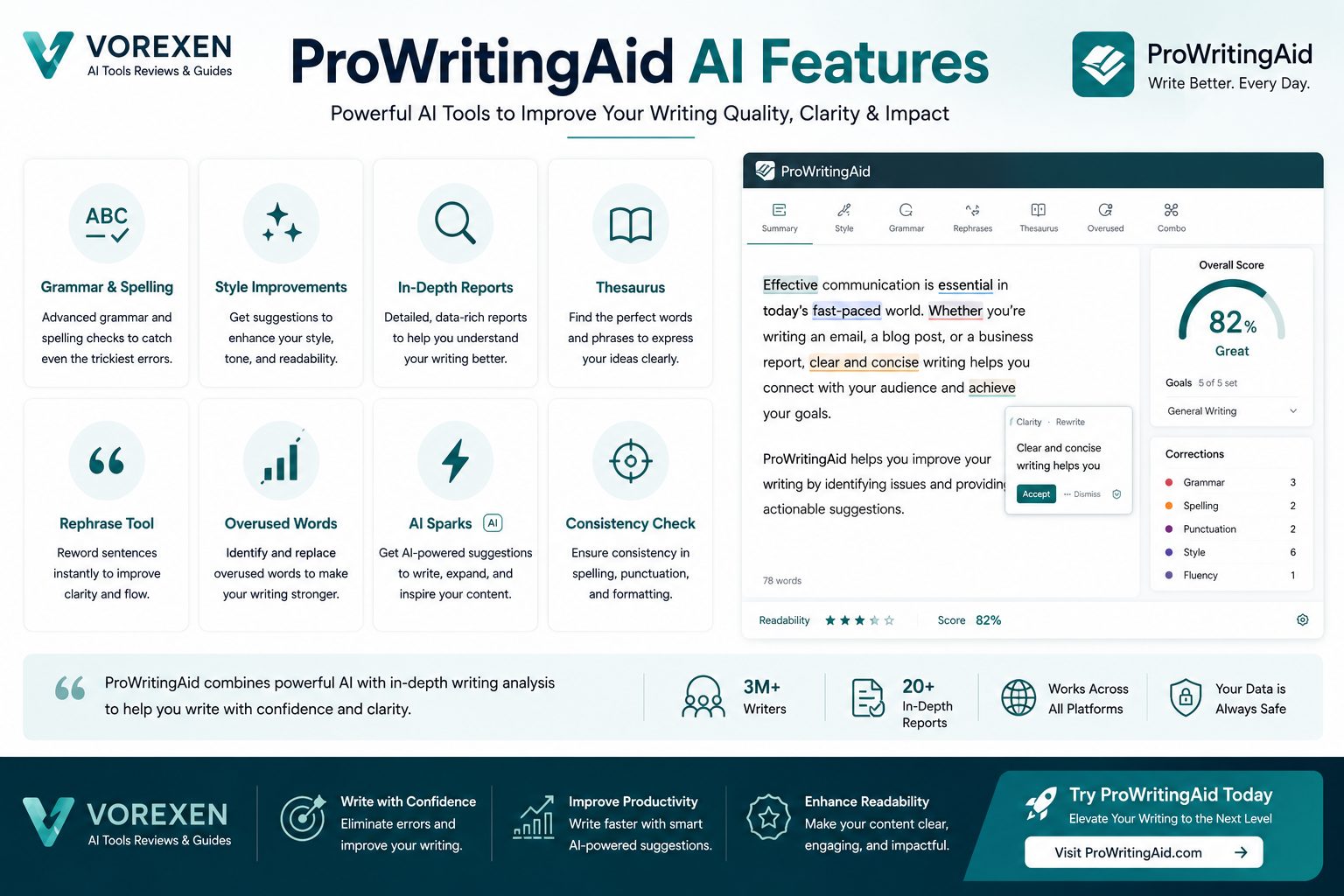
Unlike traditional grammar checkers, ProWritingAid evaluates the overall quality of your writing. It analyzes sentence variety, readability, pacing, transitions, consistency, dialogue, overused words, clichés, and dozens of additional writing metrics that help produce clearer and more engaging content.
1. AI-Powered Grammar Checking
ProWritingAid detects grammar mistakes, punctuation issues, spelling errors, and awkward phrasing while offering intelligent explanations that help users become better writers over time.
2. Readability Analysis
The platform measures sentence length, complexity, passive voice usage, and readability scores to ensure your content is easy to understand for your target audience.
3. Style Improvements
Instead of only fixing grammar, ProWritingAid helps eliminate repetitive wording, unnecessary adverbs, clichés, vague language, and weak sentence construction to create more engaging writing.
4. AI Rewriting Assistant
The integrated AI assistant can rewrite paragraphs, simplify complex sentences, improve tone, shorten lengthy passages, and generate alternative versions while preserving the original meaning.
5. More Than 20 Writing Reports
ProWritingAid generates comprehensive reports covering grammar, style, readability, pacing, sticky sentences, sentence variety, dialogue, consistency, transitions, overused words, and many other writing metrics.
6. Writing Goals
Users can customize writing goals based on document type, audience, tone, and writing style. This makes recommendations more relevant whether you’re writing technical documentation, marketing copy, or fiction.
7. Cross-Platform Integrations
- Microsoft Word
- Google Docs
- Google Chrome
- Scrivener
- Microsoft Outlook
- Desktop Application
- Web Editor
Why Writers Choose ProWritingAid
Professional writers often need more than simple grammar correction. They need actionable insights that improve clarity, consistency, and overall writing quality. ProWritingAid delivers this through detailed reports, AI-assisted editing, and personalized recommendations that support long-form content creation without sacrificing writing style.
For more AI writing solutions, explore our reviews of Grammarly, ChatGPT, Writer, INK Editor, HyperWrite, Copy.ai, Writesonic, and discover more in our Best AI Tools in 2026 guide.
ProWritingAid Pricing (2026)
ProWritingAid offers flexible pricing options for individuals, students, professionals, and enterprise teams. Unlike many AI writing platforms that require expensive monthly subscriptions, ProWritingAid also provides a lifetime license, making it an attractive long-term investment for writers who plan to use the software for years.
The platform offers a free version for basic editing and grammar checking, while Premium plans unlock advanced writing reports, AI-powered rewriting, plagiarism detection, and integrations with professional writing tools.
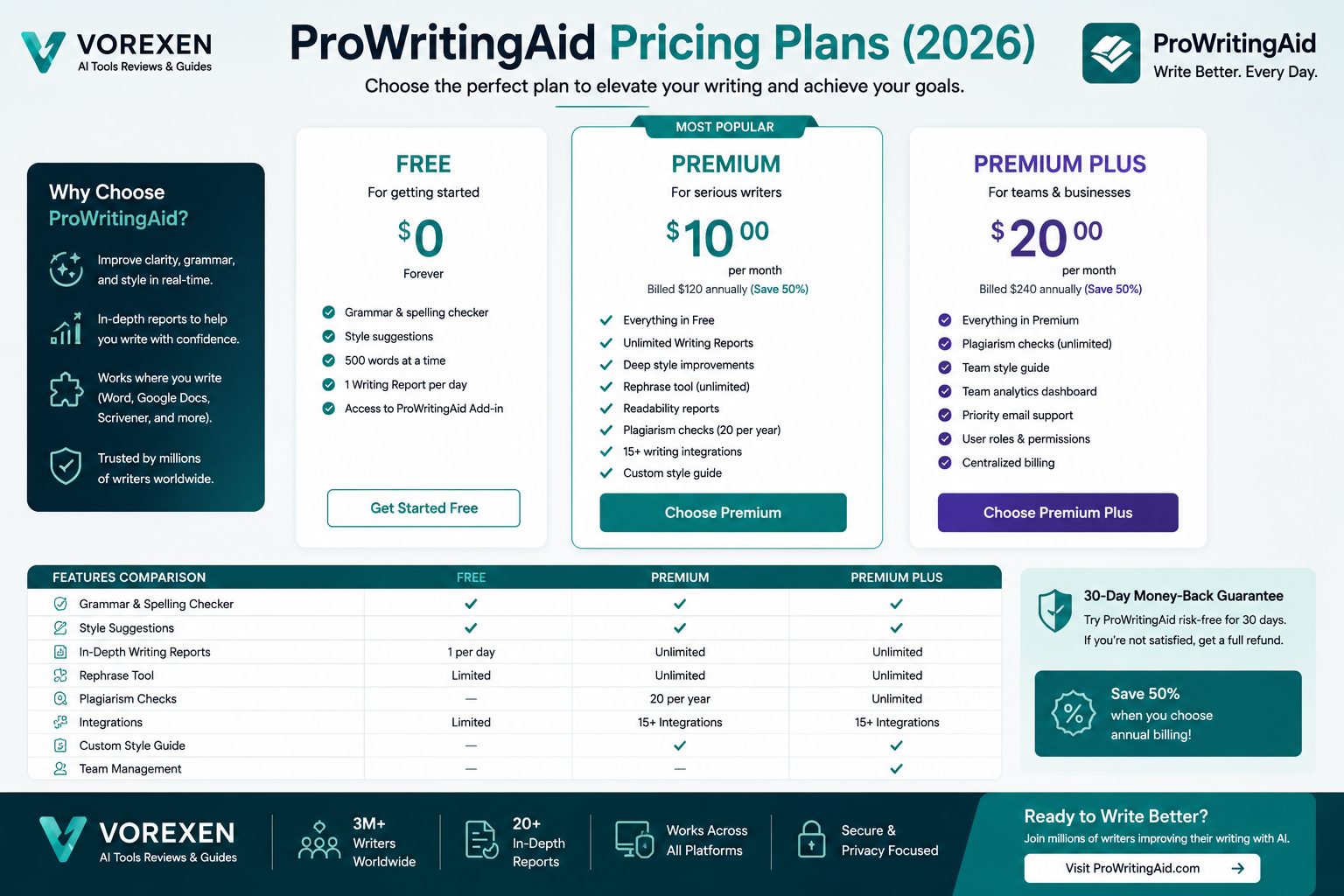
| Plan | Best For | Key Features |
|---|---|---|
| Free | Beginners | Grammar checking, spelling corrections, limited AI features |
| Premium | Professional Writers | Unlimited editing, advanced reports, AI suggestions, integrations |
| Premium Pro | Power Users | Everything in Premium plus plagiarism checking and enhanced AI features |
| Lifetime | Long-Term Users | One-time purchase with lifetime access to Premium features |
Note: Pricing and available features may change over time. Always check the official ProWritingAid website for the latest subscription plans, discounts, and promotional offers before purchasing.
Performance & Writing Accuracy
During testing, ProWritingAid consistently delivered accurate grammar corrections and meaningful style recommendations across multiple content types, including SEO articles, blog posts, emails, business documents, academic writing, and fiction. Rather than simply highlighting mistakes, it explains why a change is recommended, helping users become stronger writers over time.
Grammar Accuracy
ProWritingAid detects spelling mistakes, punctuation errors, subject-verb agreement issues, inconsistent capitalization, and grammatical problems with impressive accuracy. Its explanations are especially useful for non-native English speakers.
Readability Optimization
The readability engine identifies lengthy sentences, passive voice, complex wording, and unnecessary filler phrases. These suggestions help writers produce clearer content that is easier for readers to understand.
Style Enhancement
One of the platform’s standout features is its ability to improve writing style. It highlights repetitive words, clichés, vague expressions, overused adverbs, and awkward phrasing while offering more natural alternatives.
Long-Form Writing
Unlike many grammar checkers that focus on short documents, ProWritingAid performs exceptionally well with long-form content such as books, research papers, technical documentation, buying guides, and comprehensive blog posts.
AI Rewriting Quality
The built-in AI assistant can rewrite paragraphs, simplify difficult sentences, improve tone, shorten lengthy passages, and generate alternative versions while preserving the author’s original intent. This feature is particularly valuable for content marketers and professional editors.
Supported Platforms
- Windows Desktop
- macOS Desktop
- Web Application
- Google Chrome Extension
- Microsoft Word Add-in
- Google Docs Integration
- Scrivener Integration
- Microsoft Outlook
Is ProWritingAid Worth the Price?
If your work involves frequent writing, editing, or proofreading, ProWritingAid offers excellent value. Its combination of AI-assisted editing, comprehensive writing reports, and support for long-form documents makes it one of the strongest alternatives to traditional grammar checkers. For authors, bloggers, content marketers, and students, the lifetime plan can be especially cost-effective compared to recurring subscriptions offered by many competing platforms.
If you’re still comparing AI writing assistants, check out our reviews of ChatGPT, Grammarly, Writer, INK Editor, HyperWrite, Copy.ai, Writesonic, Simplified AI, Sudowrite, and our curated list of the Best AI Tools in 2026.
Pros & Cons
Every AI writing assistant has strengths and limitations, and ProWritingAid is no exception. While it excels at improving writing quality and readability, it is designed primarily as an editing platform rather than a full AI content generator. Here’s a balanced overview of what users can expect.
Advantages
- Excellent grammar and spelling correction
- More than 20 detailed writing reports
- Powerful readability analysis
- AI-assisted rewriting tools
- Supports long-form writing projects
- Works with Microsoft Word, Google Docs, Scrivener, and Chrome
- Helpful explanations instead of simple corrections
- Lifetime subscription option available
- Suitable for authors, bloggers, marketers, and students
- Easy-to-use interface for beginners and professionals
Disadvantages
- AI content generation is less advanced than ChatGPT
- Free plan has feature limitations
- Plagiarism checker requires Premium Pro
- Large reports may overwhelm first-time users
- Some recommendations require manual review
- Not designed for coding or research tasks
Writing Experience
Using ProWritingAid feels similar to working with a professional editor. Instead of making automatic changes behind the scenes, the platform explains each recommendation and allows you to decide whether to accept or reject it. This educational approach helps users improve their writing skills over time rather than simply correcting mistakes.
For long-form documents exceeding several thousand words, ProWritingAid remains one of the most capable editing assistants available. Authors and bloggers particularly benefit from its pacing analysis, sentence variety reports, dialogue suggestions, and consistency checks.
Security & Privacy
For many professionals, especially businesses and authors, document privacy is an important consideration. ProWritingAid uses secure connections for data transmission and provides privacy controls appropriate for professional writing workflows. Users working with confidential documents should still review the platform’s latest privacy policy before uploading sensitive information.
Integrations
One of ProWritingAid’s biggest advantages is its broad ecosystem of integrations. Instead of forcing users into a single editor, the platform works alongside many of the tools writers already use every day.
- Microsoft Word
- Google Docs
- Google Chrome
- Microsoft Outlook
- Scrivener
- Desktop Application
- Web Editor
- Browser Extensions
Who Should Choose ProWritingAid?
- Professional bloggers publishing SEO articles
- Content marketers producing long-form content
- Copywriters creating marketing campaigns
- Authors editing novels and manuscripts
- Students writing essays and research papers
- Business professionals preparing reports and presentations
- Freelance writers handling multiple client projects
Who Should Consider Another Tool?
If your primary goal is generating completely new content with conversational AI, tools like ChatGPT may be a better choice. Likewise, if your workflow focuses mainly on grammar correction with lightweight editing, Grammarly offers a simpler experience. ProWritingAid shines when detailed editing, readability improvement, and comprehensive writing analysis are your highest priorities.
Our Hands-On Evaluation
| Category | Score |
|---|---|
| Grammar Accuracy | 9.8 / 10 |
| Readability Analysis | 9.7 / 10 |
| AI Editing | 9.3 / 10 |
| Ease of Use | 9.4 / 10 |
| Integrations | 9.6 / 10 |
| Value for Money | 9.5 / 10 |
| Overall Rating | 9.5 / 10 ⭐⭐⭐⭐⭐ |
If you’re evaluating other AI writing platforms before making a decision, be sure to compare ProWritingAid with ChatGPT, Grammarly, INK Editor, Writer, HyperWrite, Jasper AI, Copy.ai, Writesonic, Simplified AI, and browse our complete guide to the Best AI Tools in 2026 to find the platform that best fits your writing workflow.
ProWritingAid vs ChatGPT
Although ProWritingAid and ChatGPT both use artificial intelligence to assist writers, they are built for different purposes. ChatGPT is a versatile AI assistant capable of generating content, brainstorming ideas, answering questions, writing code, summarizing information, and assisting with research. ProWritingAid, however, specializes in improving existing writing through advanced grammar checking, readability analysis, style recommendations, and AI-assisted editing.
If your goal is to generate content quickly from scratch, ChatGPT is one of the strongest AI assistants available. If your priority is polishing drafts, eliminating writing mistakes, and producing professional-quality documents, ProWritingAid offers a more specialized editing experience.
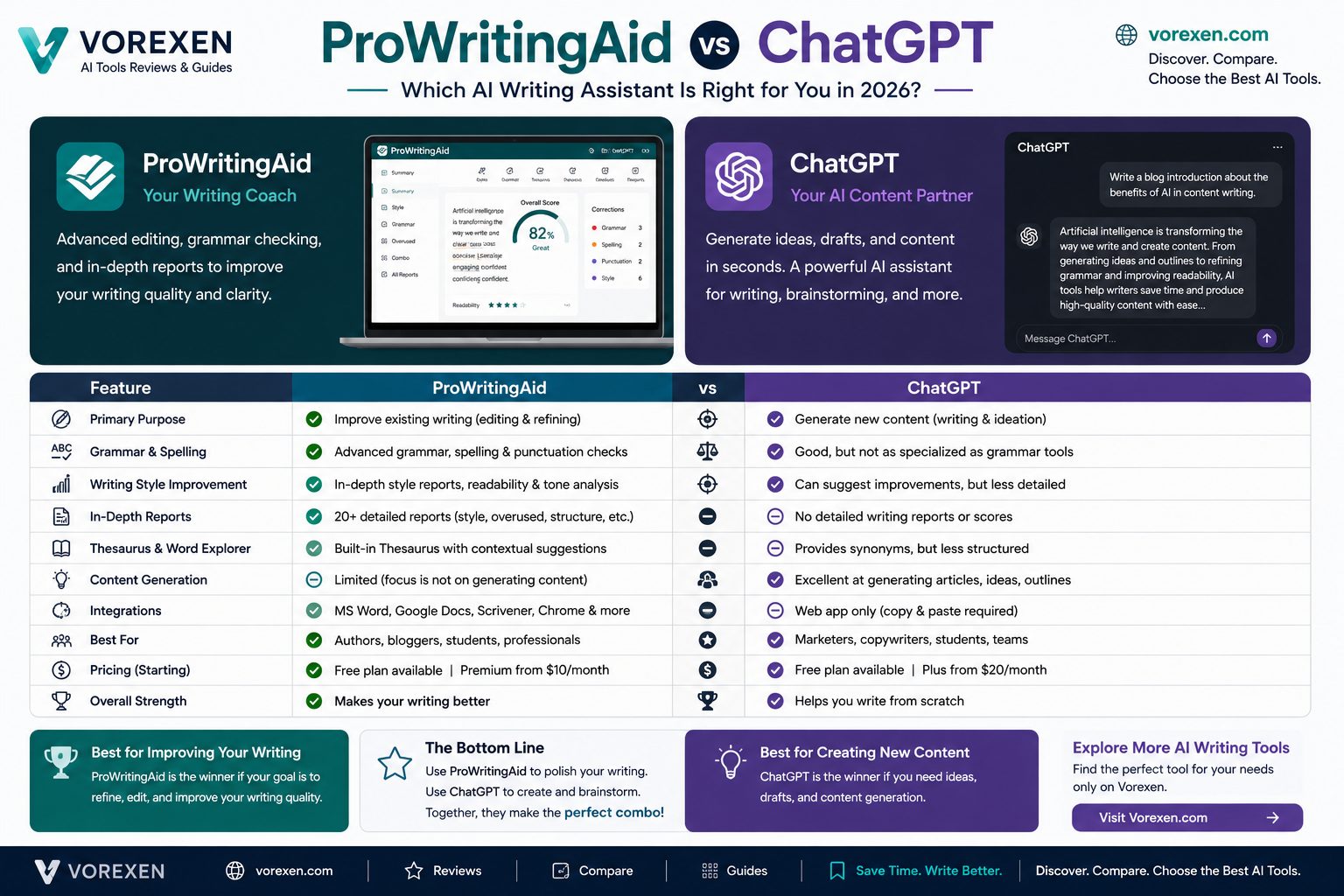
Feature Comparison
| Feature | ProWritingAid | ChatGPT |
|---|---|---|
| AI Content Generation | ⭐⭐⭐⭐☆ | ⭐⭐⭐⭐⭐ |
| Grammar Checking | ⭐⭐⭐⭐⭐ | ⭐⭐⭐⭐☆ |
| Readability Analysis | ⭐⭐⭐⭐⭐ | ⭐⭐⭐☆☆ |
| Style Suggestions | ⭐⭐⭐⭐⭐ | ⭐⭐⭐⭐☆ |
| Long-form Editing | ⭐⭐⭐⭐⭐ | ⭐⭐⭐⭐☆ |
| Research Assistance | ⭐⭐⭐☆☆ | ⭐⭐⭐⭐⭐ |
| Coding Support | ❌ | ⭐⭐⭐⭐⭐ |
| Creative Writing | ⭐⭐⭐⭐☆ | ⭐⭐⭐⭐⭐ |
| Integrations | Microsoft Word, Google Docs, Scrivener | API & Web Platform |
| Best For | Editing & Proofreading | Content Creation & AI Assistance |
Choose ProWritingAid If…
- You need professional grammar and style corrections.
- You regularly edit long-form articles or books.
- You want detailed readability and writing reports.
- You prefer learning why corrections are recommended.
- You work as an editor, author, blogger, or copywriter.
Choose ChatGPT If…
- You need an AI assistant for multiple tasks beyond writing.
- You frequently generate articles, emails, code, or marketing content.
- You want brainstorming, research, and conversational AI.
- You need help with programming and technical questions.
- You already use a separate grammar checker.
Which Tool Delivers Better Value?
For professional editing, ProWritingAid provides greater value thanks to its advanced writing reports and detailed language analysis. However, for users seeking an all-purpose AI assistant capable of generating content, solving problems, and supporting a wide range of professional tasks, ChatGPT offers significantly broader functionality.
Our Verdict
Rather than competing directly, these platforms complement each other. Many professional writers use ChatGPT to generate ideas, outlines, and first drafts, then refine the final content with ProWritingAid to improve grammar, readability, tone, and overall writing quality.
If you’re still comparing AI writing platforms, you may also want to explore our reviews of Grammarly, INK Editor, Writer, HyperWrite, Jasper AI, Copy.ai, Writesonic, Simplified AI, Sudowrite, and our curated guide to the Best AI Tools in 2026.
ProWritingAid vs Grammarly
ProWritingAid and Grammarly are two of the most popular AI-powered writing assistants, but they target different audiences. Grammarly focuses on fast grammar correction, spelling, punctuation, and writing clarity across emails, documents, and web applications. ProWritingAid goes much further by offering detailed writing reports, readability analysis, style recommendations, pacing evaluation, and AI-powered editing tools designed for long-form content.
If you simply want to eliminate grammar mistakes while writing emails or business documents, Grammarly is an excellent choice. However, if you’re producing blog posts, books, marketing content, or academic papers, ProWritingAid provides deeper analysis and far more actionable writing insights.
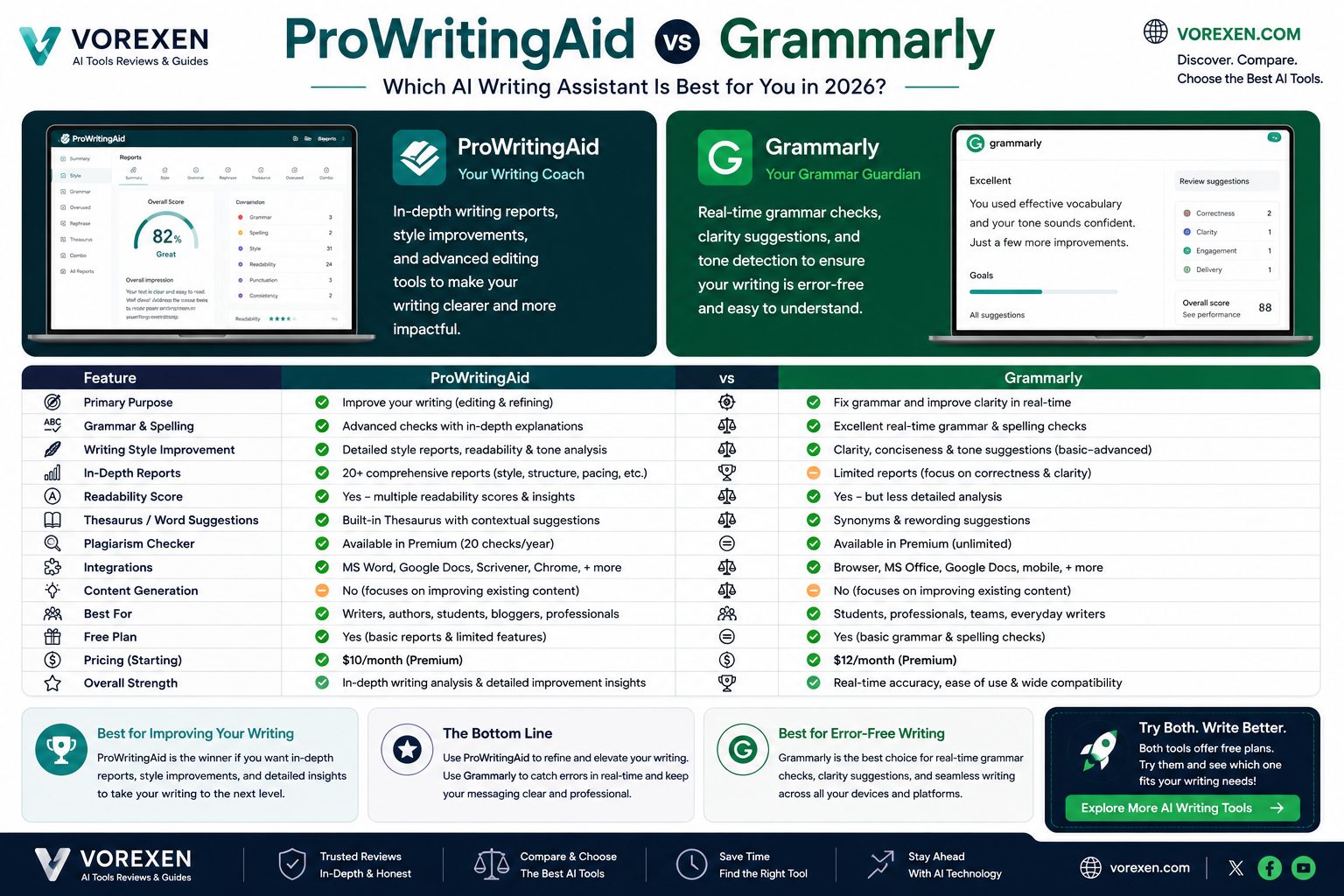
Feature Comparison
| Feature | ProWritingAid | Grammarly |
|---|---|---|
| Grammar Checking | ⭐⭐⭐⭐⭐ | ⭐⭐⭐⭐⭐ |
| Spelling Correction | ⭐⭐⭐⭐⭐ | ⭐⭐⭐⭐⭐ |
| Readability Analysis | ⭐⭐⭐⭐⭐ | ⭐⭐⭐⭐☆ |
| Writing Reports | 20+ Reports | Basic Reports |
| Style Suggestions | ⭐⭐⭐⭐⭐ | ⭐⭐⭐⭐☆ |
| AI Rewriting | ⭐⭐⭐⭐☆ | ⭐⭐⭐⭐☆ |
| Long-form Editing | ⭐⭐⭐⭐⭐ | ⭐⭐⭐☆☆ |
| Plagiarism Checker | Premium Pro | Premium |
| Best For | Authors, Bloggers & Editors | Business & Everyday Writing |
Choose ProWritingAid If…
- You write long-form articles, books, or research papers.
- You want detailed writing reports and readability analysis.
- You prefer in-depth editing instead of simple grammar corrections.
- You need AI-assisted rewriting while preserving your writing style.
- You work as a professional writer, editor, or content marketer.
Choose Grammarly If…
- You primarily write emails, business documents, and short-form content.
- You want instant grammar and spelling corrections.
- You need browser-wide writing assistance.
- You prefer a lightweight editing experience.
- You don’t require advanced writing analytics.
Which Tool Is Better?
There is no universal winner because both tools solve different problems. Grammarly excels at fast proofreading and everyday writing assistance, while ProWritingAid provides significantly more detailed editing reports and writing analysis for professionals working on long-form content.
Our Verdict
If you’re a blogger, novelist, SEO writer, affiliate marketer, or professional editor, ProWritingAid offers greater long-term value thanks to its advanced reports, readability analysis, and AI-powered editing capabilities. Grammarly remains an outstanding solution for users who prioritize speed, simplicity, and everyday writing assistance.
Many professional writers combine both tools—using ProWritingAid for deep editing and Grammarly for quick proofreading. You can also compare ProWritingAid with ChatGPT, INK Editor, Writer, HyperWrite, Jasper AI, Copy.ai, Writesonic, Simplified AI, Sudowrite, and browse our complete collection of the Best AI Tools in 2026 to discover the right AI writing assistant for your workflow.
Best Use Cases for ProWritingAid
ProWritingAid is much more than a grammar checker. It combines AI-assisted editing, readability analysis, writing reports, and style improvements to help users produce polished, professional-quality content. While it isn’t designed to replace AI chatbots like ChatGPT, it excels at refining and improving existing writing.
1. Bloggers & SEO Content Creators
Bloggers publishing long-form articles can use ProWritingAid to improve readability, eliminate repetitive wording, optimize sentence flow, and create more engaging content. This is particularly valuable for affiliate websites and content-driven businesses where writing quality directly impacts user engagement.
2. Professional Copywriters
Marketing professionals can refine landing pages, advertisements, newsletters, and sales copy while maintaining a consistent tone and persuasive writing style.
3. Authors & Novelists
One of ProWritingAid’s strongest markets is fiction writing. The software analyzes pacing, dialogue, sentence variety, overused words, and consistency across lengthy manuscripts.
4. Students & Researchers
Students can improve essays, dissertations, and research papers by identifying grammar issues, improving clarity, and creating more professional academic writing.
5. Business Professionals
From reports and presentations to business emails and proposals, ProWritingAid helps professionals communicate more clearly and confidently.
Who Should Avoid ProWritingAid?
- Users looking for an AI chatbot capable of answering questions.
- Developers who primarily need coding assistance.
- People seeking AI image or video generation.
- Teams focused mainly on workflow automation.
Top Alternatives
| Tool | Best For | Overall Rating |
|---|---|---|
| ChatGPT | AI content generation & research | 9.9/10 |
| Grammarly | Grammar correction | 9.6/10 |
| INK Editor | SEO writing optimization | 9.5/10 |
| HyperWrite | AI-assisted writing | 9.4/10 |
| Writer | Enterprise AI writing | 9.4/10 |
| Jasper AI | Marketing content | 9.5/10 |
Our Final Verdict
ProWritingAid is one of the best AI-powered editing platforms available in 2026. Rather than competing directly with conversational AI tools, it focuses on helping writers produce clearer, more engaging, and grammatically accurate content.
If your daily work involves editing articles, books, research papers, or marketing content, ProWritingAid offers exceptional value through detailed writing reports, readability analysis, and intelligent editing suggestions.
For maximum productivity, many professionals combine ChatGPT for idea generation and first drafts with ProWritingAid for editing and final polishing before publication.
Vorexen Rating: ⭐ 9.5 / 10
ProWritingAid is highly recommended for bloggers, authors, editors, students, SEO professionals, and anyone who wants to improve the quality of their writing.
Before making your final decision, you may also want to compare ChatGPT, Grammarly, INK Editor, HyperWrite, Writer, Jasper AI, Copy.ai, Writesonic, Simplified AI, and explore our complete guide to the Best AI Tools in 2026.
Frequently Asked Questions
Is ProWritingAid free?
Yes. ProWritingAid offers a free plan that includes basic grammar and spelling checks. Premium plans unlock advanced writing reports, AI-powered rewriting, plagiarism checking, and additional integrations.
Is ProWritingAid better than Grammarly?
It depends on your needs. Grammarly is excellent for fast grammar correction and everyday writing, while ProWritingAid provides deeper writing analysis, readability reports, and advanced editing features that are especially valuable for long-form content.
Can ProWritingAid replace ChatGPT?
No. ChatGPT is designed for AI conversations, content generation, research, coding, and brainstorming. ProWritingAid specializes in editing, grammar checking, readability analysis, and improving existing writing.
Does ProWritingAid detect plagiarism?
Yes. Plagiarism checking is available on supported paid plans and helps writers verify originality before publishing content.
Is ProWritingAid suitable for SEO writing?
Yes. While it is not an SEO optimization platform like INK Editor, it significantly improves readability, grammar, clarity, and writing quality, which contribute to a better user experience.
Can I use ProWritingAid with Microsoft Word?
Yes. ProWritingAid integrates with Microsoft Word, Google Docs, Scrivener, Chrome, Outlook, and several other writing applications.
Who should use ProWritingAid?
It is an excellent choice for bloggers, authors, copywriters, students, editors, content marketers, business professionals, and anyone who regularly creates long-form written content.
Is ProWritingAid good for authors?
Absolutely. Its detailed reports on pacing, dialogue, sentence variety, consistency, and readability make it one of the strongest editing assistants for fiction and non-fiction writers.
Does ProWritingAid work offline?
Some desktop features are available through its applications, but many AI-powered capabilities require an internet connection to process text and deliver suggestions.
Is ProWritingAid worth it in 2026?
Yes. For writers who frequently edit articles, books, marketing content, academic papers, or business documents, ProWritingAid remains one of the best AI-powered editing platforms available in 2026.
Final Thoughts
After evaluating its editing capabilities, grammar accuracy, readability analysis, AI-powered rewriting, integrations, and pricing, ProWritingAid earns its place among the best AI writing assistants available today. Rather than trying to be an all-in-one AI chatbot, it focuses on helping writers produce clearer, more professional, and more engaging content.
If your workflow involves creating long-form articles, books, reports, or marketing copy, ProWritingAid offers exceptional value through detailed writing insights and intelligent editing recommendations. It is particularly well suited for bloggers, authors, editors, students, and content marketers who want to improve both writing quality and productivity.
For users who need a complete AI workflow, a combination of ChatGPT for idea generation and drafting, together with ProWritingAid for editing and polishing, can be an effective approach.
Explore More AI Writing Tools
- ChatGPT Review (2026)
- Grammarly Review (2026)
- INK Editor Review (2026)
- HyperWrite Review (2026)
- Writer Review (2026)
- Jasper AI Review (2026)
- Copy.ai Review (2026)
- Writesonic Review (2026)
- Simplified AI Review (2026)
- Best AI Tools in 2026
Why We Recommend ProWritingAid
After evaluating dozens of AI writing assistants, ProWritingAid remains one of the strongest choices for writers who care about quality, clarity, and professional editing. Its AI-powered suggestions, comprehensive writing reports, readability analysis, and extensive integrations make it an excellent investment for bloggers, authors, students, marketers, and business professionals.
Unlike general AI chatbots, ProWritingAid focuses on improving existing content instead of generating everything from scratch. Many professional writers combine ChatGPT for drafting ideas with ProWritingAid for editing and polishing before publication.
Vorexen Recommendation:
⭐⭐⭐⭐⭐ 9.5/10
One of the best AI editing and proofreading tools available in 2026.
Related AI Writing Guides
- ChatGPT Review (2026)
- Grammarly Review (2026)
- INK Editor Review (2026)
- HyperWrite Review (2026)
- Writer Review (2026)
- Jasper AI Review (2026)
- Copy.ai Review (2026)
- Writesonic Review (2026)
- Simplified AI Review (2026)
- Sudowrite Review (2026)
- Best AI Writing Tools
- Best AI Tools in 2026
Affiliate Disclosure
This article may contain affiliate links. If you purchase ProWritingAid through one of these links, Vorexen may earn a commission at no additional cost to you. We only recommend AI tools that we genuinely believe provide value to our readers.
Sources
Last Updated: July 2026