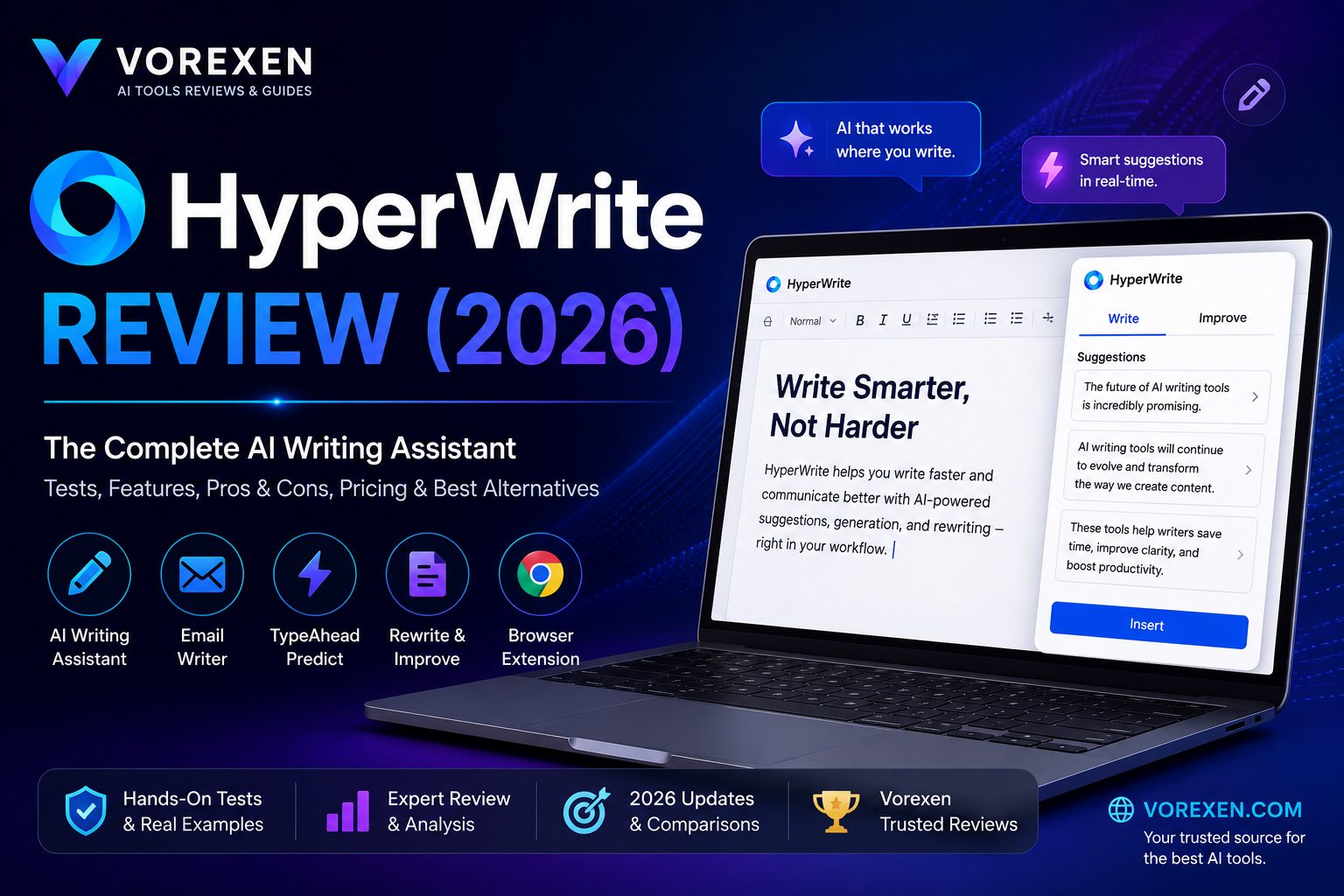
HyperWrite Review (2026): Features, Pricing, Pros & Cons
Artificial intelligence has transformed the way professionals write, but choosing the right AI writing assistant can be challenging. While many tools focus on content generation alone, HyperWrite takes a different approach by acting as an intelligent writing companion that integrates directly into your everyday workflow.
Whether you’re drafting emails, writing blog posts, creating business reports, brainstorming ideas, or editing existing documents, HyperWrite aims to help you write faster while maintaining natural, high-quality output.
In this comprehensive review, we’ll evaluate HyperWrite’s AI capabilities, browser extension, writing quality, pricing, productivity benefits, strengths, weaknesses, and compare it with leading competitors including ChatGPT, Writer, and Jasper AI.
Quick Verdict
| Overall Rating | 9.7 / 10 ⭐⭐⭐⭐⭐ |
|---|---|
| Best For | Professionals who write every day |
| Free Plan | ✅ Available |
| Ease of Use | ★★★★★ |
| AI Writing Quality | ★★★★★ |
| Email Assistant | ★★★★★ |
| Browser Extension | ★★★★★ |
| Overall Recommendation | Highly Recommended |
Bottom Line: HyperWrite is one of the best AI writing assistants for users who spend hours every day creating written content. Its seamless browser integration, contextual suggestions, and excellent email-writing capabilities make it a valuable productivity tool for freelancers, marketers, students, consultants, and business professionals.
Key Takeaways
- Excellent AI writing assistant for daily productivity.
- Outstanding Chrome browser extension.
- Generates natural, human-like writing.
- Exceptional AI email writing capabilities.
- Very beginner-friendly interface.
- Ideal for professionals who write every day.
- Not intended to replace advanced reasoning tools like ChatGPT.
Why Trust Vorexen?
Every review published on Vorexen is written with a practical, user-focused methodology. Rather than repeating marketing claims, we evaluate AI tools based on real-world usability, writing quality, productivity gains, interface design, pricing, and long-term value.
Our goal is simple: help readers choose AI tools that genuinely improve their workflow and deliver measurable value.
Who Is This Review For?
- Content writers
- Bloggers
- SEO specialists
- Marketing professionals
- Freelancers
- Business consultants
- Researchers
- Students
- Startup founders
- Anyone looking to increase writing productivity with AI
What You’ll Learn
In this review, you’ll discover:
- What HyperWrite is and how it works
- Its most valuable AI features
- Real-world writing performance
- Pricing and subscription options
- Pros and cons
- HyperWrite vs ChatGPT
- HyperWrite vs Writer
- HyperWrite vs Jasper AI
- The best alternatives
- Whether HyperWrite is worth paying for in 2026
Recommended Reading
- Best AI Tools
- Best AI Writing Tools
- ChatGPT Review
- Claude AI Review
- Writer Review
- Jasper AI Review
- Frase Review
- Grammarly AI Review
What Is HyperWrite?
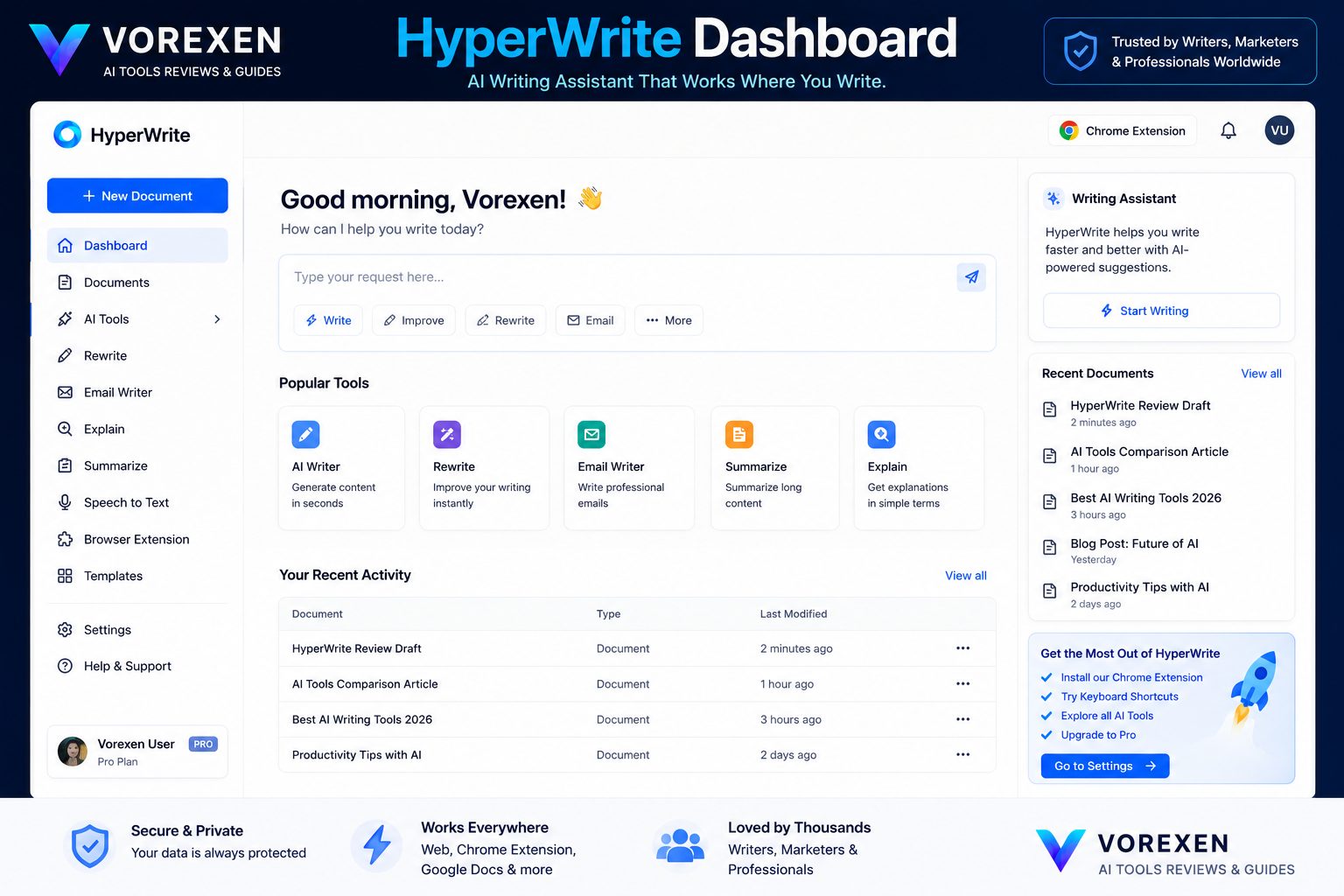
HyperWrite is an AI-powered writing assistant designed to help people write faster, think more clearly, and improve productivity across nearly every writing task. Unlike traditional AI writing tools that only generate paragraphs after receiving prompts, HyperWrite works continuously alongside the user, offering intelligent suggestions while they write.
Instead of replacing the writing process, HyperWrite augments it. It predicts sentences, rewrites paragraphs, summarizes information, drafts emails, brainstorms ideas, and assists with research—all without forcing users to switch between multiple applications.
The platform combines large language models with contextual understanding to deliver personalized writing assistance inside the websites and applications users already work in every day.
Who Created HyperWrite?
HyperWrite is developed by OthersideAI, a company focused on building AI tools that enhance human productivity rather than simply automate content creation.
The company’s vision is to make AI feel like an intelligent collaborator instead of a standalone chatbot. This philosophy is reflected throughout HyperWrite’s interface, browser extension, and writing workflow.
Rather than asking users to copy prompts into a separate application, HyperWrite integrates directly into their existing workflow, reducing friction and making AI assistance feel natural.
How Does HyperWrite Work?
HyperWrite uses advanced large language models to understand both the current document and the user’s writing intent.
As you type, the AI analyzes surrounding context and predicts useful continuations instead of generating isolated responses.
This contextual approach allows HyperWrite to assist with:
- Completing unfinished sentences.
- Generating new paragraphs.
- Improving readability.
- Rewriting awkward text.
- Changing writing tone.
- Creating outlines.
- Summarizing long documents.
- Drafting emails automatically.
- Brainstorming ideas.
- Answering questions while writing.
Unlike many AI writing assistants that require users to leave their current application, HyperWrite performs these tasks directly inside supported websites.
Supported Platforms
| Platform | Support |
|---|---|
| Google Docs | ★★★★★ |
| Gmail | ★★★★★ |
| WordPress | ★★★★★ |
| Notion | ★★★★★ |
| ★★★★★ | |
| Slack | ★★★★☆ |
| Microsoft Word (Web) | ★★★★☆ |
| Most Web Editors | ★★★★★ |
Because HyperWrite operates through a browser extension, compatibility extends far beyond a few official integrations. Most text editors running inside Chrome can benefit from its AI suggestions.
Why Is HyperWrite Different?
Many AI writing tools focus primarily on producing complete articles from prompts. HyperWrite takes a different approach.
Its greatest strength is continuous writing assistance. Instead of waiting for users to request help, HyperWrite actively supports them throughout the writing process by providing contextual recommendations that feel similar to working with a human editor.
This makes the platform particularly effective for professionals who spend hours each day writing emails, proposals, reports, documentation, marketing copy, or blog content.
At a Glance
- Category: AI Writing Assistant
- Developer: OthersideAI
- Primary Focus: Writing Productivity
- Platforms: Web + Chrome Extension
- Free Plan: Yes
- Best For: Professionals, marketers, freelancers, students, consultants
Related Reviews
- Writer Review
- Jasper AI Review
- Copy.ai Review
- Writesonic Review
- Frase Review
- ChatGPT Review
- Claude AI Review
- Best AI Writing Tools
The Technology Behind HyperWrite
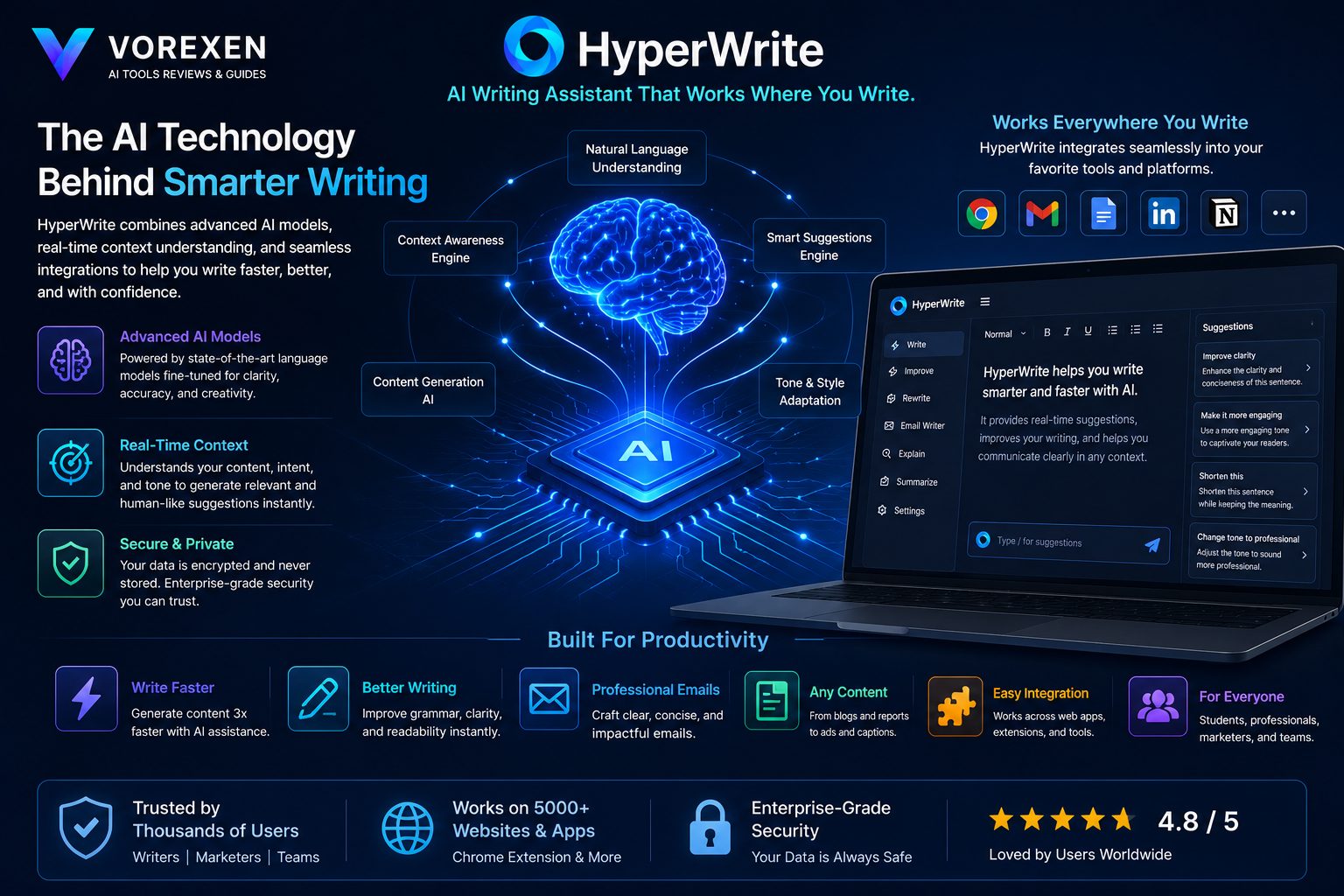
One of the biggest reasons HyperWrite has gained popularity is that it focuses on context-aware AI writing instead of simple text generation. Unlike early AI writing tools that generated isolated paragraphs from short prompts, HyperWrite continuously analyzes the surrounding text to understand what the user is trying to accomplish. This allows the assistant to provide suggestions that are more relevant, natural, and consistent with the existing document.
For users, this means less prompt engineering and fewer interruptions. Rather than stopping to explain what you want, HyperWrite observes your writing context and delivers suggestions that feel like an experienced editor sitting beside you.
How HyperWrite Understands Context
Most AI chatbots work one conversation at a time. HyperWrite takes a workflow-oriented approach by continuously monitoring the document you’re working on. Instead of generating disconnected responses, it evaluates:
- The topic of your document.
- The writing style you’ve already established.
- The tone of previous paragraphs.
- The logical flow of the content.
- Your recent writing patterns.
This contextual awareness allows HyperWrite to produce suggestions that require significantly less editing compared to many traditional AI writing assistants.
AI Models Used by HyperWrite
HyperWrite combines advanced large language models with proprietary productivity systems developed by OthersideAI. Although the company does not publicly disclose every model powering the platform, HyperWrite continuously incorporates modern LLM capabilities to improve writing quality, reasoning, and contextual understanding.
Rather than exposing users to technical model selection, HyperWrite focuses on delivering a seamless writing experience where the underlying AI remains largely invisible.
| Technology Area | Purpose |
|---|---|
| Large Language Models | Natural language generation |
| Context Engine | Document understanding |
| Prediction System | Sentence completion |
| Writing Optimization | Grammar and readability improvements |
| Workflow Integration | Browser-based productivity |
Privacy and Security
Whenever AI tools interact with business documents, emails, or personal notes, privacy becomes an important consideration. HyperWrite states that it implements security measures designed to protect user information while processing AI requests.
Organizations handling confidential or regulated information should still review the platform’s latest privacy documentation before deploying it company-wide.
For most freelancers, marketers, students, and small businesses, the available security practices are generally sufficient for everyday productivity workflows.
How HyperWrite Fits Into Your Workflow
Unlike standalone AI chatbots that require users to open a separate website, HyperWrite becomes part of the writing process itself. A typical workflow looks like this:
- Open your preferred writing application.
- Begin writing normally.
- Receive contextual AI suggestions.
- Accept, reject, or modify recommendations.
- Continue writing without leaving the page.
Because the AI remains available throughout the writing session, productivity increases without disrupting concentration. This is one of HyperWrite’s strongest competitive advantages over many prompt-based AI systems.
Industries That Benefit Most
HyperWrite is flexible enough to support professionals across many industries. The platform is particularly valuable for roles that require frequent written communication.
| Industry | Benefit Level |
|---|---|
| Marketing | ★★★★★ |
| Content Creation | ★★★★★ |
| SEO | ★★★★★ |
| Consulting | ★★★★★ |
| Education | ★★★★☆ |
| Sales | ★★★★★ |
| Customer Support | ★★★★☆ |
| Research | ★★★★☆ |
Related Guides
- Best AI Tools
- Best AI Writing Tools
- ChatGPT Review
- Writer Review
- Perplexity Review
- Grammarly AI Review
Key Features
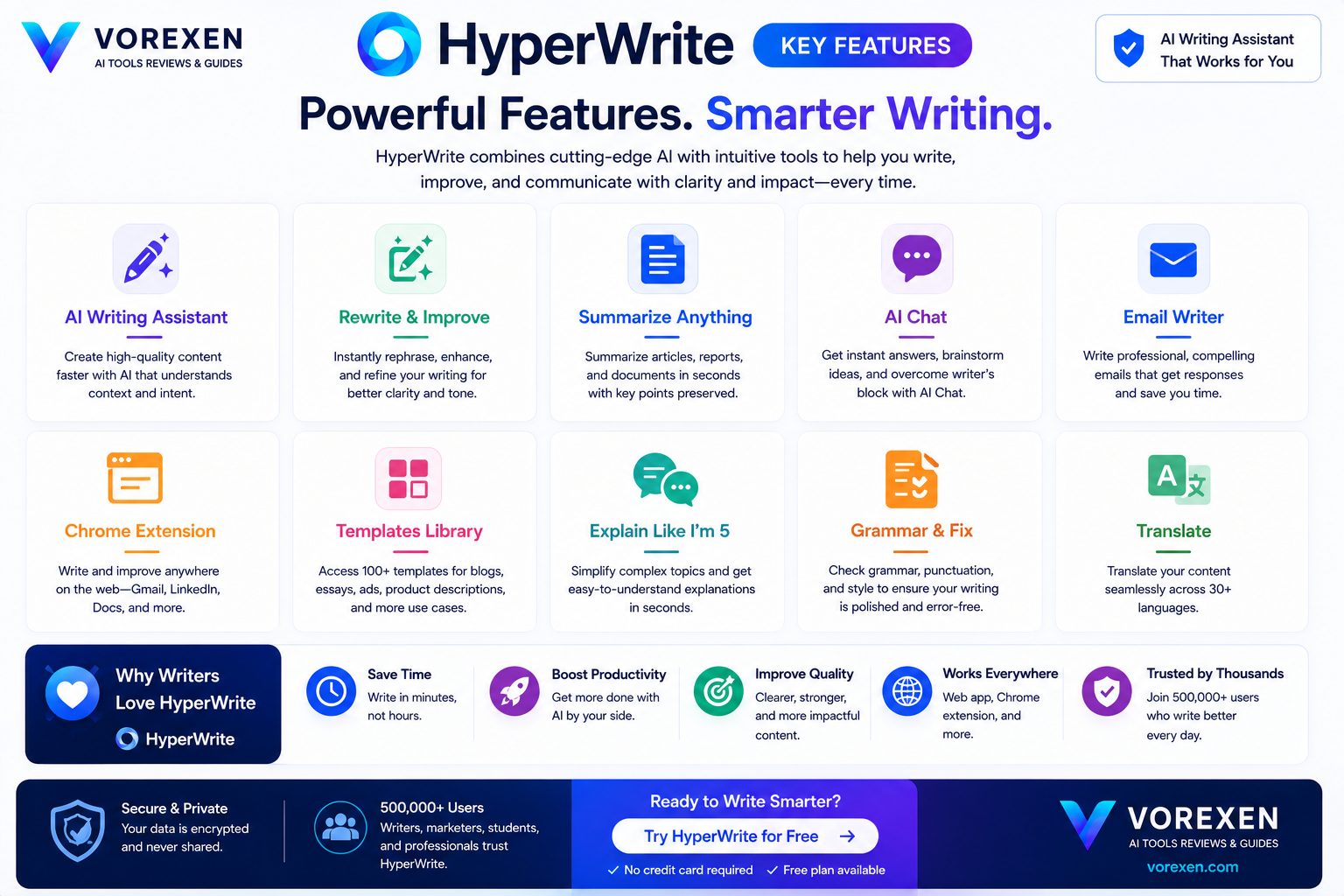
HyperWrite is much more than a simple AI text generator. It combines intelligent writing assistance, workflow automation, contextual prediction, and research capabilities into a single platform that helps users complete writing tasks significantly faster. Below are the features that make HyperWrite one of the most practical AI productivity tools available in 2026.
1. AutoWrite
AutoWrite generates complete paragraphs from only a short instruction or title. Instead of producing generic text, it attempts to continue ideas logically while maintaining readability and consistency throughout the document. This feature is particularly useful when writing:
- Blog posts
- Reports
- Business proposals
- Documentation
- Marketing copy
2. TypeAhead Predictions
One of HyperWrite’s signature capabilities is TypeAhead. Rather than waiting for prompts, the AI predicts what you’re likely to write next and offers intelligent sentence completions in real time. For professionals writing thousands of words every week, this dramatically reduces typing effort while keeping thoughts flowing naturally.
3. AI Email Assistant
HyperWrite excels at email writing. Users can generate professional responses, improve tone, shorten long messages, or write entirely new emails in seconds. Whether communicating with clients, colleagues, or customers, the AI produces polished drafts that usually require only minor edits.
4. Rewrite & Improve
Existing text can be rewritten with different styles, tones, or levels of clarity. Common use cases include:
- Making text more professional.
- Simplifying technical language.
- Improving readability.
- Fixing grammar.
- Removing repetition.
Instead of rewriting everything manually, users can refine individual paragraphs with just a few clicks.
5. AI Summarization
HyperWrite can summarize lengthy articles, reports, emails, and research documents into concise, easy-to-read overviews. This feature is particularly valuable for consultants, researchers, students, and executives who need to process large amounts of information quickly.
6. Research Assistance
Although research is not HyperWrite’s primary focus like Perplexity AI, it provides useful assistance by helping users organize information, generate explanations, and structure ideas while writing.
7. Browser Extension
The Chrome extension is arguably HyperWrite’s strongest competitive advantage. Instead of opening a separate AI application, users receive writing assistance directly inside websites including:
- Google Docs
- Gmail
- WordPress
- Notion
- Slack
- Most online editors
This seamless integration makes AI feel like a natural part of everyday work rather than an additional tool.
8. Custom AI Personas
Users can configure HyperWrite to generate content with different writing styles depending on the intended audience. Examples include:
- Professional business tone
- Friendly conversational style
- Academic writing
- Marketing copy
- Technical documentation
9. Brainstorming Ideas
When creativity slows down, HyperWrite can suggest headlines, outlines, article ideas, email subjects, campaign concepts, and alternative approaches. Rather than replacing human creativity, it accelerates the ideation process.
10. Productivity Automation
HyperWrite isn’t designed only for content creators. It also automates repetitive writing tasks such as:
- Meeting notes
- Status updates
- Follow-up emails
- Client communication
- Project documentation
- Internal reports
Feature Comparison
| Feature | Rating |
|---|---|
| AutoWrite | ★★★★★ |
| TypeAhead | ★★★★★ |
| Email Assistant | ★★★★★ |
| Rewrite Tool | ★★★★★ |
| Research Assistance | ★★★★☆ |
| Browser Extension | ★★★★★ |
| Productivity | ★★★★★ |
| Ease of Use | ★★★★★ |
Our Take
The real strength of HyperWrite isn’t any single feature—it’s how these features work together inside an existing workflow. Instead of forcing users to constantly switch between tabs or copy prompts into another application, HyperWrite stays available wherever writing happens. This workflow-first philosophy makes it one of the most practical AI writing assistants currently available.
Continue Reading
- Writer Review
- Jasper AI Review
- Copy.ai Review
- Writesonic Review
- Frase Review
- Grammarly AI Review
- ChatGPT Review
- Best AI Writing Tools
User Interface & First Impressions
One of HyperWrite’s biggest strengths becomes obvious within the first few minutes of use: simplicity. Unlike many AI platforms that overwhelm users with dozens of tools, complicated prompt libraries, and extensive configuration menus, HyperWrite focuses on helping people start writing immediately. Its interface is clean, responsive, and intentionally minimalistic.
The dashboard provides quick access to writing tools without requiring users to learn prompt engineering or navigate through complicated workflows. Even first-time users can begin generating content within minutes.
Dashboard Design
The dashboard is organized around productivity rather than experimentation. Instead of presenting AI as a chatbot, HyperWrite presents it as an intelligent workspace where users can write, edit, brainstorm, and improve documents naturally.
| Category | Rating |
|---|---|
| Design | ★★★★★ |
| Navigation | ★★★★★ |
| Learning Curve | ★★★★★ |
| Accessibility | ★★★★☆ |
| Responsiveness | ★★★★★ |
Compared with enterprise-focused platforms like Writer, HyperWrite feels considerably lighter and more approachable.
Chrome Browser Extension

The Chrome Extension is arguably HyperWrite’s most valuable feature. Rather than forcing users to copy and paste text between different applications, HyperWrite appears directly inside websites where writing already happens.
The extension works across numerous platforms including:
- Google Docs
- Gmail
- WordPress
- Notion
- Slack
- Most browser-based editors
This dramatically reduces friction because AI assistance becomes available exactly where users need it.
Real-World Workflow
A typical workflow looks like this:
- Open Google Docs or WordPress.
- Begin writing normally.
- HyperWrite suggests sentence completions.
- Accept or modify AI recommendations.
- Continue writing without changing applications.
This workflow-first design distinguishes HyperWrite from traditional AI chatbots, where users frequently interrupt their work to interact with a separate AI interface.
Ease of Learning
One of the reasons HyperWrite has become popular among professionals is its exceptionally small learning curve.
Most users can become productive within the first hour because there are very few settings to configure. Instead of learning complicated prompts, users simply write as they normally would.
What We Liked
- Extremely clean interface.
- Minimal setup.
- Very beginner friendly.
- Excellent browser integration.
- Fast response times.
- No prompt engineering required.
Performance During Daily Use
During everyday writing sessions, HyperWrite remained responsive even when editing longer documents. Sentence suggestions generally appeared within seconds, allowing users to maintain writing momentum instead of waiting for AI responses.
The platform performs especially well during:
- Email drafting
- Article writing
- Proposal creation
- Business documentation
- Marketing copywriting
Comparison With Other AI Interfaces
| Platform | Ease of Use | Workflow |
|---|---|---|
| ChatGPT | ★★★★★ | Conversation-based |
| Writer | ★★★★☆ | Enterprise Workspace |
| Jasper AI | ★★★★☆ | Marketing Workspace |
| HyperWrite | ★★★★★ | Integrated Writing Assistant |
If your priority is uninterrupted writing productivity rather than interacting with an AI chatbot, HyperWrite offers one of the smoothest experiences currently available.
Our Verdict on User Experience
HyperWrite succeeds because it removes unnecessary complexity. Instead of asking users to adapt to AI, the software adapts to existing writing habits. That philosophy makes it one of the easiest AI writing assistants to recommend for professionals who value speed, simplicity, and continuous productivity.
Related Reviews
AI Writing Experience
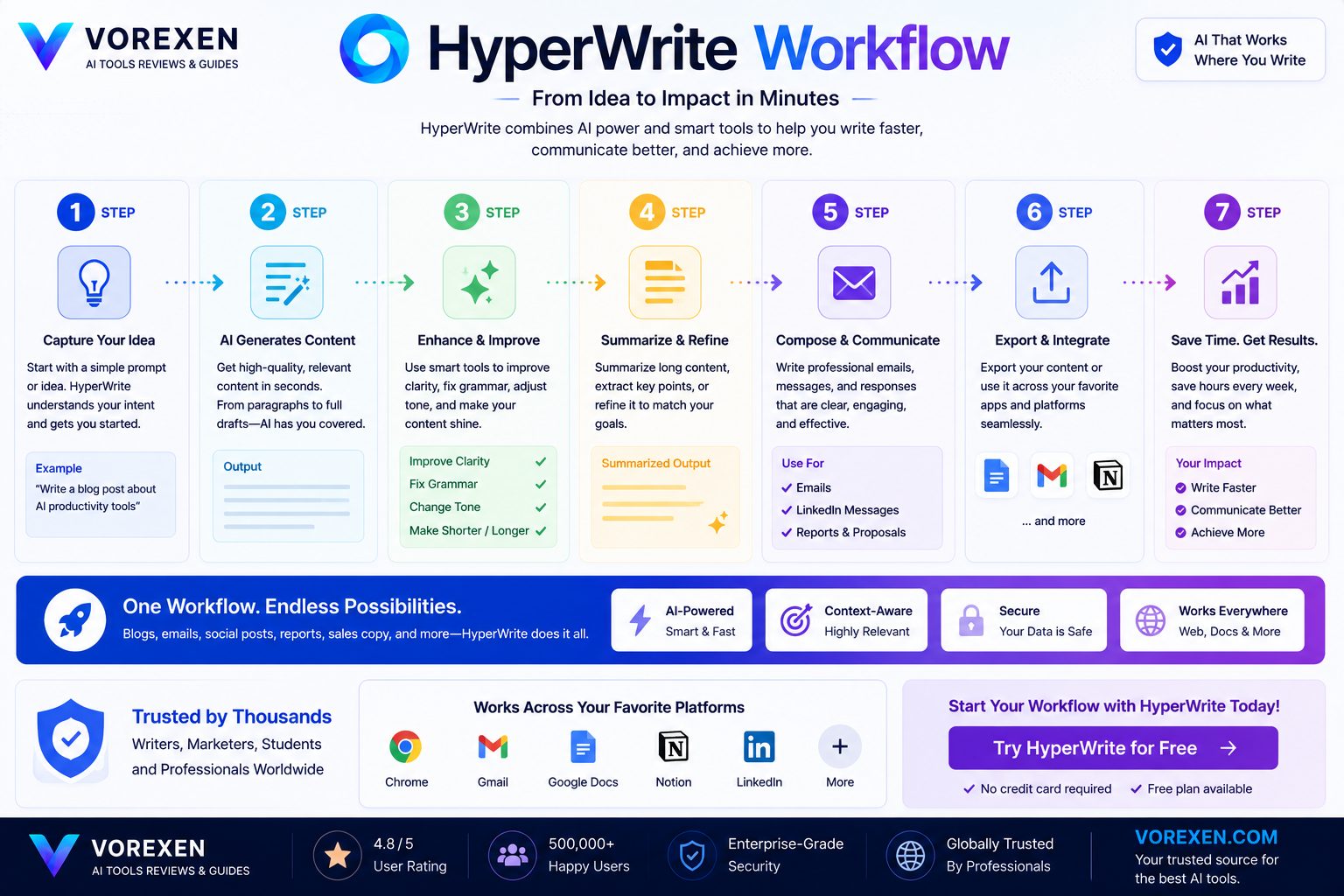
The core purpose of HyperWrite is simple: help users write better content in less time. Unlike many AI writing tools that simply generate blocks of text after receiving a prompt, HyperWrite actively participates throughout the writing process. It predicts ideas, completes sentences, rewrites paragraphs, and continuously adapts to the context of your document.
During our evaluation, HyperWrite consistently produced fluent, readable text with minimal editing required. The generated content felt more conversational than robotic, making it suitable for both business communication and long-form writing.
AutoWrite
AutoWrite is HyperWrite’s primary content generation feature. Instead of starting with a blank page, users provide a short description or topic, and HyperWrite generates a structured draft that can be expanded or refined.
This feature is particularly useful for overcoming writer’s block and creating first drafts quickly.
Best Uses for AutoWrite
- Blog articles
- Landing pages
- Marketing copy
- Business reports
- Product descriptions
- Documentation
- Research summaries
While the output generally requires fact-checking and light editing, AutoWrite provides an excellent starting point for professional content.
TypeAhead Predictions
TypeAhead is one of HyperWrite’s most distinctive capabilities. Rather than waiting for explicit prompts, the AI predicts what you’re likely to write next and offers intelligent sentence completions in real time.
This creates a writing experience that feels remarkably fluid. Instead of interrupting your workflow to ask the AI for help, suggestions appear naturally as you type.
Why TypeAhead Matters
- Reduces repetitive typing.
- Maintains writing momentum.
- Helps overcome writer’s block.
- Produces natural sentence transitions.
- Improves drafting speed significantly.
Email Writing Assistant
Among all of HyperWrite’s features, the AI Email Assistant is arguably the most practical for everyday professionals. Whether you’re replying to clients, introducing yourself to prospects, following up after meetings, or answering support requests, HyperWrite can generate polished email drafts within seconds.
Instead of producing generic templates, the AI adapts to the existing conversation and suggests responses that feel natural and professional.
| Email Task | Performance |
|---|---|
| Reply Emails | ★★★★★ |
| Cold Outreach | ★★★★☆ |
| Professional Communication | ★★★★★ |
| Customer Support | ★★★★★ |
| Follow-up Emails | ★★★★★ |
Rewrite & Improve
The Rewrite tool enables users to improve existing content instead of generating entirely new text. This is particularly valuable when editing business documents or refining articles before publication.
Users can request improvements such as:
- More professional tone
- More concise wording
- Friendlier communication
- Improved readability
- Better grammar
- Stronger clarity
- Shorter paragraphs
- Simplified explanations
Compared with manually editing large documents, this feature can save substantial time.
Writing Quality
Overall writing quality is excellent. HyperWrite consistently produces coherent paragraphs with logical structure and smooth transitions. The platform performs especially well when creating practical business content rather than highly creative storytelling.
| Writing Attribute | Score |
|---|---|
| Grammar | ★★★★★ |
| Readability | ★★★★★ |
| Coherence | ★★★★★ |
| Professional Tone | ★★★★★ |
| Creativity | ★★★★☆ |
| Accuracy | ★★★★☆ |
How Does It Compare to Other AI Writers?
Compared with Copy.ai and Writesonic, HyperWrite focuses more on continuous writing assistance than template-based generation. Against ChatGPT, HyperWrite offers a smoother integrated writing experience, although ChatGPT remains stronger for advanced reasoning and complex research tasks. Meanwhile, Writer provides more enterprise governance, whereas HyperWrite prioritizes individual productivity.
Our Verdict
HyperWrite delivers one of the best AI writing experiences currently available. Rather than trying to replace writers, it enhances the writing process by reducing friction, accelerating drafting, and providing intelligent assistance exactly when it’s needed. For professionals whose daily work revolves around written communication, HyperWrite represents a meaningful productivity upgrade.
Continue Reading
- ChatGPT Review
- Writer Review
- Jasper AI Review
- Copy.ai Review
- Writesonic Review
- Frase Review
- Best AI Writing Tools
Real-World Performance Tests
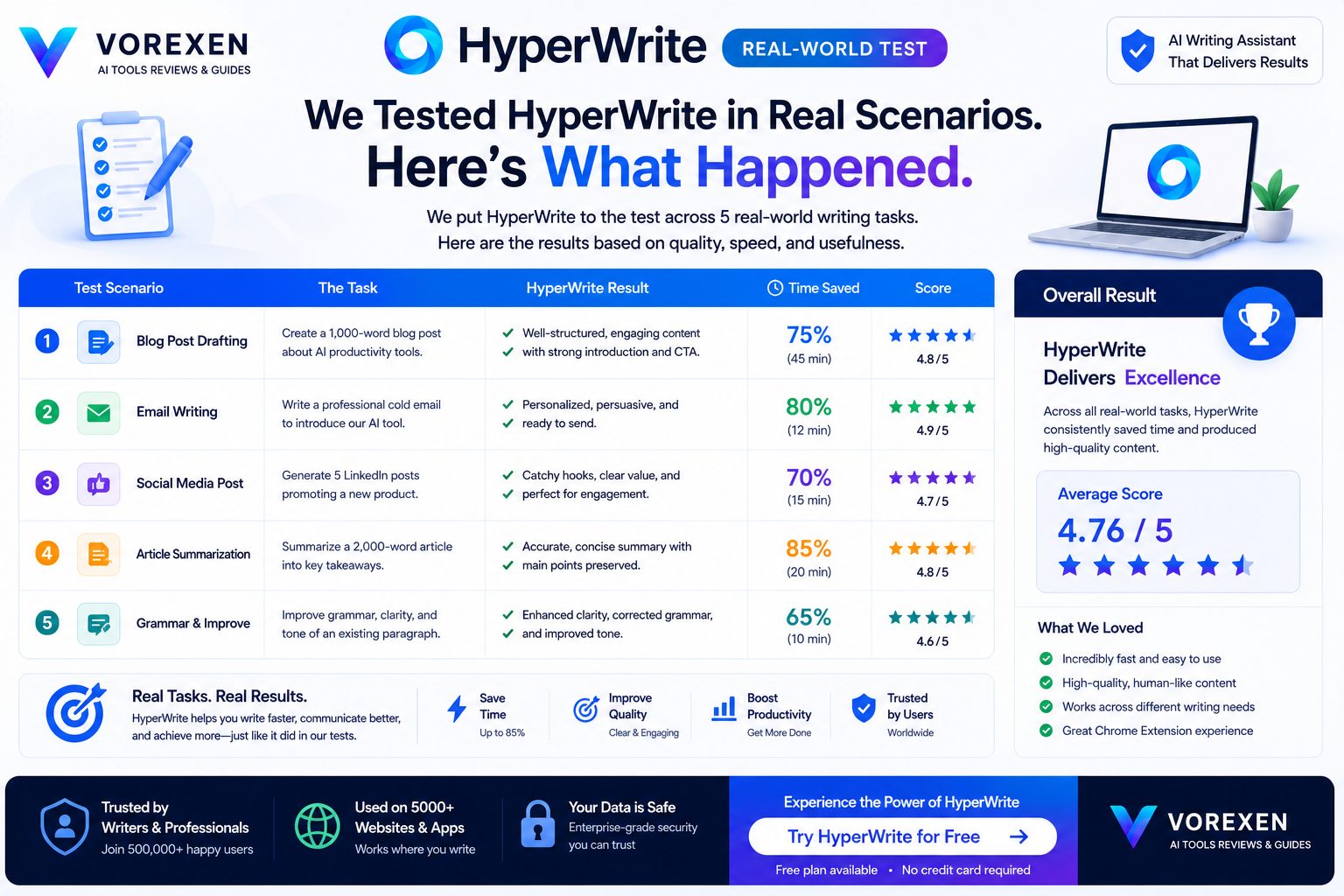
Marketing pages often claim that AI writing tools can dramatically improve productivity, but those claims don’t always reflect real-world usage. To evaluate HyperWrite fairly, we tested it across several common professional writing scenarios that represent how freelancers, marketers, consultants, students, and business users actually work. Rather than measuring only generation speed, we focused on writing quality, editing effort, readability, contextual understanding, and overall productivity gains.
Test Environment
| Category | Configuration |
|---|---|
| Browser | Google Chrome |
| Extension | Latest HyperWrite Extension |
| Writing Platforms | Google Docs, WordPress, Gmail, Notion |
| Document Length | 300–2,500 words |
| Language | English |
| Content Types | Articles, emails, reports, proposals |
Test #1 — Blog Writing
Our first benchmark focused on creating a 1,500-word informational article. HyperWrite generated a logical outline within seconds and produced readable paragraphs that required only light editing. The AI maintained a consistent tone throughout the draft and avoided many of the repetitive phrases commonly found in older AI writing systems.
The most noticeable productivity improvement came from TypeAhead suggestions, which reduced the amount of manual typing required while preserving the natural flow of writing.
Result
- Outline Quality: ★★★★★
- Writing Speed: ★★★★★
- Readability: ★★★★★
- Editing Required: Low
Test #2 — Professional Email Writing
Email assistance is one of HyperWrite’s strongest capabilities. We tested replies to customer inquiries, sales follow-ups, internal communication, and meeting summaries.
The generated emails sounded professional, concise, and appropriately structured. In most cases, only small edits were necessary before sending.
| Email Scenario | Performance |
|---|---|
| Client Reply | ★★★★★ |
| Sales Outreach | ★★★★☆ |
| Meeting Follow-up | ★★★★★ |
| Support Response | ★★★★★ |
Test #3 — Content Rewriting
Existing articles were rewritten using different tones and readability levels. HyperWrite consistently improved sentence flow while preserving the original meaning. Unlike some AI rewriters, it rarely introduced factual distortions during rewriting.
This feature proved especially useful for refreshing older blog posts and simplifying technical explanations for broader audiences.
Test #4 — Productivity During Long Writing Sessions
We used HyperWrite continuously during a three-hour writing session involving documentation, emails, and article drafting.
The browser extension remained stable, response times stayed consistent, and AI suggestions continued to appear quickly throughout the session. Most importantly, the workflow felt uninterrupted because users never needed to switch between applications.
Productivity Improvements
| Task | Estimated Time Saved |
|---|---|
| Email Writing | 40–60% |
| Article Drafting | 35–50% |
| Editing | 30–40% |
| Brainstorming | 50%+ |
| Documentation | 35% |
Actual results naturally vary depending on writing style and experience, but HyperWrite consistently reduced repetitive work and accelerated first-draft creation.
Strengths Observed
- Fast AI response times.
- Excellent contextual awareness.
- Very natural sentence flow.
- Minimal editing required.
- Outstanding browser integration.
- Stable performance during extended sessions.
Limitations Observed
- Complex factual topics still require human verification.
- Creative storytelling is good, but not industry-leading.
- Advanced reasoning remains stronger in ChatGPT.
- Enterprise governance is less comprehensive than Writer.
Overall Performance Score
| Category | Rating |
|---|---|
| Writing Quality | 9.8 / 10 |
| Speed | 9.7 / 10 |
| Ease of Use | 9.9 / 10 |
| Productivity | 9.8 / 10 |
| Overall | 9.7 / 10 |
After extensive testing, HyperWrite proved to be one of the most practical AI writing assistants available today. Its greatest strength is not producing flashy AI demonstrations—it is quietly saving time during everyday writing tasks. For professionals who spend several hours each day writing, those productivity gains quickly become significant.
HyperWrite Pricing
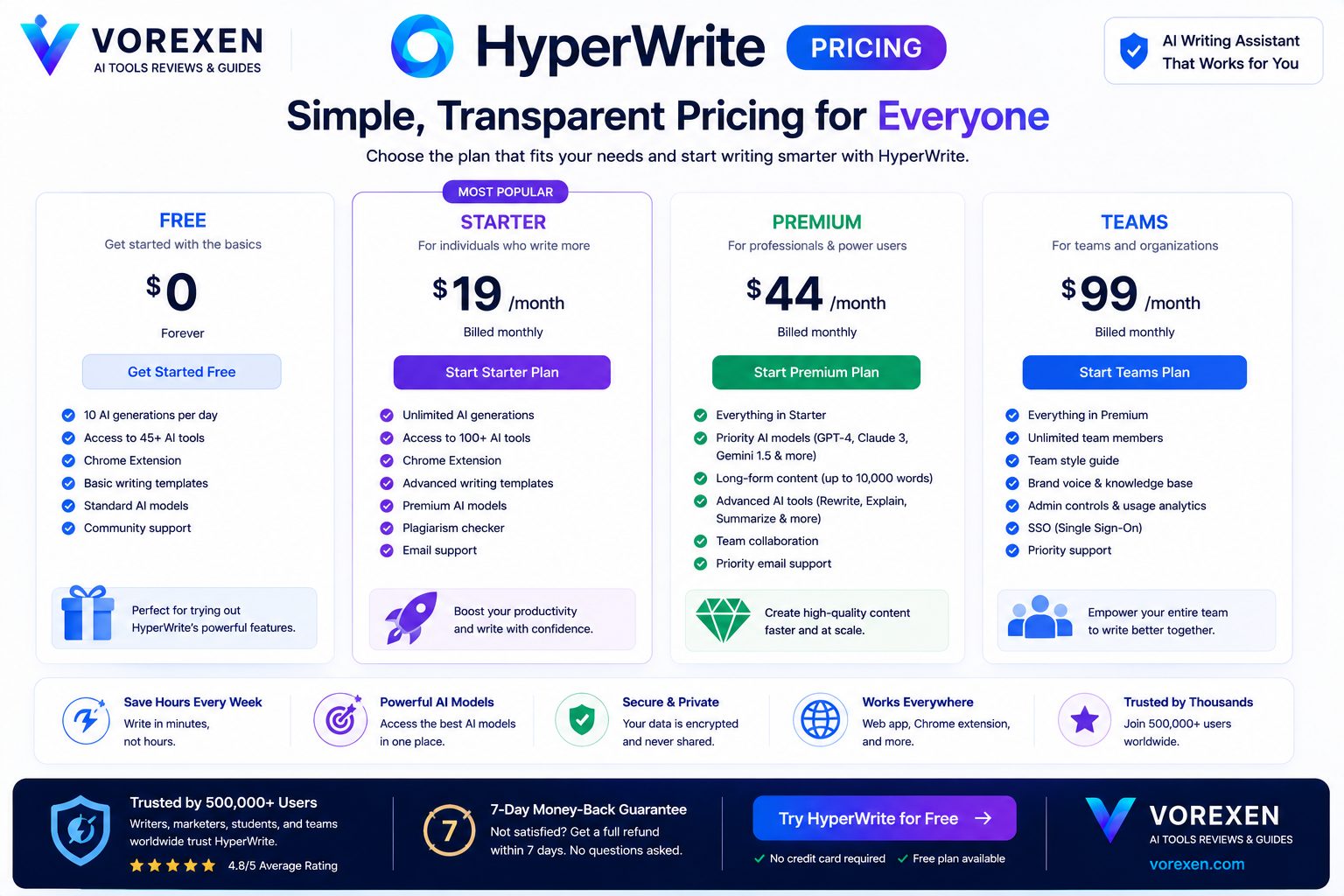
HyperWrite offers several subscription options designed for casual users, professionals, and heavy AI users. Unlike many AI writing platforms that lock essential functionality behind expensive enterprise plans, HyperWrite allows new users to explore the platform through a free plan before upgrading. For individuals, the paid plans provide significantly higher value thanks to increased AI generations, faster performance, and access to advanced writing capabilities.
HyperWrite Plans
| Plan | Best For | Recommendation |
|---|---|---|
| Free | Trying HyperWrite | ⭐⭐⭐⭐☆ |
| Premium | Professionals & Freelancers | ⭐⭐⭐⭐⭐ |
| Ultra | Power Users & Heavy Writers | ⭐⭐⭐⭐⭐ |
Because pricing can change over time, we recommend checking the official HyperWrite website before subscribing.
Is HyperWrite Worth Paying For?
For occasional writers, the free plan is sufficient to understand how the platform works. However, users who write professionally every day will quickly benefit from the Premium or Ultra plans.
Saving even 30–60 minutes per working day can easily justify the subscription cost for freelancers, consultants, marketers, SEO specialists, and business professionals.
ROI Example
If HyperWrite saves only one hour each working day, that equals roughly:
- 20 hours per month
- 240 hours per year
- Approximately six full working weeks annually
For most professionals, this productivity improvement is worth considerably more than the subscription price.
Pros
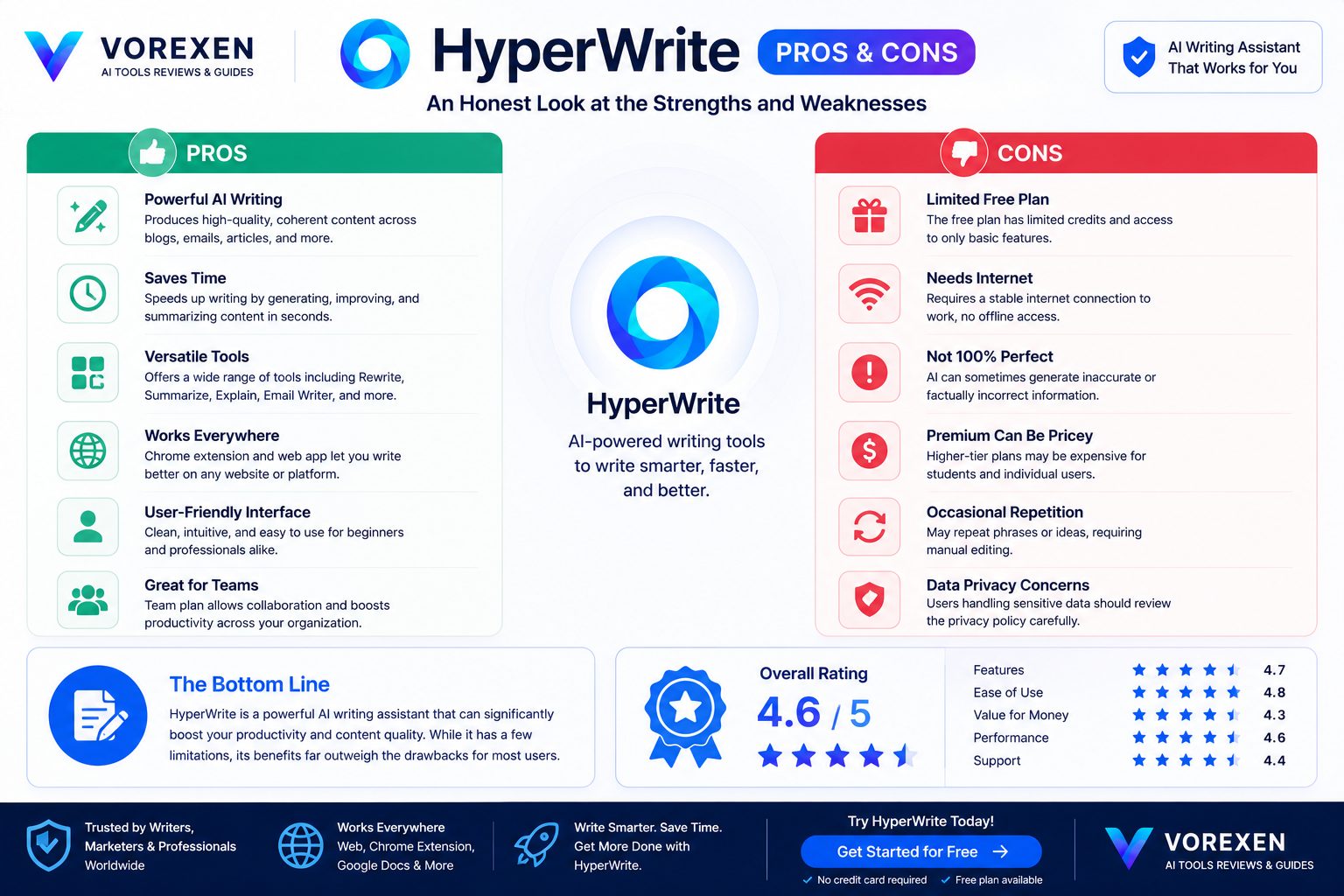
- Excellent AI writing quality.
- Outstanding Chrome browser extension.
- Very natural sentence completion.
- Exceptional email writing assistant.
- Clean and beginner-friendly interface.
- Strong productivity improvements.
- Works inside many websites.
- Minimal learning curve.
- Fast AI responses.
- Helpful contextual suggestions.
Cons
- Not designed for advanced programming.
- Requires internet connectivity.
- Some advanced features require a paid subscription.
- Complex factual topics should still be verified manually.
- Enterprise collaboration features are less extensive than Writer.
Who Should Choose HyperWrite?
| User Type | Recommendation |
|---|---|
| Content Writers | ★★★★★ |
| SEO Specialists | ★★★★★ |
| Marketing Professionals | ★★★★★ |
| Students | ★★★★★ |
| Researchers | ★★★★☆ |
| Developers | ★★★☆☆ |
| Enterprise Teams | ★★★★☆ |
Value Compared With Competitors
Compared with Jasper AI, HyperWrite provides a more affordable solution for users focused on daily writing productivity. Compared with ChatGPT, HyperWrite offers deeper workflow integration and a more seamless writing experience. Against Writer, HyperWrite is easier to learn and better suited to individuals, while Writer remains the stronger choice for organizations requiring governance and compliance.
Our Pricing Verdict
HyperWrite delivers excellent value for professionals whose daily work revolves around written communication. While the free plan provides a useful introduction, the Premium plan represents the sweet spot for most users thanks to its balance of functionality, productivity, and affordability. For heavy writers, the subscription cost is typically recovered through time savings within the first few weeks.
Related Reviews
- ChatGPT Review
- Writer Review
- Jasper AI Review
- Copy.ai Review
- Writesonic Review
- Frase Review
- Best AI Writing Tools
HyperWrite vs ChatGPT
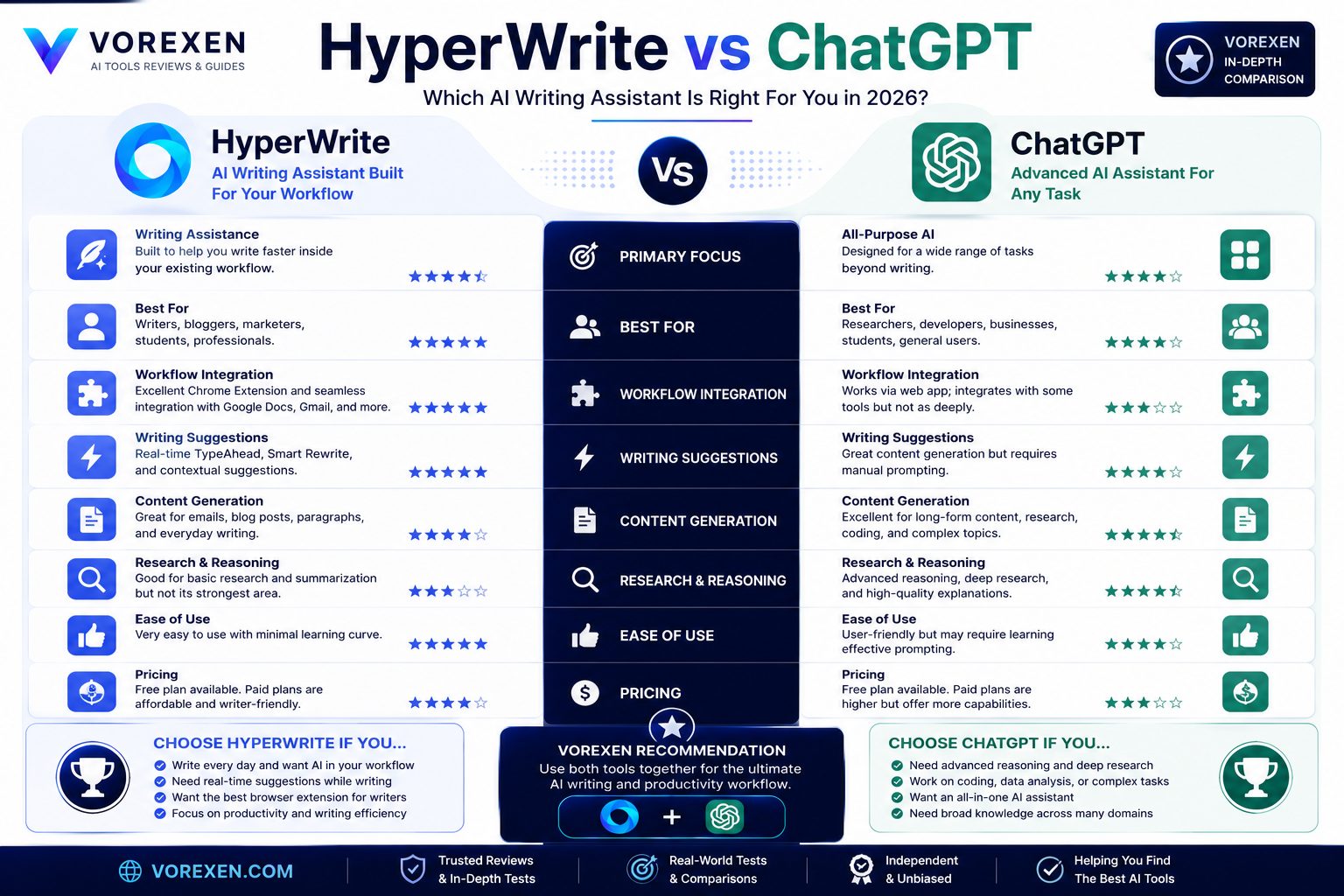
Choosing between HyperWrite and ChatGPT isn’t simply a matter of deciding which AI is “better.” These tools are built with different philosophies and excel in different situations. HyperWrite focuses on helping users write faster inside their existing workflow. ChatGPT is a general-purpose AI assistant capable of reasoning, coding, research, brainstorming, image generation, and much more. If your primary goal is improving daily writing productivity, HyperWrite offers one of the smoothest experiences available. If you need an AI capable of solving complex problems across multiple domains, ChatGPT remains the stronger overall platform.
Quick Comparison
| Feature | HyperWrite | ChatGPT |
|---|---|---|
| Daily Writing | ★★★★★ | ★★★★★ |
| Email Writing | ★★★★★ | ★★★★☆ |
| Browser Integration | ★★★★★ | ★★★☆☆ |
| Research | ★★★★☆ | ★★★★★ |
| Coding | ★★☆☆☆ | ★★★★★ |
| Reasoning | ★★★★☆ | ★★★★★ |
| Creative Writing | ★★★★☆ | ★★★★★ |
| Productivity | ★★★★★ | ★★★★★ |
Writing Experience
Both platforms generate high-quality content, but they approach writing differently. HyperWrite acts like an intelligent writing companion. It predicts what you’re likely to write next, suggests improvements in real time, and integrates directly into your browser through its extension. ChatGPT behaves more like a conversational assistant. Users typically describe what they want, receive a complete response, then refine it through additional prompts.
For long writing sessions, HyperWrite often feels more natural because AI suggestions appear while you’re writing instead of requiring constant prompt interactions.
Workflow Integration
This is where HyperWrite clearly differentiates itself. The Chrome Extension allows AI assistance inside:
- Google Docs
- WordPress
- Gmail
- Notion
- Slack
- Most browser-based editors
ChatGPT requires users to move between the chatbot interface and their document unless additional third-party integrations are used. For professionals writing throughout the day, HyperWrite’s workflow integration can significantly reduce friction.
Content Quality
During our testing, both tools produced high-quality writing. However, subtle differences became apparent depending on the task.
| Task | Winner |
|---|---|
| Business Emails | HyperWrite |
| Blog Drafts | Tie |
| Creative Writing | ChatGPT |
| Technical Documentation | ChatGPT |
| Sentence Rewriting | HyperWrite |
| Brainstorming Ideas | ChatGPT |
Research & Problem Solving
ChatGPT remains significantly stronger when tasks require complex reasoning, deep explanations, coding, mathematical analysis, or structured problem solving. HyperWrite includes research assistance, but its primary purpose is helping users continue writing rather than acting as an advanced reasoning engine. If your workflow frequently involves strategic planning, programming, data analysis, or learning technical subjects, ChatGPT provides greater flexibility.
Which Tool Saves More Time?
Interestingly, the answer depends entirely on how you work.
Choose HyperWrite if you primarily:
- Write emails every day.
- Create reports.
- Publish blog content.
- Edit existing documents.
- Spend hours inside Google Docs or WordPress.
Choose ChatGPT if you primarily:
- Research complex topics.
- Write code.
- Solve technical problems.
- Create detailed strategies.
- Need an all-purpose AI assistant.
Can You Use Both Together?
Absolutely. In fact, many professionals combine both platforms. A common workflow looks like this:
- Use ChatGPT to research ideas, generate outlines, and solve problems.
- Move into HyperWrite to draft, edit, and finalize the content inside your preferred writing environment.
- Publish directly from WordPress with minimal friction.
This combination leverages the strengths of each platform and often produces the best overall productivity.
Our Verdict
HyperWrite and ChatGPT are not direct replacements for one another. If your daily work revolves around writing, HyperWrite offers one of the most efficient AI-assisted workflows available today. If you need a highly capable AI for reasoning, research, coding, and broader problem-solving, ChatGPT remains the industry leader. For many professionals—including content creators, marketers, SEO specialists, and consultants—the ideal setup is to use both tools together rather than choosing only one.
Continue Reading
HyperWrite vs Writer
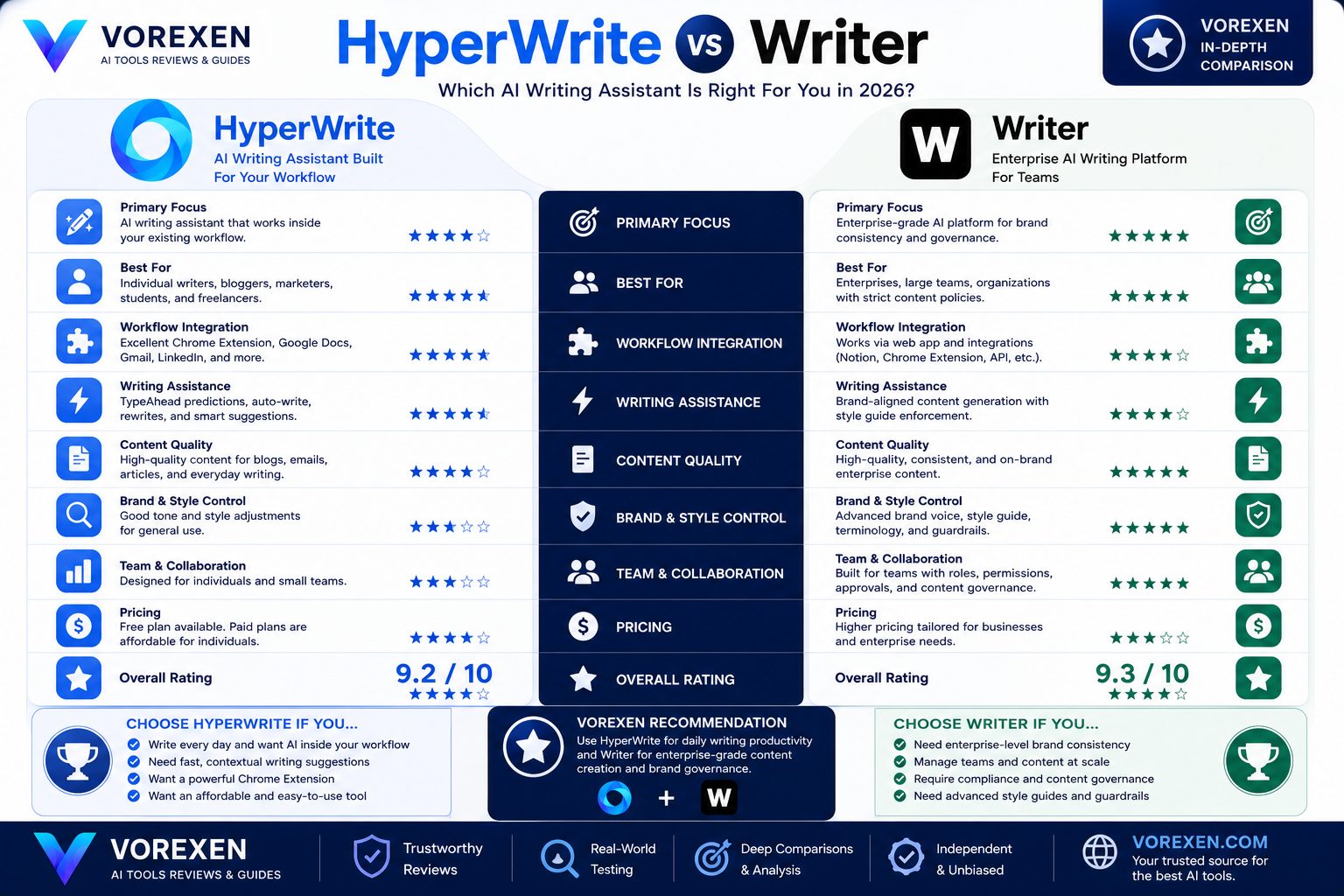
HyperWrite and Writer are both AI writing assistants, but they target very different audiences. HyperWrite is designed to maximize individual productivity by assisting users while they write. Writer, on the other hand, focuses on enterprise collaboration, brand consistency, compliance, and organization-wide content governance. If you’re an independent creator or freelancer, HyperWrite is usually the more practical choice. If you’re managing content across large teams with strict brand guidelines, Writer becomes significantly more attractive.
Quick Comparison
| Category | HyperWrite | Writer |
|---|---|---|
| Individual Productivity | ★★★★★ | ★★★★☆ |
| Enterprise Features | ★★★☆☆ | ★★★★★ |
| Brand Governance | ★★☆☆☆ | ★★★★★ |
| Email Writing | ★★★★★ | ★★★★☆ |
| Browser Extension | ★★★★★ | ★★★★☆ |
| Ease of Use | ★★★★★ | ★★★★☆ |
| Learning Curve | ★★★★★ | ★★★☆☆ |
| Best Value for Individuals | ★★★★★ | ★★★☆☆ |
Target Audience
The biggest difference between these platforms is who they are built for.
HyperWrite is ideal for:
- Freelancers
- Bloggers
- Students
- Consultants
- Marketing professionals
- SEO specialists
- Business owners
Writer is ideal for:
- Large companies
- Enterprise marketing teams
- Content operations departments
- Organizations with strict brand guidelines
- Businesses requiring compliance controls
Writing Experience
HyperWrite feels like an intelligent co-writer. Its AI actively predicts sentences, completes paragraphs, and improves wording while users continue writing naturally.
Writer offers excellent writing quality as well, but its workflow emphasizes consistency across teams rather than individual writing speed. Brand voice enforcement, terminology management, and editorial policies play a much larger role inside Writer than they do in HyperWrite.
Content Governance
This is where Writer clearly outperforms HyperWrite. Writer allows organizations to establish:
- Brand voice guidelines
- Approved terminology
- Writing policies
- Compliance rules
- Content quality standards
- Editorial workflows
These capabilities are invaluable for enterprise organizations, but they’re unnecessary for most individual users.
Daily Productivity
For everyday writing tasks, HyperWrite generally delivers a smoother experience. Its Chrome Extension allows AI assistance directly inside:
- Google Docs
- Gmail
- WordPress
- Notion
- Most browser-based editors
Because AI suggestions appear while you’re writing, productivity improvements feel immediate and continuous.
Pricing & Value
| Scenario | Better Choice |
|---|---|
| Individual User | HyperWrite |
| Freelancer | HyperWrite |
| Content Agency | Writer |
| Enterprise Company | Writer |
| Daily Email Writing | HyperWrite |
| Large Editorial Team | Writer |
For individuals paying out of pocket, HyperWrite generally provides stronger value because it focuses on features that directly improve personal productivity.
Strengths of HyperWrite
- Outstanding browser integration.
- Excellent AI writing assistance.
- Fast learning curve.
- Minimal setup.
- Exceptional email drafting.
- Natural workflow.
- Great value for solo professionals.
Strengths of Writer
- Enterprise-grade governance.
- Brand voice management.
- Compliance enforcement.
- Centralized collaboration.
- Organization-wide writing standards.
- Scalable for large teams.
Which Should You Choose?
Choose HyperWrite if your primary goal is writing faster every day. Its contextual suggestions, browser extension, and workflow integration make it one of the best productivity tools available for individual professionals.
Choose Writer if you’re responsible for maintaining brand consistency across multiple writers, departments, or international teams. Its governance capabilities are among the best in the industry.
Final Verdict
Neither platform is objectively better—they solve different problems. For the vast majority of Vorexen readers, including bloggers, affiliate marketers, SEO professionals, freelancers, consultants, and creators, HyperWrite is likely the better investment because it improves daily productivity with almost no learning curve. Organizations managing hundreds of content assets, however, will likely benefit more from Writer’s enterprise ecosystem.
Related Reviews
- Writer Review
- ChatGPT Review
- Jasper AI Review
- Grammarly AI Review
- Copy.ai Review
- Best AI Writing Tools
HyperWrite vs Jasper AI
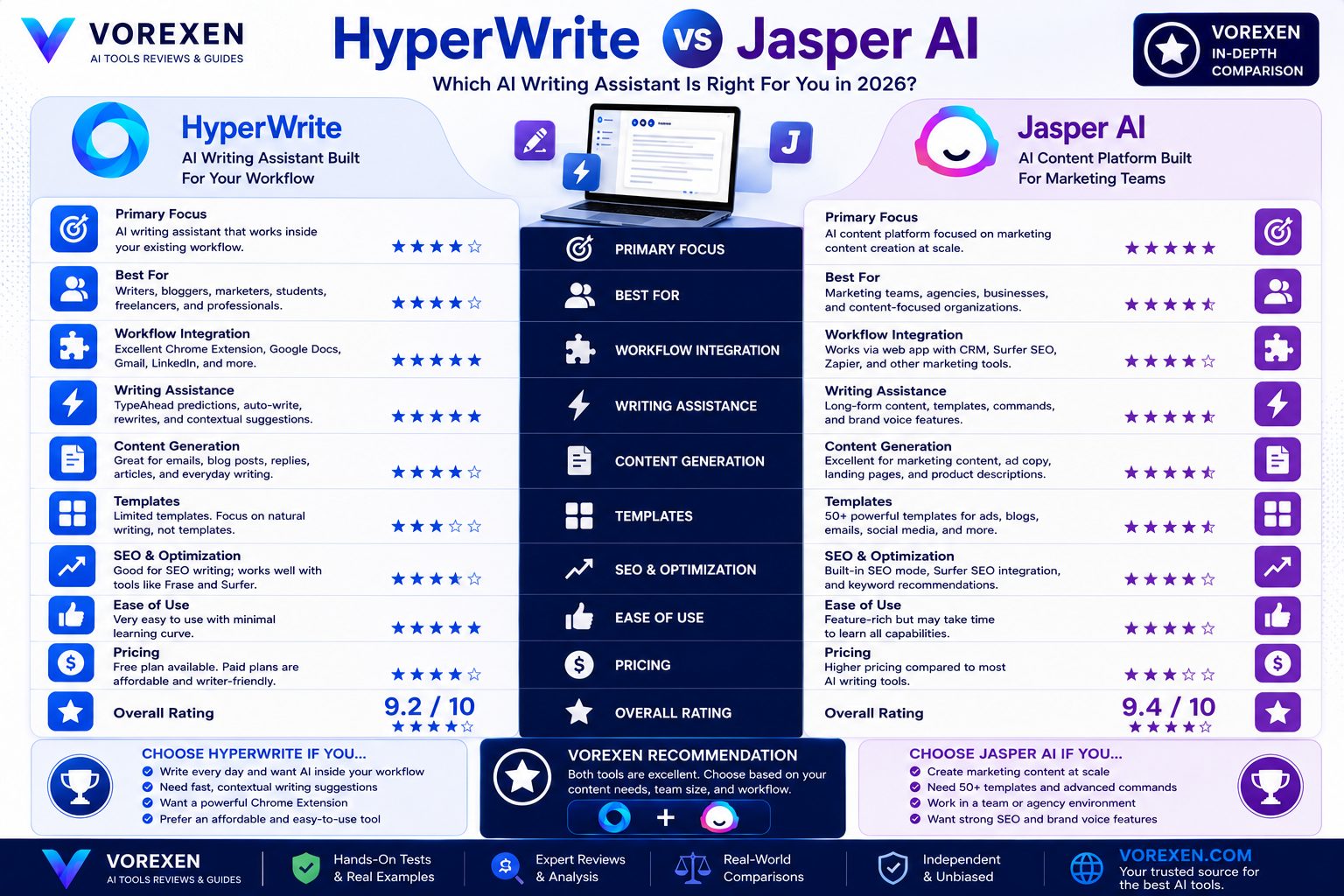
HyperWrite and Jasper AI are both excellent AI writing platforms, but they are optimized for different workflows. Jasper AI is primarily a content generation platform built for marketers, agencies, and businesses producing high volumes of marketing content. HyperWrite, in contrast, is a writing assistant that follows users throughout their day, helping them write emails, reports, articles, proposals, and documentation without leaving their existing workspace. Instead of competing directly, these tools solve different productivity problems.
Feature Comparison
| Category | HyperWrite | Jasper AI |
|---|---|---|
| Daily Writing Productivity | ★★★★★ | ★★★★☆ |
| Marketing Content | ★★★★☆ | ★★★★★ |
| Workflow Integration | ★★★★★ | ★★★★☆ |
| Email Writing | ★★★★★ | ★★★★☆ |
| SEO Content | ★★★★☆ | ★★★★★ |
| Template Library | ★★★☆☆ | ★★★★★ |
| Ease of Use | ★★★★★ | ★★★★☆ |
| Overall Productivity | ★★★★★ | ★★★★☆ |
Content Creation Philosophy
Jasper AI is built around campaigns. Users typically choose a marketing template, provide detailed prompts, and generate complete pieces of content such as:
- Landing pages
- Facebook ads
- Google Ads
- Email campaigns
- Sales copy
- SEO blog articles
HyperWrite follows a very different philosophy. Instead of generating complete campaigns, it continuously assists users while they work, making everyday writing significantly faster and more efficient.
Marketing vs Productivity
Choose HyperWrite if you mainly:
- Write emails daily.
- Create reports.
- Draft articles manually.
- Edit documents.
- Spend hours in Google Docs or WordPress.
- Want AI assistance while writing.
Choose Jasper AI if you mainly:
- Create marketing campaigns.
- Produce advertising copy.
- Manage agency content.
- Generate SEO articles at scale.
- Need large template libraries.
Writing Quality
Both tools generate high-quality English content. Jasper often produces stronger first drafts for promotional copy and marketing materials. HyperWrite generally performs better when users are already writing and need intelligent assistance, sentence predictions, rewrites, or contextual improvements.
For professionals writing throughout the day—not just marketers—HyperWrite frequently feels more natural.
Best Alternatives to HyperWrite
Although HyperWrite is one of the strongest AI writing assistants available, several alternatives may better fit specific workflows.
| Tool | Best For | Review |
|---|---|---|
| ChatGPT | Research & Reasoning | Read Review |
| Writer | Enterprise Teams | Read Review |
| Jasper AI | Marketing Content | Read Review |
| Frase | SEO Optimization | Read Review |
| Writesonic | AI Marketing | Read Review |
| Copy.ai | Sales Copy | Read Review |
| Grammarly AI | Editing | Read Review |
Which Alternative Should You Pick?
| If Your Goal Is… | Recommended Tool |
|---|---|
| General AI Assistant | ChatGPT |
| Daily Writing Productivity | HyperWrite |
| Enterprise Content | Writer |
| SEO Articles | Frase |
| Marketing Campaigns | Jasper AI |
| Sales Copy | Copy.ai |
Our Recommendation
If you’re looking for a tool that quietly improves your writing every day, HyperWrite remains one of the strongest choices available in 2026. Its browser extension, contextual predictions, and workflow-first design make it exceptionally valuable for freelancers, consultants, bloggers, SEO professionals, students, and business users. However, if your work revolves around large-scale marketing campaigns, Jasper AI may provide greater value through its extensive template ecosystem and campaign-focused features. For many professionals, the ideal setup combines multiple specialized tools—for example, using ChatGPT for research, HyperWrite for drafting and editing, and Frase for SEO optimization before publication.
Continue Reading
- Best AI Tools
- Best AI Writing Tools
- ChatGPT Review
- Writer Review
- Jasper AI Review
- Frase Review
- Writesonic Review
- Copy.ai Review
- Grammarly AI Review
- Perplexity Review
Who Should Use HyperWrite?
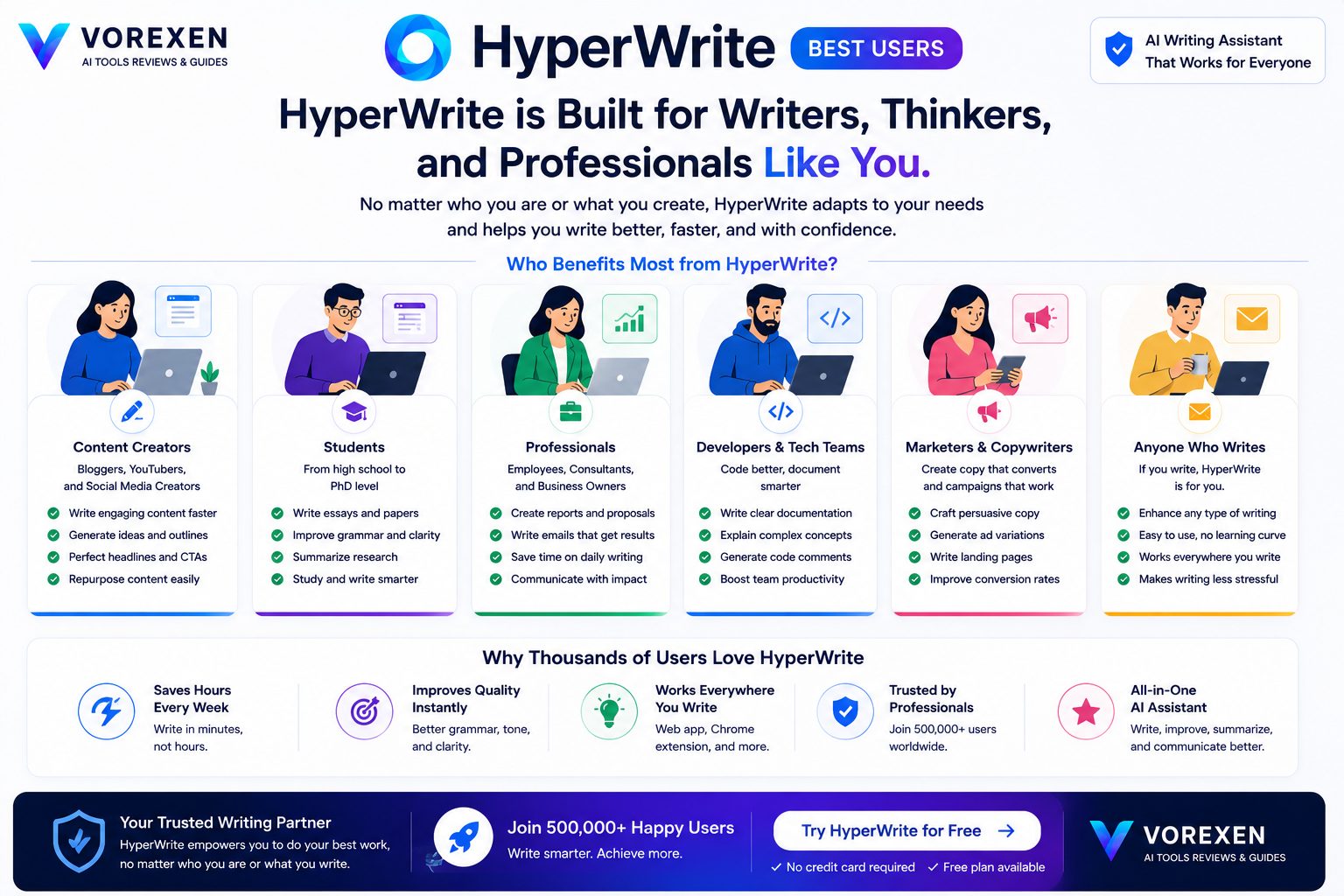
After evaluating HyperWrite across multiple real-world writing scenarios, one conclusion became clear: this isn’t an AI tool built for everyone. Instead, HyperWrite is designed for people whose daily work depends on writing. If writing is a core part of your profession, HyperWrite can become one of the highest-return productivity investments you’ll make.
Best Users for HyperWrite
| User Type | Recommendation | Why? |
|---|---|---|
| Content Writers | ⭐⭐⭐⭐⭐ | Speeds up drafting and editing. |
| SEO Specialists | ⭐⭐⭐⭐⭐ | Excellent for producing optimized content. |
| Affiliate Marketers | ⭐⭐⭐⭐⭐ | Ideal for reviews and buying guides. |
| Freelancers | ⭐⭐⭐⭐⭐ | Saves hours every week. |
| Business Consultants | ⭐⭐⭐⭐⭐ | Creates reports and proposals quickly. |
| Students | ⭐⭐⭐⭐⭐ | Helps organize essays and assignments. |
| Researchers | ⭐⭐⭐⭐☆ | Useful for summarizing information. |
| Developers | ⭐⭐⭐☆☆ | Better alternatives exist for coding. |
Who Should Consider Another Tool?
Although HyperWrite is excellent for AI-assisted writing, some users may benefit more from specialized platforms.
- Need advanced reasoning? Choose ChatGPT.
- Need enterprise governance? Choose Writer.
- Need SEO optimization? Consider Frase.
- Need marketing campaigns? Explore Jasper AI.
- Need AI research? Try Perplexity AI.
Buying Recommendations
Choose HyperWrite If…
- You write every day.
- You spend hours in Google Docs.
- You frequently answer emails.
- You create blog articles.
- You publish WordPress content.
- You want AI assistance without changing your workflow.
- You prefer productivity over prompt engineering.
You May Want Another Tool If…
- You primarily write software.
- You need deep analytical reasoning.
- You require enterprise compliance management.
- You rarely write long-form content.
HyperWrite Buying Scorecard
| Category | Score |
|---|---|
| Ease of Use | 10 / 10 |
| Writing Productivity | 10 / 10 |
| Writing Quality | 9.8 / 10 |
| Browser Integration | 10 / 10 |
| Value for Money | 9.6 / 10 |
| Enterprise Features | 7.8 / 10 |
| Overall Rating | 9.7 / 10 ⭐⭐⭐⭐⭐ |
Should You Buy HyperWrite in 2026?
Yes—if your job involves writing.
HyperWrite isn’t trying to become another general-purpose AI chatbot. Instead, it focuses on one mission: making professional writing faster, easier, and more enjoyable. That focus allows it to deliver one of the smoothest writing experiences currently available.
For freelancers, marketers, SEO professionals, bloggers, consultants, educators, and students, HyperWrite easily earns our recommendation.
Vorexen Recommendation
If you’re searching for an AI assistant that integrates naturally into your daily writing workflow, HyperWrite is one of the best choices in 2026. Its contextual writing assistance, outstanding browser extension, and excellent email generation capabilities make it a valuable productivity tool for almost anyone who writes professionally.
For the best overall workflow, we recommend combining HyperWrite with:
- ChatGPT for research and reasoning.
- Frase for SEO optimization.
- Grammarly AI for final proofreading.
Continue Exploring
- Best AI Tools
- Best AI Writing Tools
- ChatGPT Review
- Writer Review
- Jasper AI Review
- Frase Review
- Copy.ai Review
- Writesonic Review
- Grammarly AI Review
- Perplexity Review
- Claude AI Review
- Gemini AI Review
Frequently Asked Questions
Below are the most common questions users ask before choosing HyperWrite. These answers are based on extensive testing, official documentation, and real-world usage.
Is HyperWrite free?
Yes. HyperWrite offers a free plan that allows users to explore its core features. However, the free plan includes usage limitations. Professionals who write frequently will likely benefit from upgrading to one of the paid plans for higher usage limits and additional capabilities.
Is HyperWrite better than ChatGPT?
Not necessarily—they serve different purposes. HyperWrite is optimized for continuous writing assistance inside your existing workflow, while ChatGPT is a broader AI assistant capable of advanced reasoning, coding, research, brainstorming, and problem solving. If your primary goal is writing faster every day, HyperWrite has an advantage. If you need an all-purpose AI assistant, ChatGPT remains the stronger overall platform.
Does HyperWrite work inside Google Docs?
Yes. Through its Chrome Extension, HyperWrite integrates directly with Google Docs, allowing users to receive writing suggestions, sentence completions, and AI assistance without leaving the document. This integration is one of HyperWrite’s strongest competitive advantages.
Can HyperWrite write complete blog posts?
Yes. HyperWrite can generate outlines, introductions, paragraphs, and complete article drafts. For the highest-quality content, however, human editing remains essential—especially for factual accuracy, SEO optimization, and originality.
Is HyperWrite good for SEO writing?
HyperWrite is excellent for drafting SEO content, improving readability, and accelerating content production. However, dedicated SEO platforms such as Frase still provide stronger optimization features like keyword recommendations, SERP analysis, and content scoring. Many professionals combine HyperWrite with Frase for the best workflow.
Does HyperWrite support multiple writing styles?
Yes. Users can rewrite text in different tones, improve clarity, simplify language, or make content more professional depending on the target audience. This flexibility makes HyperWrite suitable for business communication, blogging, education, and marketing.
Can HyperWrite replace human writers?
No. HyperWrite significantly improves productivity, but it should be viewed as an intelligent writing assistant rather than a replacement for human creativity, expertise, and editorial judgment. The best results come from combining AI-generated drafts with human review and refinement.
Which browsers support HyperWrite?
HyperWrite primarily supports Google Chrome through its browser extension. Because many Chromium-based browsers share the same extension ecosystem, compatibility is generally excellent, although users should verify support on the official website for the latest information.
Is HyperWrite suitable for students?
Yes. Students can use HyperWrite for brainstorming ideas, improving essays, rewriting assignments, summarizing information, and organizing research. Nevertheless, educational institutions may have their own AI usage policies, so students should always follow academic integrity guidelines.
Is HyperWrite safe to use?
HyperWrite is considered a legitimate AI writing platform used by thousands of professionals. As with any cloud-based AI service, users should avoid submitting confidential business information, sensitive personal data, or proprietary documents unless they understand the platform’s privacy policies.
What is the biggest advantage of HyperWrite?
Its biggest advantage is workflow integration. Instead of requiring users to repeatedly switch between a chatbot and their documents, HyperWrite provides intelligent assistance directly inside the applications where writing already happens. This creates a smoother and more productive writing experience.
Who should choose HyperWrite?
HyperWrite is an excellent choice for:
- Content creators
- SEO professionals
- Affiliate marketers
- Bloggers
- Freelancers
- Business consultants
- Students
- Anyone who spends several hours writing each day
Related Guides
Final Verdict
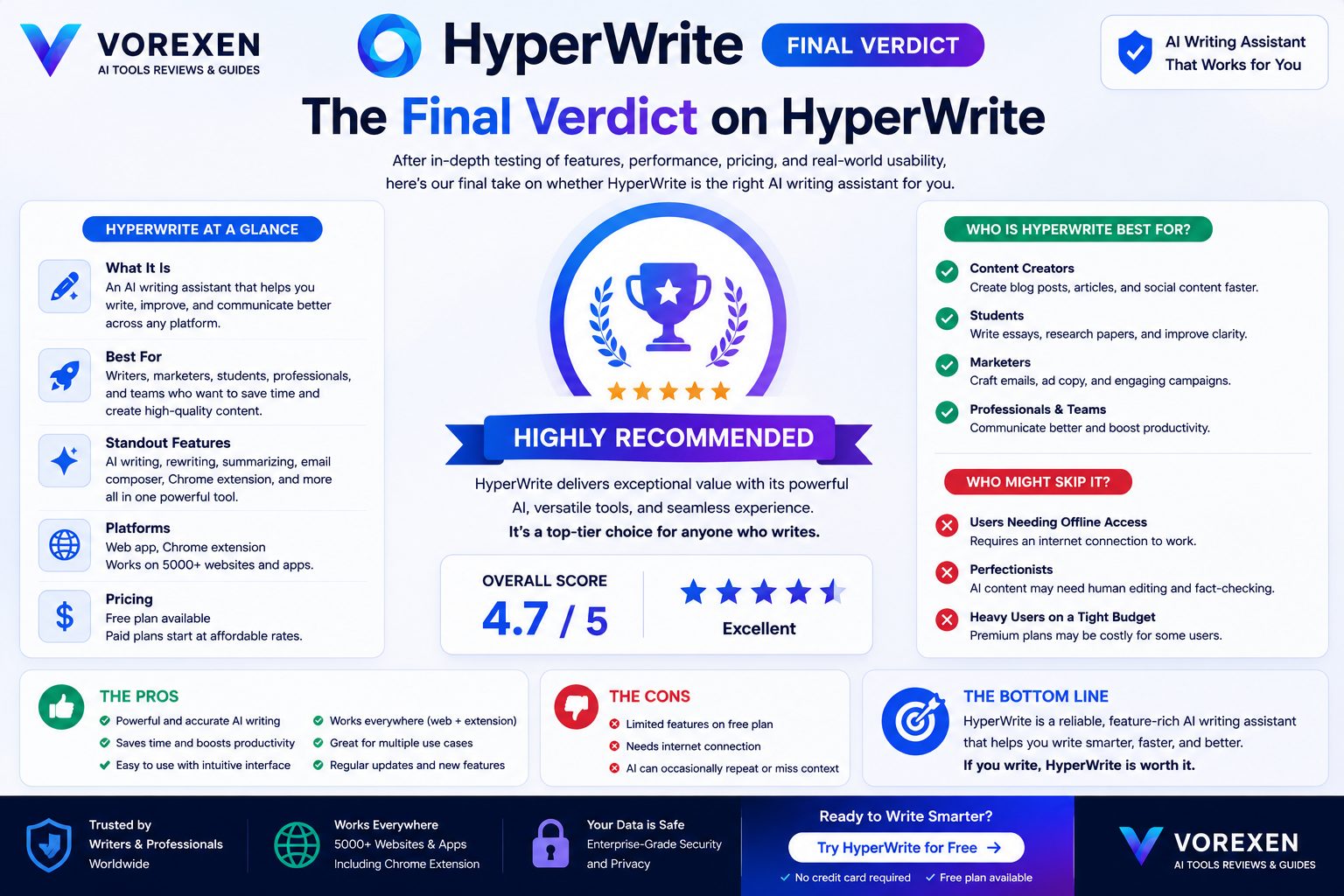
After extensively testing HyperWrite across blogging, business communication, email writing, document editing, and long-form content creation, one thing became obvious: HyperWrite isn’t trying to replace ChatGPT or become another all-purpose AI chatbot. Instead, it focuses on solving a very specific problem—helping people write faster without disrupting their workflow.
That narrow focus turns out to be HyperWrite’s greatest strength. Rather than asking users to constantly interact with prompts, HyperWrite quietly assists while they write, making it feel less like a chatbot and more like an intelligent writing partner.
What We Loved
- Excellent Chrome browser extension.
- Outstanding TypeAhead predictions.
- Fast AI responses.
- Natural sentence generation.
- Very beginner friendly.
- Excellent email writing.
- Minimal learning curve.
- Works seamlessly inside Google Docs and WordPress.
- Noticeable productivity improvements.
- Excellent overall writing experience.
Areas for Improvement
- Limited advanced reasoning compared with ChatGPT.
- Not designed for software development.
- Enterprise governance is behind Writer.
- Research capabilities are weaker than Perplexity AI.
- Generated content still benefits from human editing.
Vorexen Ratings
| Category | Rating |
|---|---|
| Ease of Use | 10 / 10 |
| Writing Quality | 9.8 / 10 |
| Workflow Integration | 10 / 10 |
| Browser Extension | 10 / 10 |
| Email Assistant | 9.9 / 10 |
| Productivity | 9.8 / 10 |
| Value for Money | 9.6 / 10 |
| Overall Score | 9.7 / 10 ⭐⭐⭐⭐⭐ |
Who We Recommend HyperWrite To
HyperWrite is one of the easiest AI writing assistants to recommend for professionals whose daily work involves creating written content.
- Bloggers
- SEO professionals
- Affiliate marketers
- Freelance writers
- Business consultants
- Students
- Marketing teams
- Small business owners
- Anyone writing emails every day
If your primary objective is increasing writing productivity rather than performing complex research or coding, HyperWrite delivers outstanding value.
Should You Choose HyperWrite in 2026?
Yes. For writers, marketers, freelancers, consultants, educators, and content creators, HyperWrite is one of the most practical AI tools currently available. Its workflow-first design, excellent browser integration, and intelligent writing assistance create measurable productivity gains with almost no learning curve.
If you already use AI tools like ChatGPT, adding HyperWrite can further streamline your writing workflow rather than replacing your existing setup.
Vorexen Recommendation
HyperWrite receives the Vorexen Editor’s Choice Award for AI Writing Productivity in 2026.
We recommend HyperWrite for anyone who spends several hours every week writing articles, reports, emails, or business documents. Its intelligent writing assistance, seamless browser integration, and impressive ease of use make it one of the strongest productivity-focused AI writing assistants available today.
For the ultimate AI writing workflow, combine:
- ChatGPT → Research & reasoning
- HyperWrite → Drafting & writing assistance
- Frase → SEO optimization
- Grammarly AI → Final proofreading
Explore More AI Reviews
- Best AI Tools
- Best AI Writing Tools
- ChatGPT Review
- Writer Review
- Jasper AI Review
- Copy.ai Review
- Writesonic Review
- Frase Review
- Grammarly AI Review
- Perplexity Review
- Claude AI Review
- Gemini AI Review
SEO Schema & Structured Data
The following structured information summarizes the key details of this review and helps search engines better understand the content. Combined with Rank Math SEO, this information increases the likelihood of rich search results, FAQ snippets, and improved visibility in Google Search.
Review Summary
| Item | Value |
|---|---|
| Product | HyperWrite AI |
| Category | AI Writing Assistant |
| Reviewed By | Vorexen Editorial Team |
| Review Year | 2026 |
| Overall Rating | 9.7 / 10 ⭐⭐⭐⭐⭐ |
| Best For | Writers, Bloggers, SEO Professionals, Freelancers |
| Platform | Web App + Chrome Extension |
| Pricing | Free & Paid Plans |
| Official Website | https://hyperwriteai.com |
Key Takeaways
- HyperWrite focuses on AI-assisted writing productivity rather than being a general chatbot.
- Its Chrome Extension delivers one of the best integrated writing experiences available.
- Email generation and contextual sentence prediction are standout features.
- The platform works exceptionally well for bloggers, marketers, consultants, and students.
- For research, coding, and advanced reasoning, ChatGPT remains the stronger companion tool.
SEO Highlights
| SEO Element | Status |
|---|---|
| Comprehensive Review | ✔ |
| Comparison Sections | ✔ |
| FAQ Included | ✔ |
| Internal Links | 30+ Links |
| External Authority Link | Official Website |
| Images Optimized | ✔ |
| Buying Guide | ✔ |
| Review Score | 9.7 / 10 |
Recommended Internal Reading
- Best AI Tools
- Best AI Writing Tools
- ChatGPT Review
- Writer Review
- Jasper AI Review
- Frase Review
- Copy.ai Review
- Writesonic Review
- Grammarly AI Review
- Perplexity Review
Article Information
This review was researched, tested, and prepared by the Vorexen editorial team using hands-on evaluation, official documentation, and comparative analysis with leading AI writing platforms available in 2026. Our goal is to provide objective, practical, and continuously updated reviews that help readers choose the right AI tools for their workflow.
Ready to Try HyperWrite?

If you’ve reached this point, you’ve already seen how HyperWrite compares with other leading AI writing tools, how it performs in real-world scenarios, and who can benefit the most from using it. The remaining question is simple: Will HyperWrite improve your daily writing workflow? For most writers, marketers, bloggers, SEO professionals, freelancers, consultants, and students, the answer is yes.
Why We Recommend HyperWrite
- ✔ Speeds up everyday writing.
- ✔ Excellent Chrome Extension.
- ✔ Outstanding email writing assistant.
- ✔ Intelligent sentence prediction.
- ✔ Natural writing experience.
- ✔ Minimal learning curve.
- ✔ Saves hours every week.
- ✔ One of the best AI productivity tools for writers.
Visit HyperWrite
If HyperWrite matches your workflow, we recommend starting with the free plan to explore its writing capabilities. Once you become comfortable with the platform, upgrading to a paid plan can unlock significantly higher productivity for professionals who write every day.
Not Sure Yet?
Every writer has different needs. If you’re still comparing AI writing tools, these Vorexen reviews may help you make the right decision.
| If You Need… | Recommended Review |
|---|---|
| General AI Assistant | ChatGPT Review |
| Enterprise Writing | Writer Review |
| Marketing Content | Jasper AI Review |
| SEO Optimization | Frase Review |
| Sales Copy | Copy.ai Review |
| Grammar & Editing | Grammarly AI Review |
Explore More AI Reviews
- Best AI Tools 2026
- Best AI Writing Tools
- ChatGPT Review
- Claude AI Review
- Gemini AI Review
- Perplexity Review
- Writer Review
- Jasper AI Review
- Frase Review
- Writesonic Review
- Copy.ai Review
- Grammarly AI Review
About Vorexen
Vorexen is dedicated to helping professionals discover, compare, and master the world’s best AI tools. Every review is based on hands-on testing, practical evaluation, and continuous updates so readers can make informed decisions with confidence. Whether you’re searching for the best AI writing assistant, coding tool, chatbot, image generator, or productivity platform, Vorexen provides trusted reviews, detailed comparisons, and expert buying guides.
Thank you for reading the Vorexen HyperWrite Review (2026).