Ultimate Microsoft Copilot Review (2026): Features, Pricing, Pros & Cons
Artificial intelligence has transformed the way people work, communicate, and create content. Among today’s leading AI assistants, Microsoft Copilot stands out because of its seamless integration with Windows, Microsoft 365, Edge, Teams, and GitHub.
Powered by advanced AI models and Microsoft’s enterprise ecosystem, Copilot helps users write documents, analyze spreadsheets, create presentations, summarize meetings, generate code, and automate repetitive tasks.
In this comprehensive review, we’ll explore Microsoft Copilot’s features, pricing, advantages, disadvantages, and whether it’s the right AI assistant for your workflow in 2026.
What Is Microsoft Copilot?
Microsoft Copilot is Microsoft’s AI-powered assistant designed to improve productivity across its software ecosystem. Originally introduced as Bing Chat, Copilot has evolved into a unified AI platform integrated into Windows, Microsoft 365, Edge, Teams, Outlook, and many enterprise services.
Its goal is to help users work faster, make better decisions, and automate repetitive tasks using natural language.
Main Capabilities
- AI conversations
- Content creation
- Email drafting
- Excel analysis
- PowerPoint generation
- Coding assistance
- Meeting summaries
- Real-time web search
- Image generation
Key Features
AI Chat Assistant
Copilot answers questions, explains concepts, brainstorms ideas, and assists with everyday tasks using conversational AI.
Microsoft 365 Integration
Microsoft Copilot integrates deeply with Word, Excel, PowerPoint, Outlook, Teams, and OneNote, allowing users to create documents, analyze data, summarize emails, and build presentations without leaving their applications.
Windows Copilot
Windows users can access Copilot directly from the desktop to change settings, summarize files, launch applications, and receive AI-powered assistance throughout the operating system.
AI Writing
Copilot generates professional emails, blog posts, reports, product descriptions, social media content, and business documents while maintaining a polished writing style.
Coding Assistance
Developers can generate code, debug applications, explain algorithms, create documentation, and write unit tests across popular programming languages.
Excel Intelligence
Copilot automatically analyzes spreadsheets, creates formulas, builds charts, summarizes datasets, and identifies trends that would otherwise require manual work.
PowerPoint Generation
Users can quickly create presentations from documents, outlines, or simple prompts while Copilot designs layouts and speaker notes automatically.
Outlook Email Assistant
Copilot drafts professional emails, summarizes long conversations, rewrites messages, and suggests responses to improve communication.
Teams Meeting Summaries
Copilot generates meeting notes, identifies action items, highlights important decisions, and produces follow-up summaries for participants.
Real-Time Web Search
Integrated with Microsoft Edge and Bing Search, Copilot provides current information, research assistance, and summarized web results.
AI Image Generation
Users can generate illustrations, concept art, marketing visuals, and creative images directly from text prompts.
User Interface
Microsoft Copilot offers a modern, clean interface that feels familiar to anyone using Microsoft products. Navigation is intuitive, and the AI experience remains consistent across desktop, web, and mobile devices.
Performance
Copilot excels in business productivity, document creation, spreadsheet analysis, presentation design, enterprise collaboration, and workflow automation.
Its greatest strength is the seamless integration across Microsoft’s software ecosystem.
Pricing
Free Plan
Microsoft offers a free version with core AI capabilities for personal use.
Premium Plans
- Microsoft Copilot Pro
- Microsoft 365 Copilot
- Enterprise Plans
Paid subscriptions unlock advanced AI models, Microsoft 365 integration, enterprise security, and higher usage limits.
Pros
- Excellent Microsoft 365 integration
- Powerful Office automation
- Professional writing assistance
- Strong coding support
- AI image generation
- Enterprise-grade security
- Windows integration
- Real-time web search
- Easy-to-use interface
- Free version available
Cons
- Best experience requires Microsoft’s ecosystem
- Premium features require paid plans
- Advanced Office features depend on Microsoft 365 licensing
- Less customizable than ChatGPT
Who Should Use Microsoft Copilot?
Microsoft Copilot is ideal for:
- Business professionals
- Corporate teams
- Students
- Developers
- Project managers
- Financial analysts
- Consultants
- Microsoft 365 users
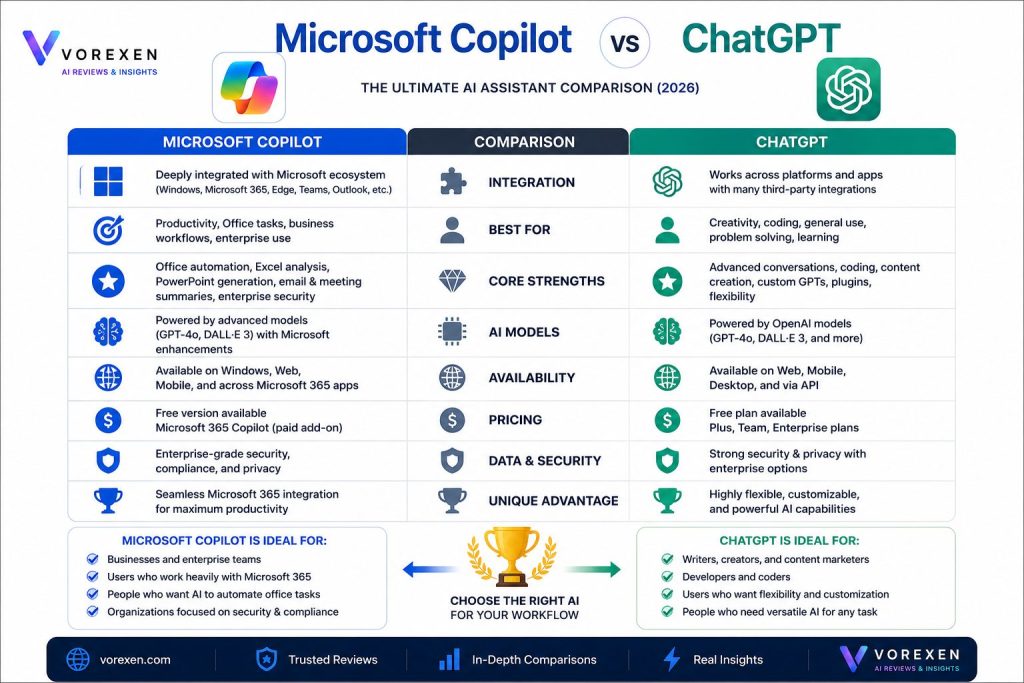
Microsoft Copilot vs ChatGPT
Microsoft Copilot Is Better For
- Microsoft Office productivity
- Excel analysis
- PowerPoint creation
- Business collaboration
- Enterprise environments
ChatGPT Is Better For
- Creative writing
- Advanced programming
- Custom AI assistants
- Automation workflows
- Flexible conversations
Many professionals combine both platforms—using Microsoft Copilot for Office productivity and ChatGPT for research, coding, and creative tasks.
Frequently Asked Questions
Is Microsoft Copilot free?
Yes. Microsoft offers a free version, while premium plans provide advanced AI features and Microsoft 365 integration.
Is Microsoft Copilot better than ChatGPT?
It depends on your workflow. Copilot is the better choice for Microsoft Office users, while ChatGPT offers greater flexibility for creative work, programming, and automation.
Can Microsoft Copilot write code?
Yes. It supports code generation, debugging, documentation, and explanations across multiple programming languages.
Is Microsoft Copilot good for business?
Absolutely. It is one of the strongest AI assistants for enterprise productivity and collaboration.
Final Verdict
Microsoft Copilot has become one of the most powerful AI productivity assistants in 2026. Its deep integration with Microsoft 365, Windows, Teams, Outlook, and Edge makes it an outstanding solution for professionals and businesses.
While ChatGPT remains more flexible for creative writing, advanced coding, and custom AI workflows, Microsoft Copilot dominates productivity within the Microsoft ecosystem.
If your daily work revolves around Microsoft Office, Windows, and enterprise collaboration, Microsoft Copilot is one of the smartest AI investments you can make in 2026.
Read More