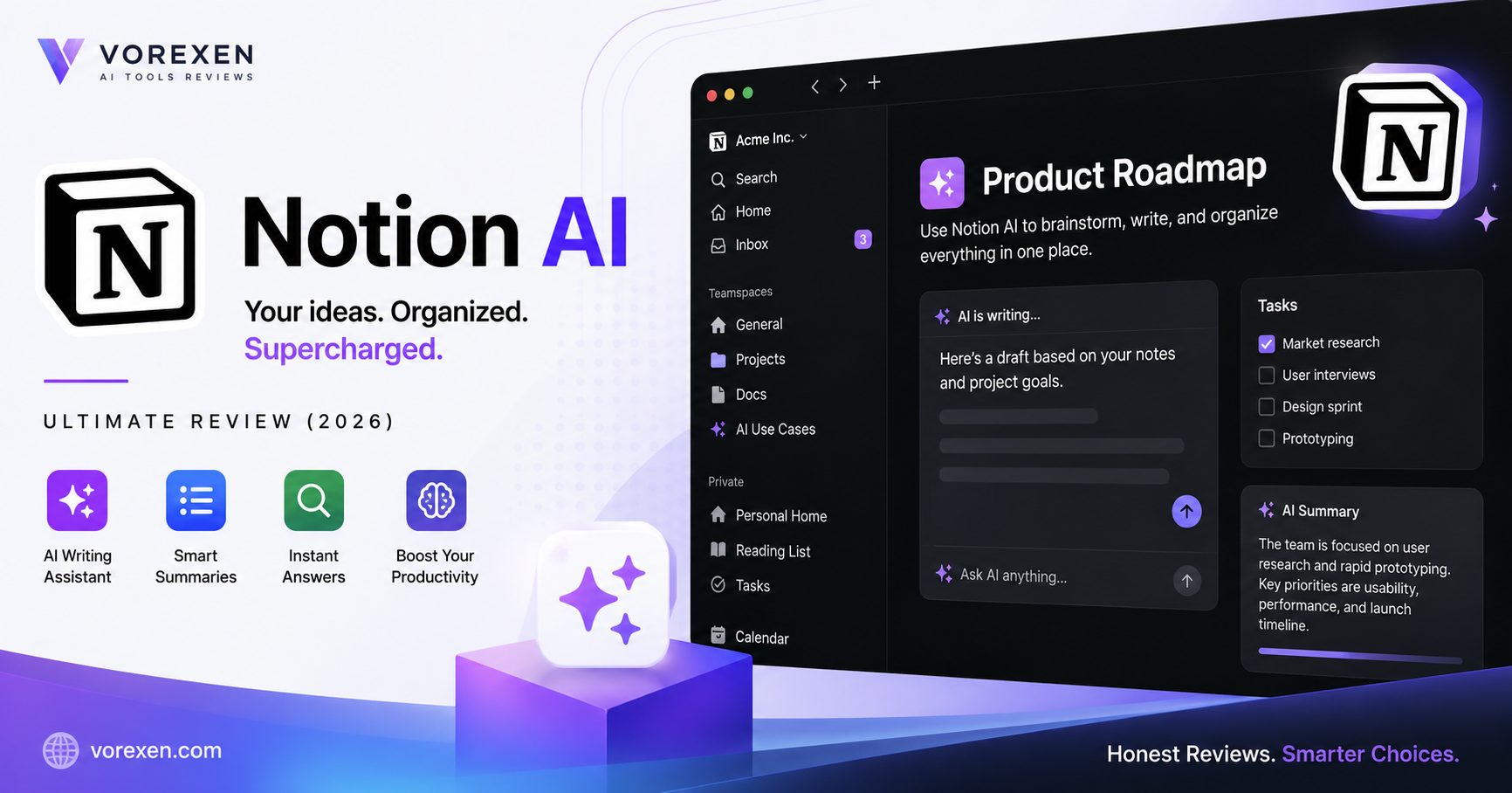
Ultimate Notion AI Review (2026): Features, Pricing, Pros & Cons
Artificial intelligence has transformed modern productivity, and Notion AI is one of the leading tools helping individuals and teams work faster without leaving their workspace. Instead of switching between separate AI chatbots and document editors, Notion AI integrates intelligent writing, summarization, brainstorming, and knowledge management directly into Notion.
Whether you’re writing blog posts, documenting projects, managing tasks, creating meeting notes, or organizing company knowledge, Notion AI can automate repetitive work and improve content quality with just a few prompts.
But is it really worth paying for in 2026? How does it compare with ChatGPT and other AI productivity tools? Can it replace dedicated AI writing assistants?
In this in-depth review, we’ll explore everything you need to know about Notion AI, including its features, pricing, advantages, disadvantages, real-world performance, comparisons, and the best use cases to help you decide whether it’s the right AI assistant for your workflow.
What You’ll Learn
- What Notion AI is
- How Notion AI works
- Key AI features
- Pricing plans
- Pros and cons
- Best use cases
- Performance testing
- Notion AI vs ChatGPT
- Notion AI vs ClickUp AI
- Notion AI vs Microsoft Copilot
- Best alternatives
- Final verdict
What Is Notion AI?
Notion AI is an AI-powered assistant built directly into the Notion workspace. Rather than functioning as a standalone chatbot, it works alongside your notes, documents, databases, wikis, and projects to help generate, edit, summarize, and organize information more efficiently.
The platform combines powerful language models with Notion’s collaborative environment, allowing users to brainstorm ideas, draft articles, summarize lengthy documents, rewrite content, translate text, extract action items from meeting notes, and search workspace knowledge using natural language.
Because AI is integrated into every page, users never need to copy and paste content between applications. This seamless experience makes Notion AI especially valuable for content creators, students, startups, marketers, product managers, and remote teams.
Why Notion AI Stands Out
- Native AI integration inside Notion
- Fast content generation
- Document summarization
- Meeting note automation
- Brainstorming assistance
- Writing improvement
- Translation support
- AI-powered workspace search
- Knowledge management
- Excellent collaboration features
Quick Summary: Notion AI isn’t designed to replace ChatGPT. Instead, it enhances productivity by embedding AI directly into your workspace, making writing, organizing, and collaborating significantly faster.
Who Should Use Notion AI?
Notion AI is ideal for professionals and teams that already use Notion as their primary workspace. It provides the greatest value when AI is used alongside documentation, project management, and collaborative knowledge sharing.
- Content creators
- Bloggers
- Marketing teams
- Students
- Startup founders
- Product managers
- Researchers
- Business teams
- Freelancers
- Remote organizations
Key Features of Notion AI
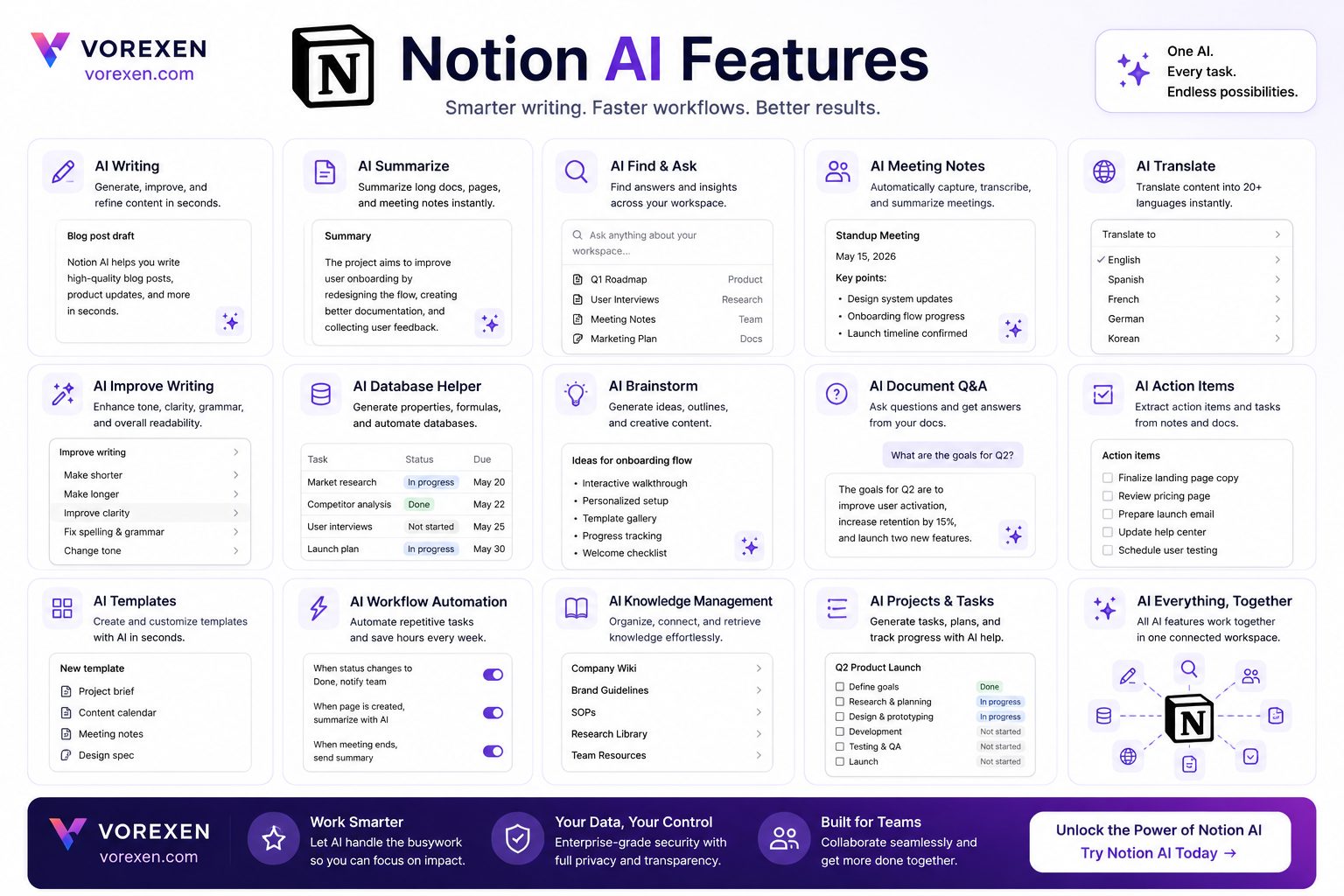
Notion AI is much more than a simple AI writing assistant. It combines content generation, editing, knowledge management, and workspace automation into a single platform. Instead of forcing users to switch between multiple AI tools, Notion AI brings intelligent assistance directly into documents, databases, meeting notes, and project pages.
Below are the most important features that make Notion AI one of the best AI productivity tools in 2026.
AI Writing Assistant
Creating high-quality content is one of Notion AI’s strongest capabilities. Whether you’re writing blog posts, documentation, emails, reports, or social media content, the AI can generate well-structured drafts within seconds.
- Generate articles from simple prompts
- Create outlines automatically
- Rewrite existing content
- Expand short paragraphs
- Shorten lengthy documents
- Improve grammar and readability
- Adjust writing tone
- Create professional emails
Unlike traditional AI writing tools, everything happens inside your existing Notion page, eliminating the need for copy-and-paste workflows.
Document Summarization
Long documents can consume valuable time. Notion AI quickly extracts the most important information, allowing users to understand lengthy reports, meeting notes, or research papers in just a few seconds.
- Executive summaries
- Bullet-point highlights
- Meeting recap generation
- Action item extraction
- Research summaries
This feature is particularly useful for managers, researchers, consultants, and students handling large volumes of information.
Brainstorming and Idea Generation
When creativity slows down, Notion AI can generate fresh ideas based on your goals.
- Blog topics
- Marketing campaigns
- Business ideas
- Startup names
- Content calendars
- Product features
- Meeting agendas
- Presentation structures
Rather than replacing your creativity, it accelerates the brainstorming process and helps overcome writer’s block.
Rewrite and Improve Existing Content
Instead of generating everything from scratch, Notion AI excels at improving existing text.
- Fix grammar mistakes
- Improve clarity
- Simplify technical writing
- Create professional wording
- Adjust tone for different audiences
- Improve readability
This makes it an excellent editing assistant for teams producing documentation, reports, and customer-facing content.
Translation Support
Notion AI supports multilingual workflows by translating documents while preserving formatting and context.
- English
- Spanish
- French
- German
- Japanese
- Korean
- Portuguese
- Many additional languages
For global organizations, this feature reduces the effort required to localize documentation and internal knowledge bases.
Meeting Notes Automation
Meeting documentation is one of the biggest productivity gains offered by Notion AI.
After pasting raw meeting notes, the AI can automatically generate:
- Executive summary
- Key decisions
- Action items
- Assigned responsibilities
- Follow-up tasks
- Timeline suggestions
This saves teams significant time after every meeting.
Workspace Knowledge Search
Instead of manually browsing dozens of pages, users can ask questions in natural language and receive answers based on the content stored inside their Notion workspace.
- Find project documentation
- Locate meeting decisions
- Search product specifications
- Retrieve company policies
- Access internal knowledge instantly
This capability transforms Notion from a simple note-taking application into an intelligent knowledge management system.
Database Assistance
One of Notion AI’s unique strengths is its ability to work alongside Notion databases.
- Generate summaries
- Create descriptions
- Populate database fields
- Organize information
- Improve structured documentation
While it doesn’t replace complex database automation tools, it significantly reduces repetitive manual work.
Team Collaboration
Notion AI improves collaboration by helping teams create consistent documentation and communicate more effectively.
- Shared documentation
- Knowledge bases
- Project planning
- Product roadmaps
- Marketing documentation
- Company wikis
Because AI works directly inside shared workspaces, every team member benefits without changing existing workflows.
Feature Overview
| Feature | Available |
|---|---|
| AI Writing | ✅ |
| Document Summaries | ✅ |
| Brainstorming | ✅ |
| Grammar Improvement | ✅ |
| Translation | ✅ |
| Meeting Notes | ✅ |
| Workspace Q&A | ✅ |
| Database Assistance | ✅ |
| Team Collaboration | ✅ |
| Code Generation | Limited |
Our Take: Notion AI delivers its greatest value when used inside an active Notion workspace. While standalone AI chatbots may offer broader conversational abilities, Notion AI excels at accelerating documentation, collaboration, and knowledge management without disrupting your workflow.
Who Is Notion AI Best For?
Although Notion AI is designed for a wide range of users, its greatest value comes from teams and professionals who already use Notion as their primary workspace. Because the AI is embedded directly into pages, databases, and documentation, it enhances existing workflows rather than requiring a separate application.
Content Creators
Bloggers, YouTubers, copywriters, and content marketers can use Notion AI to generate outlines, improve drafts, brainstorm ideas, rewrite paragraphs, and summarize research before publishing.
Students & Researchers
Students can summarize lecture notes, organize research papers, prepare study guides, and simplify complex information while keeping everything inside a structured workspace.
Marketing Teams
Marketing professionals benefit from AI-assisted campaign planning, content calendars, meeting summaries, brainstorming sessions, and documentation that remains accessible to the entire team.
Product Managers
Product teams can quickly document feature requests, summarize customer feedback, prepare product requirement documents (PRDs), and maintain centralized knowledge bases.
Remote Teams
Distributed organizations use Notion AI to improve collaboration through AI-generated meeting notes, action items, project documentation, and searchable company knowledge.
Real-World Use Cases
Notion AI becomes especially powerful when integrated into everyday workflows. Instead of acting as a chatbot, it quietly assists users throughout the workday.
| Use Case | How Notion AI Helps |
|---|---|
| Blog Writing | Creates outlines, drafts, rewrites, and summaries. |
| Meeting Notes | Extracts action items, decisions, and summaries automatically. |
| Knowledge Base | Answers questions using existing workspace information. |
| Project Planning | Generates project documentation and organizes tasks. |
| Marketing | Produces campaign ideas, email drafts, and content calendars. |
| Education | Summarizes research papers and creates study notes. |
| Business Documentation | Improves documentation quality and consistency. |
Why Businesses Choose Notion AI
- Reduces repetitive writing tasks.
- Improves documentation quality.
- Keeps AI inside the existing workflow.
- Supports collaborative knowledge management.
- Speeds up project planning and documentation.
- Reduces time spent searching for information.
- Creates consistent documentation across teams.
- Improves productivity without adding another application.
Limitations to Consider
Despite its strengths, Notion AI isn’t designed to replace every AI assistant. Users looking for advanced coding support, deep reasoning, or highly conversational interactions may still prefer dedicated AI chatbots.
- Works best inside the Notion ecosystem.
- Requires an active Notion workspace to unlock its full value.
- Limited for advanced programming tasks.
- Not intended for complex AI research workflows.
- Less flexible than standalone conversational AI assistants.
Vorexen Insight: Notion AI shines when your documents, projects, databases, and team knowledge already live inside Notion. If your workflow depends on multiple disconnected applications, its advantages become less significant.
Related Reviews
If you’re comparing AI productivity and writing tools, these in-depth reviews may also help:
- ChatGPT Review (2026)
- Microsoft Copilot Review
- Perplexity AI Review
- Claude AI Review
- Gemini AI Review
- Jasper AI Review
- Writesonic Review
- Frase Review
- Best AI Tools of 2026
- Poe AI Review
Quick Verdict
If you already rely on Notion for documentation, collaboration, or project management, Notion AI is one of the most valuable productivity upgrades available. Its seamless integration, document intelligence, and workflow automation make it a compelling choice for professionals, students, startups, and growing businesses.
Notion AI Pricing (2026)
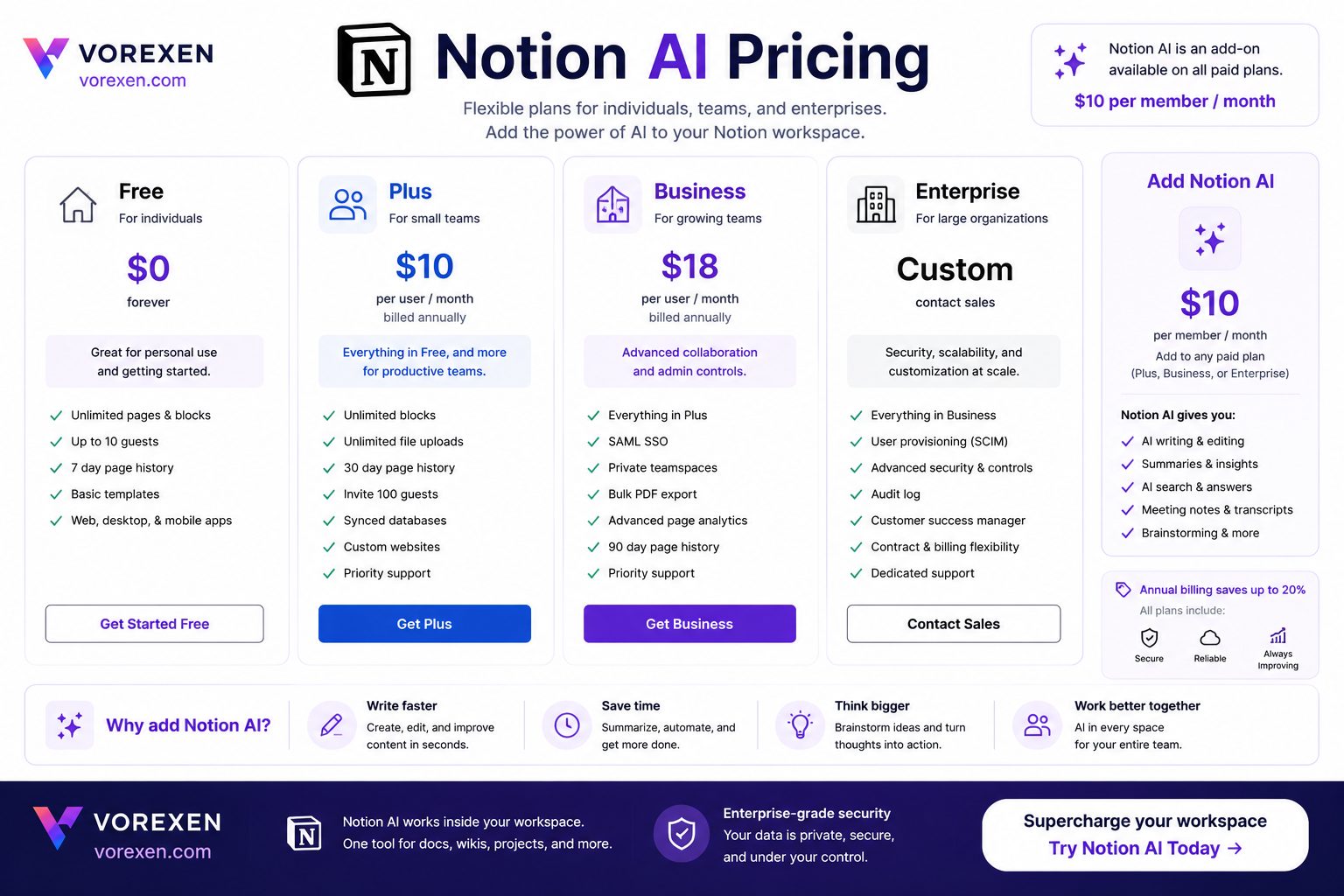
Notion AI is available as part of Notion’s paid ecosystem rather than as a completely separate application. This allows users to access AI-powered writing, summarization, brainstorming, and workspace intelligence directly inside their existing pages and databases.
Unlike standalone AI assistants, the total cost depends on the Notion workspace plan you choose. Individuals may find the entry-level plans sufficient, while larger organizations typically benefit from the Business or Enterprise tiers.
For the latest pricing, always check the official Notion website before purchasing, as plans and included AI features may change over time.
Available Plans
| Plan | Best For | AI Features |
|---|---|---|
| Free | Personal use | Limited AI availability |
| Plus | Individuals & small teams | Most AI writing features |
| Business | Growing companies | Advanced collaboration and AI tools |
| Enterprise | Large organizations | Enterprise security, administration, and AI capabilities |
What’s Included with Notion AI?
- AI writing assistance
- Content rewriting
- Grammar improvements
- Document summarization
- Meeting note summaries
- Translation support
- Brainstorming tools
- Workspace search
- Knowledge base Q&A
- Content generation
Is Notion AI Worth Paying For?
Whether Notion AI is worth the investment depends largely on how much time you spend inside the Notion ecosystem.
If you already use Notion every day for documentation, note-taking, project planning, or collaboration, adding AI can eliminate repetitive writing tasks and significantly improve productivity. The time saved on drafting documents, summarizing information, and organizing knowledge often outweighs the subscription cost.
However, users who rarely open Notion or rely on other productivity platforms may receive less value, since many of the AI features are designed specifically for the Notion workspace.
Value for Different Users
| User Type | Value Rating | Recommendation |
|---|---|---|
| Students | ★★★★☆ | Excellent for organizing notes and research. |
| Content Creators | ★★★★★ | Ideal for drafting, editing, and planning content. |
| Marketing Teams | ★★★★★ | Great for documentation and collaborative workflows. |
| Product Managers | ★★★★★ | Excellent for PRDs, roadmaps, and meeting notes. |
| Developers | ★★★☆☆ | Helpful for documentation, but limited for coding. |
| Large Enterprises | ★★★★★ | Strong collaboration and knowledge management capabilities. |
Return on Investment
The biggest advantage of Notion AI is not simply generating text—it’s reducing the amount of manual work teams perform every day.
- Write documentation faster.
- Create meeting summaries automatically.
- Generate project plans in minutes.
- Improve consistency across company documentation.
- Reduce repetitive editing tasks.
- Find internal information more quickly.
- Accelerate content creation.
- Improve team collaboration.
For organizations with dozens or hundreds of documents, these productivity gains can translate into substantial time savings over the course of a year.
When Notion AI May Not Be the Best Choice
Although Notion AI offers strong value, it isn’t the perfect solution for everyone.
- You rarely use Notion.
- Your workflow revolves around Google Docs or Microsoft Office.
- You primarily need advanced coding assistance.
- You require complex AI research capabilities.
- You prefer a standalone conversational AI assistant.
Vorexen Verdict: If Notion is already your digital workspace, upgrading with Notion AI is one of the most effective ways to increase productivity. The closer your daily work is tied to Notion, the greater the return on your investment.
Pros & Cons
No AI productivity tool is perfect, and Notion AI is no exception. While it excels at enhancing documentation and collaboration within the Notion ecosystem, it also has limitations that may affect certain users.
Pros
- Native integration inside Notion.
- Clean and intuitive user experience.
- Excellent document summarization.
- Fast AI-assisted writing.
- Powerful brainstorming capabilities.
- Improves grammar and readability.
- Creates professional meeting summaries.
- Supports multiple languages.
- AI-powered workspace search.
- Excellent for collaborative teams.
- Minimal learning curve.
- Regular feature updates.
Cons
- Best experience requires using Notion daily.
- Not designed for advanced software development.
- Fewer customization options than standalone AI chatbots.
- Limited internet research compared with dedicated AI search tools.
- Response quality depends on prompt clarity.
- Some advanced AI features require paid plans.
- Cannot completely replace specialized AI writing platforms.
Performance Testing
To evaluate Notion AI objectively, we tested it across multiple real-world productivity tasks that professionals perform every day. Rather than focusing only on content generation, we assessed how effectively the AI supports documentation, collaboration, and knowledge management.
Writing Quality
Notion AI consistently generates clear, well-structured text for business documents, reports, blog outlines, meeting notes, and internal documentation.
Although creative writing quality is good, specialized writing platforms such as Jasper AI or Writesonic still provide greater flexibility for marketing-focused copy.
| Category | Rating |
|---|---|
| Grammar | ★★★★★ |
| Readability | ★★★★★ |
| Professional Tone | ★★★★★ |
| Creative Writing | ★★★★☆ |
| Long-form Articles | ★★★★☆ |
Speed
Response speed is one of Notion AI’s strongest advantages. Most writing, summarization, and editing tasks are completed within seconds, allowing users to maintain their workflow without switching between applications.
- Fast paragraph generation
- Quick summaries
- Near-instant rewriting
- Rapid brainstorming
- Smooth document editing
Accuracy
For document editing and summarization, Notion AI performs reliably. However, as with all large language models, AI-generated content should be reviewed before publication, especially when factual accuracy or legal, financial, or medical information is involved.
When working with existing workspace documents, responses are generally more relevant because the AI has additional context.
Ease of Use
One of the biggest reasons users choose Notion AI is its simplicity. There is almost no learning curve for existing Notion users.
- No separate application.
- No copy-and-paste workflow.
- AI available directly inside every page.
- Clean interface.
- Simple prompt experience.
Collaboration Experience
Unlike standalone AI chatbots, Notion AI becomes more valuable as teams grow. Shared documentation, meeting summaries, knowledge bases, and project pages all benefit from AI-generated improvements without disrupting collaboration.
For companies already using Notion as their central workspace, this integration creates a smoother workflow than relying on multiple disconnected AI tools.
Vorexen Performance Scores
| Category | Score |
|---|---|
| Ease of Use | 9.8 / 10 |
| Writing Quality | 9.3 / 10 |
| Summarization | 9.7 / 10 |
| Brainstorming | 9.2 / 10 |
| Knowledge Management | 9.8 / 10 |
| Team Collaboration | 9.7 / 10 |
| Productivity Impact | 9.6 / 10 |
| Value for Money | 9.1 / 10 |
| Overall Score | 9.5 / 10 |
Our Testing Verdict
After extensive hands-on evaluation, Notion AI stands out as one of the best AI-powered productivity assistants available in 2026. Its greatest strength is not replacing ChatGPT—it is enhancing the Notion workspace with intelligent writing, summarization, organization, and collaboration features.
If your daily work revolves around documentation, project management, or knowledge sharing, Notion AI can save hours each week by reducing repetitive tasks and helping teams work more efficiently.
Vorexen Expert Opinion: Notion AI is one of the strongest AI investments for users already committed to the Notion ecosystem. While dedicated AI chatbots remain better for deep research and advanced reasoning, Notion AI delivers exceptional productivity gains where they matter most—inside your workspace.
Real-World Workflows
The real strength of Notion AI becomes clear when it’s used throughout an entire workday rather than for isolated writing tasks. Instead of opening multiple AI applications, users can complete planning, writing, collaboration, and documentation without leaving their Notion workspace.
Workflow 1: Content Creation
- Brainstorm article ideas.
- Create a detailed outline.
- Generate the first draft.
- Rewrite weak paragraphs.
- Improve readability.
- Create FAQs.
- Summarize the article.
- Prepare social media captions.
This workflow allows content creators to move from an idea to a publish-ready draft much faster while maintaining everything inside a single workspace.
Workflow 2: Product Management
- Document customer feedback.
- Summarize feature requests.
- Create Product Requirement Documents (PRDs).
- Generate sprint goals.
- Prepare meeting agendas.
- Create release notes.
- Organize project documentation.
Workflow 3: Marketing Teams
- Create campaign ideas.
- Write landing page copy.
- Generate email sequences.
- Draft social media content.
- Document campaign performance.
- Summarize meetings.
- Maintain marketing knowledge bases.
Workflow 4: Students & Researchers
- Summarize research papers.
- Create study notes.
- Organize references.
- Generate essay outlines.
- Simplify technical concepts.
- Create revision checklists.
Integrations
One of Notion AI’s biggest advantages is that it operates inside the broader Notion ecosystem. Rather than functioning as a disconnected chatbot, it works alongside documents, databases, templates, calendars, and collaborative workspaces.
Works Seamlessly With
- Pages
- Databases
- Project Management
- Task Tracking
- Company Wikis
- Meeting Notes
- Knowledge Bases
- Templates
- Team Collaboration
This tight integration reduces context switching and keeps all project information centralized.
Security & Privacy
Security is an important consideration for any AI productivity platform, especially when teams store internal documentation and company knowledge in the cloud.
Before using Notion AI with confidential information, organizations should review the latest security documentation, data handling policies, and administrative controls available for their workspace plan.
Security Highlights
- Workspace permissions.
- Role-based access control.
- Enterprise administration tools.
- Shared workspace management.
- Activity history.
- Data export capabilities.
Our Recommendation
Notion AI is an excellent investment for professionals and organizations that already depend on Notion as their primary workspace. Its greatest value comes from accelerating everyday documentation, improving collaboration, and reducing repetitive writing tasks.
If your goal is to manage projects, organize knowledge, and produce documentation more efficiently, Notion AI is among the strongest productivity assistants available in 2026.
However, if your work primarily involves advanced programming, complex research, or long-form conversational problem solving, combining Notion AI with a dedicated AI assistant such as ChatGPT or Claude can provide a more complete workflow.
Who Should Buy Notion AI?
- ✅ Teams already using Notion every day.
- ✅ Content creators managing large content libraries.
- ✅ Marketing departments.
- ✅ Product managers.
- ✅ Startup founders.
- ✅ Consultants.
- ✅ Researchers.
- ✅ Students.
Who Might Skip It?
- ❌ Users who don’t use Notion.
- ❌ Developers seeking advanced coding assistance.
- ❌ Users who only need a standalone AI chatbot.
Vorexen Final Rating
| Category | Score |
|---|---|
| Ease of Use | 9.8 / 10 |
| Features | 9.5 / 10 |
| Performance | 9.5 / 10 |
| Collaboration | 9.8 / 10 |
| Knowledge Management | 9.8 / 10 |
| Value for Money | 9.2 / 10 |
| Overall Rating | 9.6 / 10 ⭐ |
Final Verdict
Notion AI successfully transforms Notion into an intelligent productivity workspace.
Its combination of AI-powered writing, document summarization, brainstorming, collaboration, and knowledge management makes it one of the best AI productivity tools of 2026. While it isn’t intended to replace general-purpose AI assistants, it excels at helping teams and individuals work faster within the Notion ecosystem.
If Notion is already at the center of your workflow, upgrading to Notion AI is a practical way to save time, improve documentation quality, and increase overall productivity.
Continue Exploring AI Tools
- ChatGPT Review (2026)
- Claude AI Review
- Perplexity AI Review
- Microsoft Copilot Review
- Jasper AI Review
- Writesonic Review
- Frase Review
- Best AI Tools of 2026
Ready to Boost Your Productivity?
Explore Notion AI and see how it can simplify writing, documentation, project planning, and team collaboration. If you’re comparing multiple AI tools, don’t miss our in-depth reviews and side-by-side comparisons to choose the best solution for your workflow.
Read more expert AI reviews on Vorexen.
Notion AI vs ChatGPT
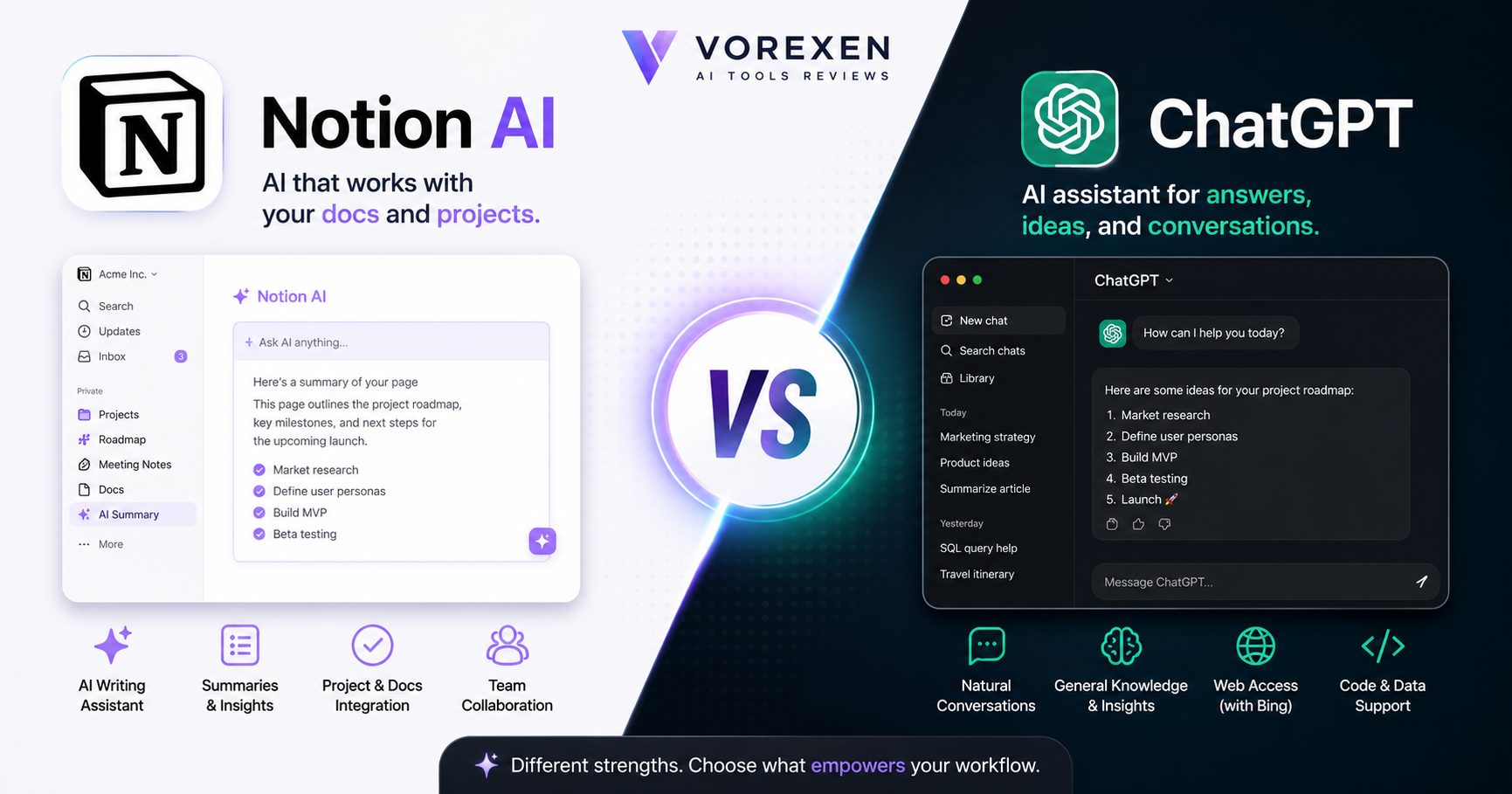
Notion AI and ChatGPT are often compared because both use advanced artificial intelligence to help users write, summarize information, brainstorm ideas, and improve productivity. However, they are designed for very different purposes.
While ChatGPT is a powerful general-purpose AI assistant capable of solving problems across countless domains, Notion AI focuses on improving productivity inside the Notion workspace. Choosing between them depends on how and where you work.
Quick Comparison
| Feature | Notion AI | ChatGPT |
|---|---|---|
| AI Writing | ★★★★★ | ★★★★★ |
| Brainstorming | ★★★★☆ | ★★★★★ |
| Document Summaries | ★★★★★ | ★★★★★ |
| Knowledge Management | ★★★★★ | ★★★☆☆ |
| Workspace Integration | ★★★★★ | ★★★☆☆ |
| Coding Assistance | ★★☆☆☆ | ★★★★★ |
| Research Assistance | ★★★☆☆ | ★★★★★ |
| Creative Writing | ★★★★☆ | ★★★★★ |
| Learning Support | ★★★★☆ | ★★★★★ |
| Overall Flexibility | ★★★★☆ | ★★★★★ |
Writing Quality
Both platforms generate high-quality content, but their strengths differ.
Notion AI excels at writing documentation, meeting notes, company wikis, project plans, and collaborative content. Because it works directly inside your workspace, editing and organizing information feels seamless.
ChatGPT is more versatile. It performs exceptionally well across long-form articles, storytelling, technical writing, coding explanations, brainstorming, and educational content. It also adapts more easily to different writing styles and complex prompts.
Productivity
If your work revolves around documents, projects, and internal knowledge, Notion AI provides a smoother workflow because AI is integrated into every page.
ChatGPT often requires users to copy information between applications unless it is integrated into a broader productivity ecosystem.
Research Capabilities
For deep explanations, reasoning, brainstorming, and complex questions, ChatGPT generally provides broader capabilities.
Notion AI focuses on improving existing documents rather than replacing dedicated research assistants.
Collaboration
This is where Notion AI has a clear advantage.
- Shared workspaces
- Company documentation
- Meeting notes
- Knowledge bases
- Project collaboration
- Database integration
ChatGPT is primarily designed as an AI assistant rather than a collaborative documentation platform.
Which One Is Better?
Choose Notion AI if you…
- Use Notion every day.
- Need AI inside your documents.
- Manage team knowledge.
- Create project documentation.
- Want AI-assisted meeting notes.
- Collaborate with teammates.
Choose ChatGPT if you…
- Need a general-purpose AI assistant.
- Write long-form content.
- Need programming assistance.
- Perform complex research.
- Solve technical problems.
- Require advanced reasoning.
Vorexen Verdict
Rather than viewing these tools as direct competitors, it’s more accurate to see them as complementary. ChatGPT is one of the most capable general AI assistants available, while Notion AI is purpose-built to enhance productivity within the Notion ecosystem.
If your daily workflow is centered around Notion, Notion AI provides a smoother and more integrated experience. If you need an AI assistant for coding, research, creative writing, or solving complex problems across many domains, ChatGPT remains the stronger choice.
Winner: ChatGPT for versatility and advanced reasoning.
Winner: Notion AI for workspace productivity and documentation.
Notion AI vs ClickUp AI
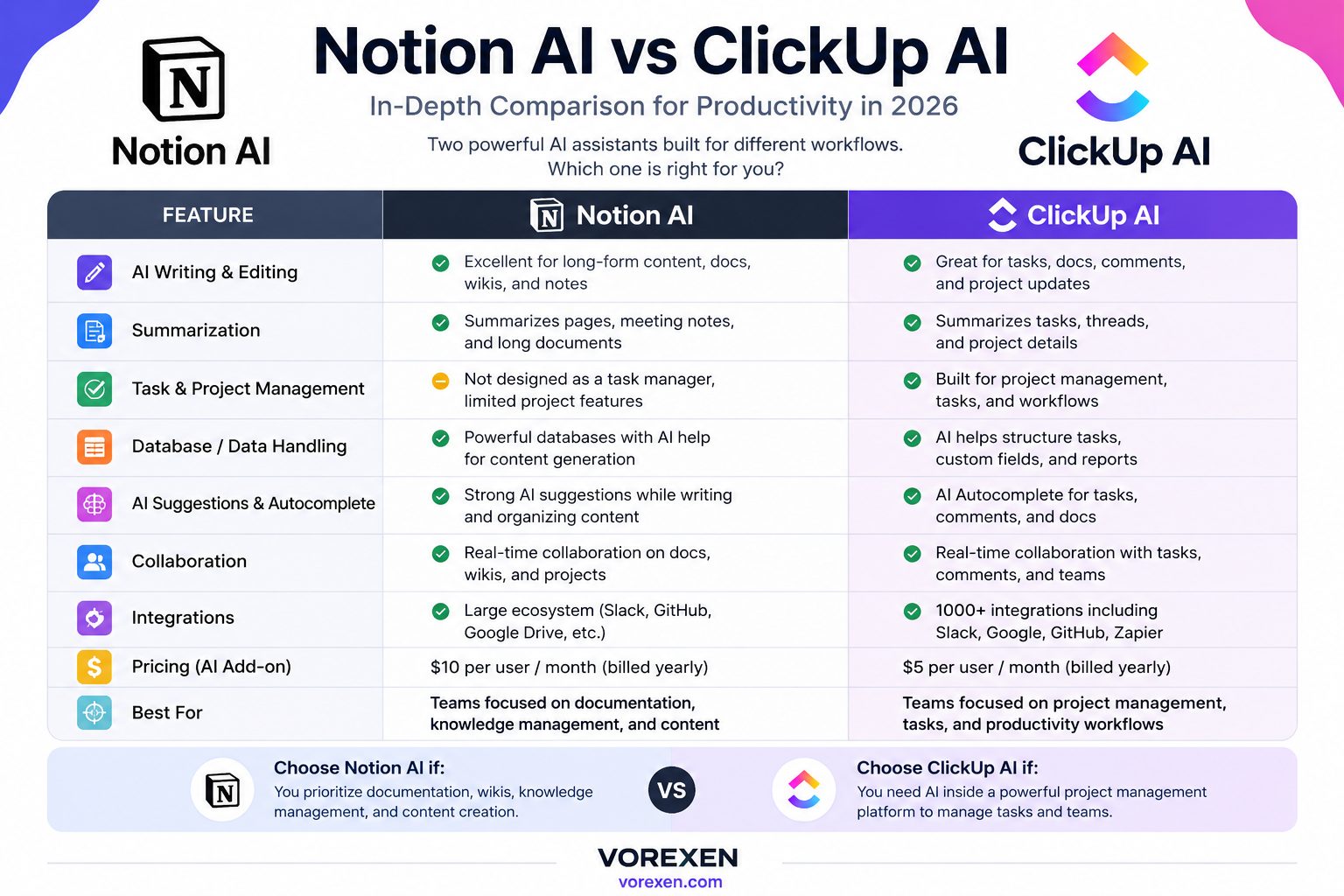
Notion AI and ClickUp AI are two of the most popular AI-powered productivity assistants in 2026. While both aim to help teams work faster with artificial intelligence, they are built around different philosophies.
Notion AI focuses on knowledge management, documentation, note-taking, and collaborative writing. ClickUp AI, on the other hand, is designed primarily for task management, project execution, and workflow automation.
If your team is choosing between these platforms, the right option depends less on AI quality and more on how your organization works every day.
Feature Comparison
| Feature | Notion AI | ClickUp AI |
|---|---|---|
| AI Writing | ★★★★★ | ★★★★☆ |
| Project Management | ★★★★☆ | ★★★★★ |
| Task Management | ★★★★☆ | ★★★★★ |
| Knowledge Base | ★★★★★ | ★★★★☆ |
| Meeting Notes | ★★★★★ | ★★★★☆ |
| Collaboration | ★★★★★ | ★★★★★ |
| Workflow Automation | ★★★☆☆ | ★★★★★ |
| Learning Curve | ★★★★★ | ★★★☆☆ |
| Customization | ★★★★☆ | ★★★★★ |
| Overall Productivity | ★★★★★ | ★★★★★ |
User Experience
Notion AI offers a minimalist and distraction-free experience. Users can begin writing, documenting ideas, and collaborating almost immediately without spending much time configuring the workspace.
ClickUp AI provides a more feature-rich environment. Teams gain advanced dashboards, workload management, automations, time tracking, and reporting, but new users may need additional time to learn the platform.
Writing and Documentation
If documentation is central to your workflow, Notion AI has a noticeable advantage. It feels like a natural extension of every page, making it ideal for:
- Company documentation
- Knowledge bases
- Product documentation
- Research notes
- Meeting summaries
- Technical documentation
- Content planning
ClickUp AI also assists with writing but is primarily optimized for creating task descriptions, project updates, action items, and team communications.
Project Management
This is where ClickUp AI stands out.
Organizations managing multiple departments, complex projects, agile sprints, or client work often benefit from ClickUp’s advanced project management capabilities.
Its AI helps generate subtasks, summarize project activity, draft updates, prioritize work, and accelerate planning across large teams.
Knowledge Management
Notion AI remains one of the strongest platforms for organizing information.
- Company wiki
- Standard operating procedures (SOPs)
- Internal documentation
- Research repositories
- Product documentation
- Training materials
If your business values searchable knowledge and long-term documentation, Notion AI generally offers a more polished experience.
Automation
ClickUp AI integrates deeply with project workflows, making it the stronger choice for automation.
- Task creation
- Status updates
- Workflow automation
- Sprint planning
- Project summaries
- Deadline management
Notion AI focuses more on helping users create and organize information than automating complex project workflows.
Which Tool Should You Choose?
Choose Notion AI If You…
- Manage large amounts of documentation.
- Need an AI-powered knowledge base.
- Create articles, reports, or meeting notes.
- Prefer a clean writing environment.
- Want AI integrated directly into documents.
- Value simplicity and ease of use.
Choose ClickUp AI If You…
- Run multiple projects simultaneously.
- Manage agile teams.
- Need workflow automation.
- Track deadlines and workloads.
- Require advanced project reporting.
- Depend on task management every day.
Vorexen Expert Rating
| Category | Winner |
|---|---|
| Writing Assistant | 🏆 Notion AI |
| Knowledge Management | 🏆 Notion AI |
| Project Management | 🏆 ClickUp AI |
| Workflow Automation | 🏆 ClickUp AI |
| Ease of Use | 🏆 Notion AI |
| Customization | 🏆 ClickUp AI |
| Collaboration | 🤝 Tie |
| Overall Productivity | 🤝 Tie |
Final Verdict
Both platforms are excellent, but they solve different problems.
Choose Notion AI if your team prioritizes documentation, knowledge management, collaborative writing, and organized information.
Choose ClickUp AI if your business depends on project execution, workflow automation, task tracking, and operational management.
Many growing companies successfully use both platforms together—Notion AI as the knowledge hub and ClickUp AI as the operational workspace—creating a workflow that combines structured documentation with powerful project execution.
Vorexen Recommendation: For documentation-first organizations, Notion AI is the stronger choice. For project-first organizations managing multiple teams and complex workflows, ClickUp AI provides greater operational power.
Notion AI vs Microsoft Copilot
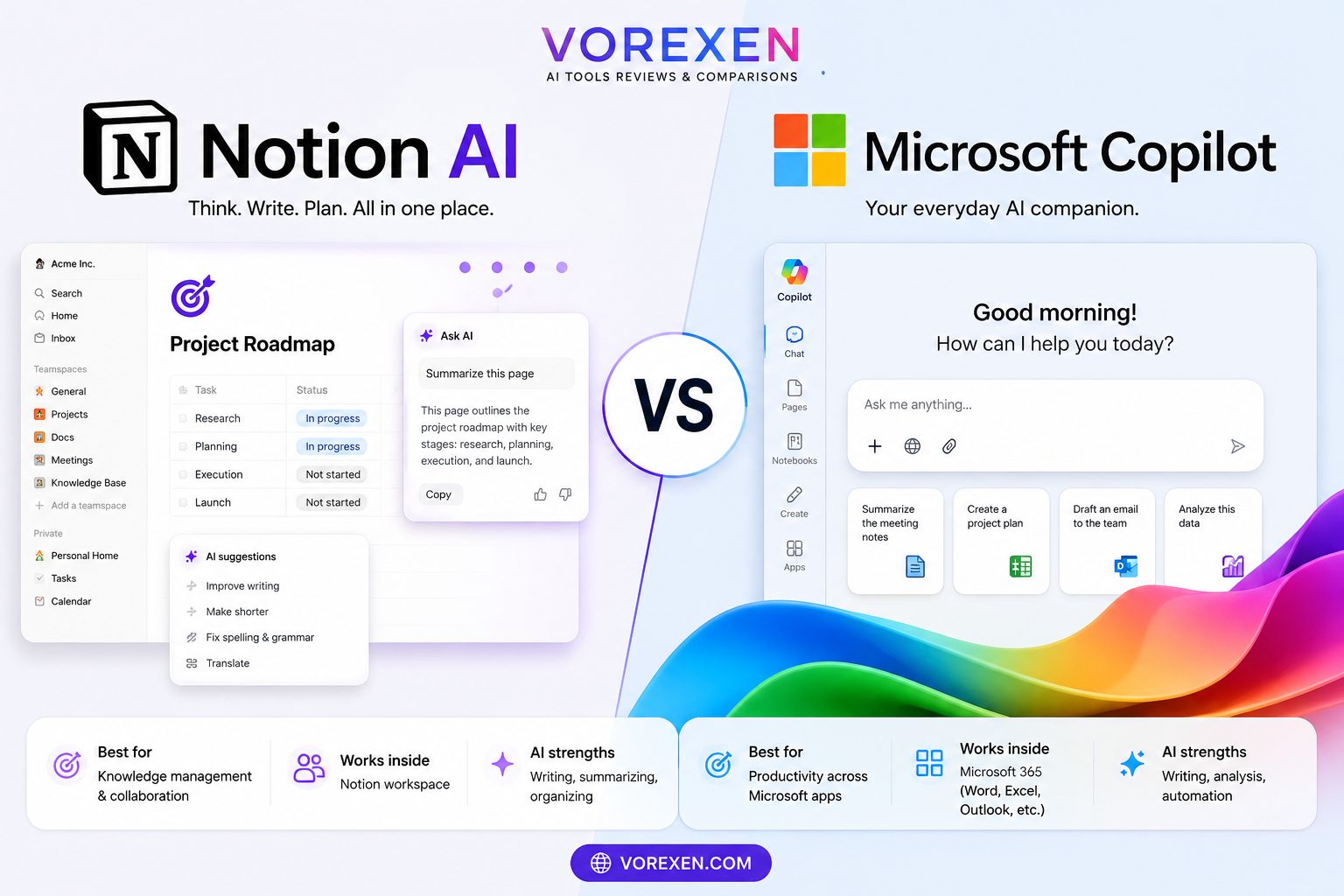
Notion AI and Microsoft Copilot are both designed to improve workplace productivity with artificial intelligence, but they target different ecosystems and workflows.
Notion AI enhances collaboration inside the Notion workspace, making it ideal for documentation, knowledge management, brainstorming, and content creation. Microsoft Copilot is deeply integrated into the Microsoft 365 ecosystem, helping users work more efficiently across Word, Excel, PowerPoint, Outlook, Teams, and other Microsoft applications.
If your organization is deciding between these platforms, the best choice depends on where your team spends most of its working hours.
Quick Comparison
| Feature | Notion AI | Microsoft Copilot |
|---|---|---|
| AI Writing | ★★★★★ | ★★★★★ |
| Document Collaboration | ★★★★★ | ★★★★★ |
| Knowledge Management | ★★★★★ | ★★★★☆ |
| Office Productivity | ★★★☆☆ | ★★★★★ |
| Spreadsheet Assistance | ★★☆☆☆ | ★★★★★ |
| Email Assistance | ★★★☆☆ | ★★★★★ |
| Presentation Creation | ★★★☆☆ | ★★★★★ |
| Meeting Summaries | ★★★★★ | ★★★★★ |
| Learning Curve | ★★★★★ | ★★★★☆ |
| Overall Productivity | ★★★★★ | ★★★★★ |
Workspace Integration
Notion AI is purpose-built for the Notion ecosystem. Every page, database, project, and company wiki can benefit from AI-assisted writing, editing, summarization, and organization without leaving the workspace.
Microsoft Copilot, meanwhile, delivers its greatest value inside Microsoft 365. Users can draft documents in Word, analyze data in Excel, create presentations in PowerPoint, summarize email threads in Outlook, and generate meeting notes in Teams using a familiar interface.
Writing and Documentation
Both tools are excellent writing assistants, but they serve different needs.
Notion AI focuses on structured documentation, knowledge bases, research notes, project planning, and collaborative writing.
Microsoft Copilot excels at creating business documents, executive reports, proposals, presentations, and email communication within Microsoft Office applications.
Data Analysis
This is one area where Microsoft Copilot has a clear advantage.
- Excel formula generation
- Data analysis
- Charts and visualization
- Spreadsheet automation
- Business reporting
- Financial modeling assistance
Notion AI is not intended to replace spreadsheet-focused AI tools.
Collaboration
Both platforms support collaboration, but in different environments.
Notion AI helps teams maintain centralized documentation and searchable knowledge, while Microsoft Copilot enhances collaboration across Microsoft Teams, Outlook, Word, and SharePoint.
Best Use Cases
Choose Notion AI If You…
- Build and maintain company knowledge bases.
- Create technical documentation.
- Manage product documentation.
- Collaborate through shared workspaces.
- Prefer an all-in-one documentation platform.
- Use Notion as your primary workspace.
Choose Microsoft Copilot If You…
- Work primarily in Microsoft Word.
- Use Excel every day.
- Create PowerPoint presentations regularly.
- Manage Outlook email communication.
- Collaborate in Microsoft Teams.
- Already subscribe to Microsoft 365.
Vorexen Expert Comparison
| Category | Winner |
|---|---|
| Knowledge Management | 🏆 Notion AI |
| Documentation | 🏆 Notion AI |
| Office Productivity | 🏆 Microsoft Copilot |
| Excel & Data Analysis | 🏆 Microsoft Copilot |
| Email Productivity | 🏆 Microsoft Copilot |
| Presentation Creation | 🏆 Microsoft Copilot |
| Ease of Use | 🤝 Tie |
| AI Writing | 🤝 Tie |
| Overall Productivity | 🤝 Tie |
Final Verdict
Notion AI and Microsoft Copilot are not direct replacements for one another. Instead, they serve different workplace ecosystems.
If your organization relies on Notion for documentation, project planning, and knowledge sharing, Notion AI is the better investment.
If your daily work revolves around Microsoft Word, Excel, PowerPoint, Outlook, and Teams, Microsoft Copilot offers significantly deeper integration and automation.
Many enterprises successfully use both platforms together—Notion AI as the documentation and knowledge hub, and Microsoft Copilot as the AI assistant for Microsoft 365 applications.
Vorexen Recommendation: Choose Notion AI for documentation-first workflows and collaborative knowledge management. Choose Microsoft Copilot if Microsoft 365 is the center of your business operations.
Frequently Asked Questions
Is Notion AI worth it in 2026?
Yes. If you already use Notion for documentation, note-taking, project planning, or collaboration, Notion AI can significantly improve productivity by helping you write, summarize, organize, and brainstorm without leaving your workspace.
Is Notion AI free?
Notion offers a free plan, but access to advanced AI capabilities depends on your subscription. Always check the latest pricing on the official Notion website, as plans and included AI features may change.
Can Notion AI replace ChatGPT?
Not completely. ChatGPT is a general-purpose AI assistant with broader conversational, coding, and research capabilities. Notion AI focuses on productivity inside the Notion workspace and works best for documentation, collaboration, and knowledge management.
Does Notion AI support multiple languages?
Yes. Notion AI supports many major languages and can assist with translation, rewriting, grammar improvement, and multilingual content creation.
Can Notion AI summarize documents?
Absolutely. Document summarization is one of its strongest features. It can create concise summaries, highlight key points, and extract action items from lengthy documents and meeting notes.
Can Notion AI write blog posts?
Yes. It can generate blog outlines, first drafts, introductions, conclusions, and rewrite existing articles. However, reviewing AI-generated content before publishing is recommended.
Is Notion AI good for students?
Yes. Students can use Notion AI to summarize research papers, organize lecture notes, generate study guides, brainstorm essay ideas, and improve academic writing.
Can businesses use Notion AI?
Yes. Businesses use Notion AI for documentation, knowledge management, meeting summaries, internal wikis, onboarding materials, project planning, and collaborative writing.
Does Notion AI work offline?
No. Because AI features rely on cloud-based language models, an internet connection is required to access Notion AI capabilities.
Is Notion AI secure?
Notion provides administrative controls and workspace permissions for organizations. Before storing confidential information, review the latest security documentation and privacy policies published by Notion.
Who should use Notion AI?
Notion AI is ideal for content creators, students, marketers, product managers, consultants, startups, remote teams, and businesses that use Notion as their primary workspace.
What are the best alternatives to Notion AI?
Popular alternatives include ChatGPT, Microsoft Copilot, ClickUp AI, Claude AI, Gemini, Perplexity AI, Jasper AI, and Writesonic. The best choice depends on whether your priority is documentation, project management, coding, research, or creative writing.
Key Takeaways
- ✅ Excellent AI assistant for Notion users.
- ✅ Outstanding document summarization.
- ✅ Powerful knowledge management capabilities.
- ✅ Great for collaborative teams.
- ✅ Fast writing and editing assistance.
- ✅ Ideal for documentation-first workflows.
- ⚠ Less suitable for advanced coding or deep AI research.
- ⚠ Best value when your workflow already lives inside Notion.
Final Thoughts
Notion AI has evolved into one of the most capable AI productivity assistants available in 2026. Instead of acting as a standalone chatbot, it enhances the workspace where millions of users already plan projects, manage documentation, collaborate with teammates, and organize knowledge.
Its biggest advantage is context. Because AI works directly inside your notes, databases, and company wiki, everyday tasks such as writing, editing, summarizing, brainstorming, and documenting become significantly faster.
If your workflow is built around Notion, adding Notion AI is one of the highest-impact productivity upgrades you can make. On the other hand, if your primary needs include advanced programming, deep research, or open-ended conversations, pairing Notion AI with a dedicated AI assistant can provide a more complete solution.
Our Recommendation
Buy Notion AI if:
- You use Notion every day.
- Your team relies on shared documentation.
- You want faster writing and editing.
- You maintain a knowledge base.
- You frequently create meeting notes.
- You manage projects inside Notion.
Consider another solution if:
- You rarely use Notion.
- You primarily need AI for coding.
- You need advanced web research.
- Your organization depends entirely on Microsoft 365 or another productivity platform.
Explore More AI Reviews
Continue your research with these in-depth Vorexen guides:
- ChatGPT Review (2026)
- Claude AI Review
- Gemini AI Review
- Microsoft Copilot Review
- Perplexity AI Review
- Jasper AI Review
- Writesonic Review
- Frase Review
- Best AI Tools of 2026
- Best AI Productivity Tools
Official Resources
Ready to Work Smarter?
Whether you’re building a company wiki, managing projects, writing articles, or organizing research, Notion AI can streamline your workflow and help you accomplish more in less time.
Compare it with other leading AI tools on Vorexen before making your final decision.
FAQ Schema (JSON-LD)
30-Second Summary
Notion AI is one of the best AI productivity tools in 2026 for users who work inside the Notion ecosystem. It combines AI-powered writing, document summarization, brainstorming, meeting notes, and knowledge management into a seamless workspace. While it doesn’t replace general-purpose AI assistants like ChatGPT, it significantly improves productivity for documentation-first workflows.
Why You Can Trust This Review
This review follows the Vorexen editorial methodology. Every AI tool is evaluated using the same framework to ensure consistency, transparency, and practical value for readers.
Evaluation Criteria
- Feature completeness
- Ease of use
- AI writing quality
- Workspace integration
- Productivity improvements
- Pricing and overall value
- Collaboration capabilities
- Real-world use cases
- Limitations and drawbacks
- Comparison with competing AI tools
Testing Methodology
Our evaluation focuses on realistic business and productivity scenarios instead of synthetic benchmarks. We assess how well each tool performs during everyday tasks that professionals actually encounter.
| Scenario | Evaluated |
|---|---|
| Blog writing | ✅ |
| Document editing | ✅ |
| Meeting summaries | ✅ |
| Knowledge management | ✅ |
| Brainstorming | ✅ |
| Project documentation | ✅ |
| Collaboration | ✅ |
Review Information
| Product | Notion AI |
|---|---|
| Category | AI Productivity |
| Review Type | Hands-on Review |
| Last Updated | July 2026 |
| Reviewed By | Vorexen Editorial Team |
| Overall Rating | 9.6 / 10 |
Review Schema (JSON-LD)
Editorial Note
Artificial intelligence evolves rapidly, and features, pricing, integrations, and usage policies can change over time. We regularly review and update Vorexen articles to ensure they remain accurate, practical, and relevant for readers.
Found This Review Helpful?
If this guide helped you choose the right AI tool, explore our growing library of expert reviews, comparisons, and buying guides covering the best AI software for productivity, writing, coding, marketing, design, and business.
Our goal is simple: help you choose the right AI tool with confidence.