Ultimate Codeium Review 2026: Is This AI Coding Assistant Worth Using?
Artificial intelligence is transforming software development faster than ever before. Modern AI coding assistants can autocomplete code, explain complex functions, generate entire files, and even help developers debug applications in real time. Instead of spending hours writing repetitive boilerplate code, developers can now focus on solving real problems while AI handles routine programming tasks.
Among today’s most popular AI coding assistants, Codeium has become one of the strongest alternatives to GitHub Copilot. It combines fast code completion, AI chat, code generation, and broad IDE compatibility while offering one of the most generous free plans available for developers.
Whether you’re a beginner learning Python, a professional software engineer building enterprise applications, or a freelancer managing multiple client projects, Codeium aims to make coding faster, more accurate, and significantly more productive.
In this comprehensive review, we’ll explore everything you need to know about Codeium, including its features, pricing, developer experience, supported IDEs, advantages, disadvantages, and how it compares with leading competitors like GitHub Copilot and Cursor.
Quick Overview
| Developer |
Codeium |
| Category |
AI Coding Assistant |
| Best For |
Developers, Students, Software Teams |
| Platforms |
VS Code, JetBrains IDEs, Neovim, Jupyter, Vim and more |
| Programming Languages |
70+ Languages |
| Free Plan |
Yes |
| Overall Rating |
★★★★★ 4.6 / 5 |
What Is Codeium?
Codeium is an AI-powered coding assistant designed to help developers write code more efficiently through intelligent autocomplete, AI-powered chat, code explanations, debugging assistance, and natural language code generation.
Unlike traditional autocomplete engines that only predict the next word or line, Codeium analyzes the surrounding project context to generate accurate suggestions for functions, classes, algorithms, documentation, and repetitive coding patterns.
The platform integrates directly into popular development environments, allowing developers to receive AI assistance without leaving their editor. This streamlined workflow reduces context switching and helps maintain productivity throughout the software development process.
One of Codeium’s biggest advantages is its generous free plan, making advanced AI coding assistance accessible to individual developers, students, startups, and small teams without requiring an immediate paid subscription.
Why Developers Choose Codeium
Modern software development moves quickly, and developers are expected to build high-quality applications under tight deadlines. Writing every line of code manually is no longer the most efficient approach. AI coding assistants help automate repetitive tasks, reduce errors, and accelerate development without replacing the developer’s expertise.
Codeium has become a popular choice because it combines intelligent code completion, AI-powered chat, and broad IDE compatibility with a generous free plan. Whether you’re creating a simple script or working on a large production codebase, it can assist throughout the development lifecycle.
Instead of constantly switching between documentation, search engines, and Stack Overflow, developers can ask Codeium questions directly inside their editor and receive contextual suggestions based on the code they’re writing.
Why It Stands Out
- Fast AI-powered code completion
- Natural language code generation
- Built-in AI coding assistant
- Supports dozens of programming languages
- Works inside popular IDEs
- Helpful for beginners and experienced developers
- Generous free plan for individual users
Key Features at a Glance
| Feature |
Availability |
| AI Code Completion |
✔ Yes |
| AI Chat Assistant |
✔ Yes |
| Code Generation |
✔ Yes |
| Code Explanation |
✔ Yes |
| Bug Detection Assistance |
✔ Yes |
| Refactoring Suggestions |
✔ Yes |
| Multi-file Context |
✔ Supported |
| IDE Extensions |
✔ Multiple IDEs |
| Programming Languages |
70+ |
| Free Version |
✔ Available |
Main Benefits of Using Codeium
Developers often spend a significant amount of time writing repetitive code, searching documentation, fixing syntax mistakes, or explaining unfamiliar code. Codeium reduces this overhead by providing intelligent suggestions exactly where they’re needed.
Because the assistant works directly inside supported IDEs, developers can stay focused on building software instead of constantly switching between different tools and browser tabs.
Vorexen Insight
Codeium delivers the greatest value when used as a productivity assistant rather than an automatic code generator. Developers who review, understand, and refine AI-generated code will typically achieve better results than those who rely on AI suggestions without verification.
Who Should Use Codeium?
Students and Beginners
If you’re learning programming, Codeium can explain unfamiliar code, generate examples, and help you understand programming concepts faster. It should complement learning rather than replace it.
Professional Developers
Experienced engineers can use Codeium to automate repetitive coding tasks, generate boilerplate, refactor existing code, and speed up everyday development while maintaining full control over the final implementation.
Freelancers
Freelancers managing multiple projects can use Codeium to reduce development time, improve consistency, and deliver client work more efficiently.
Development Teams
Software teams can benefit from AI-assisted coding workflows, faster onboarding, and improved productivity across projects while keeping developers focused on higher-value engineering tasks.
Supported IDEs and Development Environments
One of Codeium’s biggest strengths is its broad compatibility with modern development tools. Instead of limiting developers to a single editor, Codeium integrates directly into many of the IDEs professionals already use every day. This allows teams to adopt AI assistance without changing their existing workflow.
Installation usually takes only a few minutes. After signing in, developers can install the appropriate extension for their preferred IDE and immediately start receiving AI-powered code suggestions, explanations, and chat assistance.
| IDE |
Support |
Best For |
| Visual Studio Code |
★★★★★ |
General development |
| JetBrains IDEs |
★★★★★ |
Professional software development |
| Visual Studio |
★★★★☆ |
.NET applications |
| Neovim |
★★★★★ |
Advanced developers |
| Vim |
★★★★☆ |
Lightweight workflows |
| Jupyter Notebook |
★★★★☆ |
Data science & machine learning |
Programming Language Support
Modern developers rarely work with just one programming language. Codeium is designed to understand a wide variety of languages used across web development, mobile applications, cloud infrastructure, data science, and enterprise software.
Its AI models analyze the surrounding project context to generate relevant suggestions regardless of whether you’re writing frontend interfaces, backend APIs, automation scripts, or infrastructure configuration files.
Popular Supported Languages
- Python
- JavaScript
- TypeScript
- Java
- C#
- C++
- Go
- Rust
- PHP
- Ruby
- Swift
- Kotlin
- SQL
- HTML & CSS
- Bash
How Codeium Works
Codeium continuously analyzes the file you’re editing together with surrounding code to understand your intent. As you type, the AI predicts what you’re trying to build and offers complete functions, logical blocks, documentation, or improvements before you even finish writing.
Developers can also describe a task in natural language. Instead of manually implementing every step, Codeium converts plain English instructions into working code suggestions that can then be reviewed and refined.
Because suggestions appear directly inside the editor, developers spend less time switching between documentation, browser tabs, and external AI tools. This uninterrupted workflow helps maintain focus and improves overall productivity.
Example Workflow
- Write a comment describing what you want.
- Codeium understands the request.
- The AI generates code suggestions.
- Review and edit the generated output.
- Accept the suggestion and continue coding.
Why Developers Trust Codeium
Choosing an AI coding assistant is about more than autocomplete quality. Developers also care about speed, reliability, privacy, ease of use, and compatibility with existing tools.
Codeium has earned a strong reputation by providing fast suggestions, support for numerous programming languages, and an accessible free plan. For many individual developers, students, freelancers, and startups, it offers an attractive balance between functionality and cost.
Like any AI assistant, however, its output should always be reviewed before being used in production. Human oversight remains essential for ensuring correctness, security, maintainability, and compliance with project standards.
What You’ll Learn Next
In the next section, we’ll take a detailed look at Codeium’s core capabilities, including AI code completion, chat assistance, code generation, debugging support, refactoring tools, and pricing. We’ll also evaluate how these features perform in real-world development scenarios.
Continue to Codeium Features →
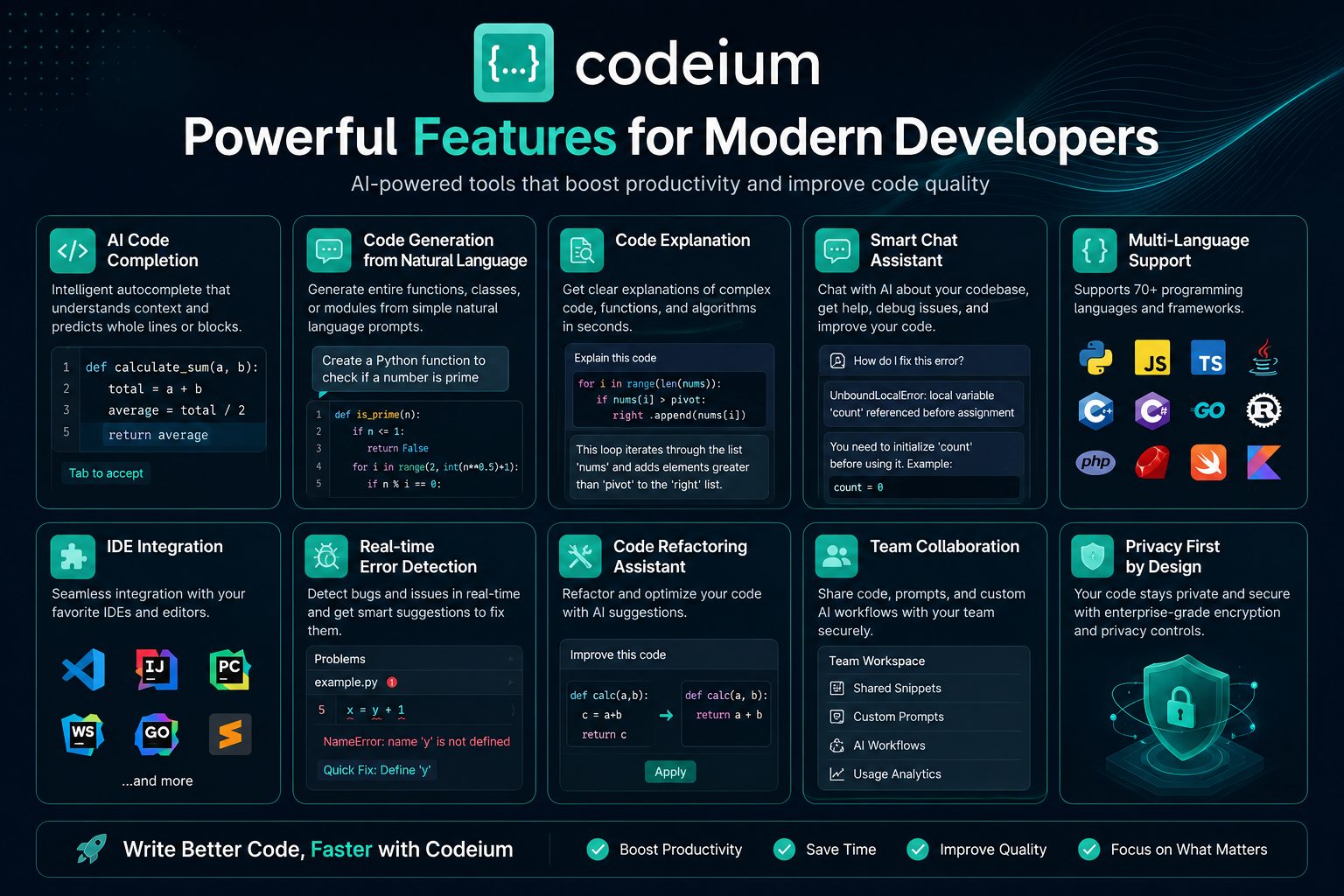
Codeium Features
The quality of an AI coding assistant depends on much more than autocomplete speed. Developers expect modern AI tools to understand project context, generate reliable code, explain unfamiliar functions, assist with debugging, and integrate naturally into existing workflows.
Codeium combines these capabilities into a single platform designed to improve developer productivity without disrupting the coding experience. Instead of acting as a simple autocomplete extension, it functions as an intelligent development assistant that can help throughout the software development lifecycle.
Below are the most important features that make Codeium one of the leading AI coding assistants in 2026.
Core Features Overview
| Feature |
Rating |
| AI Code Completion |
★★★★★ |
| Code Generation |
★★★★★ |
| AI Chat Assistant |
★★★★★ |
| Code Explanation |
★★★★☆ |
| Refactoring Assistance |
★★★★☆ |
| IDE Integration |
★★★★★ |
| Language Support |
★★★★★ |
| Ease of Use |
★★★★★ |
AI Code Completion
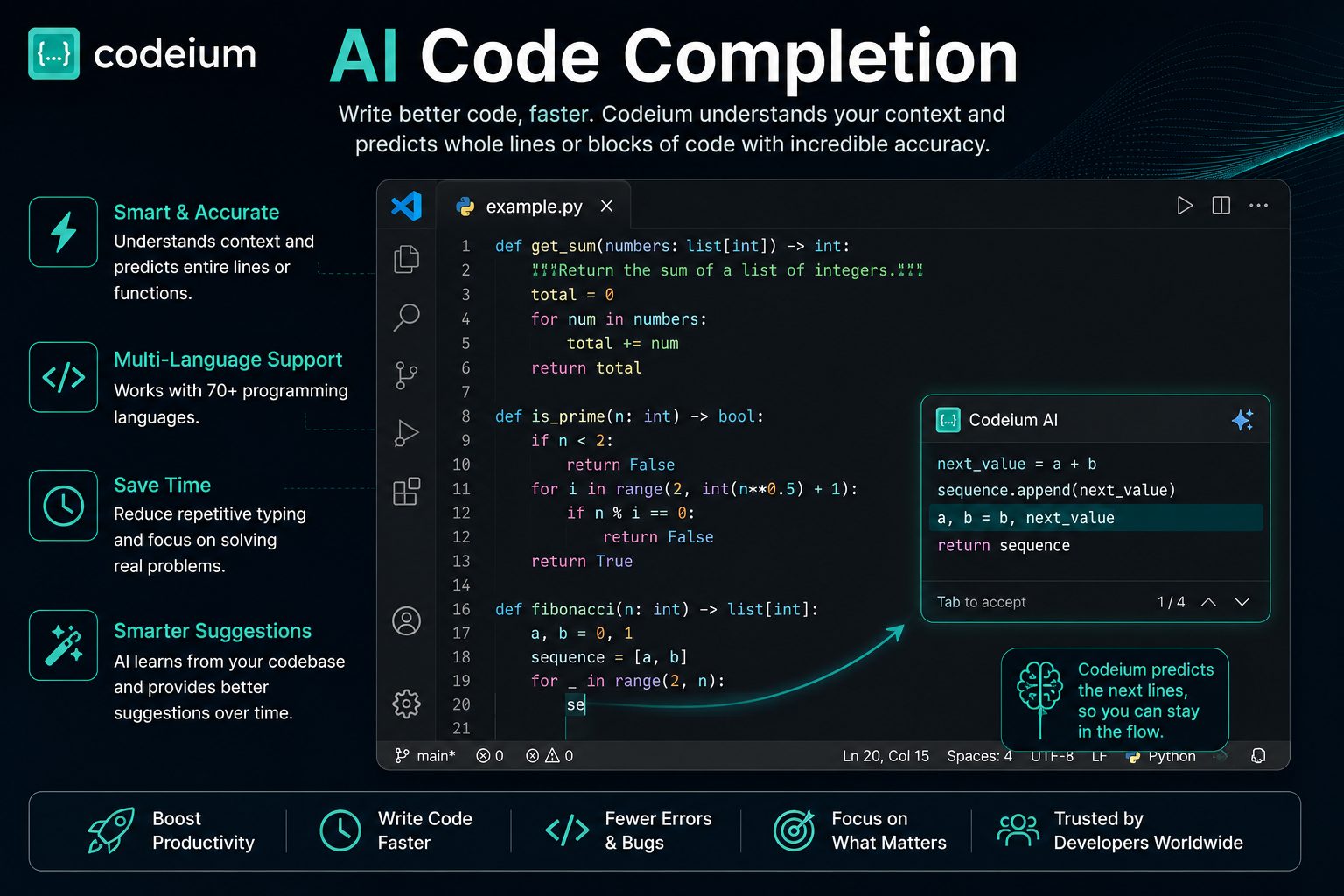
AI-powered code completion is the feature most developers use every day, and it is one of Codeium’s strongest capabilities. As you type, the assistant predicts your next lines of code using the surrounding context instead of relying only on the current line.
Rather than suggesting a few keywords, Codeium can generate complete functions, loops, conditionals, database queries, API calls, and repetitive boilerplate code. This significantly reduces manual typing and allows developers to focus on application logic instead of repetitive syntax.
Suggestions are displayed directly inside the editor and can often be accepted with a single keystroke, creating a smooth and uninterrupted development workflow.
Vorexen Insight
Code completion delivers the best results when your project follows consistent naming conventions and clean architecture. Well-structured codebases provide richer context, allowing the AI to generate more accurate and relevant suggestions.
Key Benefits of AI Code Completion
- Generates complete functions instead of single words.
- Understands surrounding project context.
- Reduces repetitive coding tasks.
- Speeds up software development.
- Maintains coding flow with minimal interruptions.
- Supports dozens of programming languages.
- Helps reduce common syntax mistakes.
Natural Language Code Generation
Codeium also supports natural language programming. Instead of manually writing every implementation detail, developers can describe what they want in plain English and allow the AI to generate an initial solution.
For example, a prompt such as “Create a REST API endpoint that validates user input and stores records in a database” can produce a structured implementation that developers can review, modify, and integrate into their project.
This capability is particularly useful when creating boilerplate code, repetitive CRUD operations, utility functions, configuration files, or prototype applications.
Typical Use Cases
- Generate API endpoints
- Create database models
- Build reusable utility functions
- Generate documentation comments
- Create test cases
- Produce starter templates
- Write configuration files
AI Chat Assistant
Beyond code completion, Codeium includes an AI chat assistant that helps developers solve programming problems without leaving their IDE. Instead of searching multiple websites or reading lengthy documentation, you can ask questions directly inside your development environment.
The assistant understands the context of your project and can explain functions, recommend improvements, generate new code, and answer technical questions. This makes it useful for both experienced developers and beginners who need additional guidance while learning.
Keeping conversations inside the editor reduces context switching and allows developers to stay focused on building software rather than searching for answers across multiple resources.
Common AI Chat Tasks
- Explain unfamiliar code
- Generate implementation ideas
- Answer programming questions
- Create regular expressions
- Write SQL queries
- Generate documentation
- Improve code readability
- Recommend best practices
Code Explanation
Understanding existing code is often more difficult than writing new code. Large projects may contain complex business logic, legacy systems, or unfamiliar frameworks that require significant time to understand.
Codeium helps by explaining functions, classes, and algorithms in plain language. Developers can quickly understand what a section of code does before modifying it, reducing the risk of introducing unexpected bugs.
This capability is especially valuable when joining an existing development team or maintaining software that was written by someone else.
Vorexen Insight
AI-generated explanations are an excellent starting point, but developers should still verify important implementation details when working on production systems or security-sensitive applications.
Debugging Assistance
Finding bugs can consume a significant portion of development time. Syntax mistakes are usually easy to identify, but logical errors, incorrect API usage, and unexpected edge cases often require deeper investigation.
Codeium assists developers by analyzing problematic code, suggesting possible causes, and recommending improvements. Although it cannot replace systematic testing and debugging, it often helps identify common issues much faster.
Developers can also ask the AI to explain error messages, propose fixes, or recommend alternative implementations that improve code stability and maintainability.
Debugging Capabilities
- Explain compiler errors
- Suggest possible fixes
- Identify common programming mistakes
- Recommend cleaner implementations
- Improve exception handling
- Optimize repetitive logic
Code Refactoring
As software projects grow, maintaining clean and readable code becomes increasingly important. Codeium can assist with refactoring by suggesting simpler implementations, reducing duplication, and improving overall code organization.
Rather than rewriting entire applications, developers can use AI recommendations to modernize individual functions, improve naming conventions, simplify conditional logic, and enhance maintainability while preserving functionality.
These suggestions can be especially helpful during code reviews or when preparing a project for long-term maintenance.
Examples of Refactoring Support
| Task |
Benefit |
| Reduce duplicate code |
Improves maintainability |
| Simplify complex functions |
Improves readability |
| Rename variables |
Creates clearer code |
| Optimize loops |
Better performance |
| Improve documentation |
Easier collaboration |
| Modernize syntax |
Better compatibility with current standards |
Developer Productivity
The greatest advantage of Codeium is not that it writes code automatically—it is that it helps developers spend more time solving meaningful problems and less time on repetitive tasks.
By combining AI code completion, contextual chat, debugging support, and refactoring suggestions inside one environment, Codeium creates a smoother development workflow that can improve productivity for individuals and software teams alike.
Developers should still review every AI-generated suggestion, especially when working on production systems, but using Codeium as a collaborative coding assistant can significantly reduce development time while maintaining code quality.
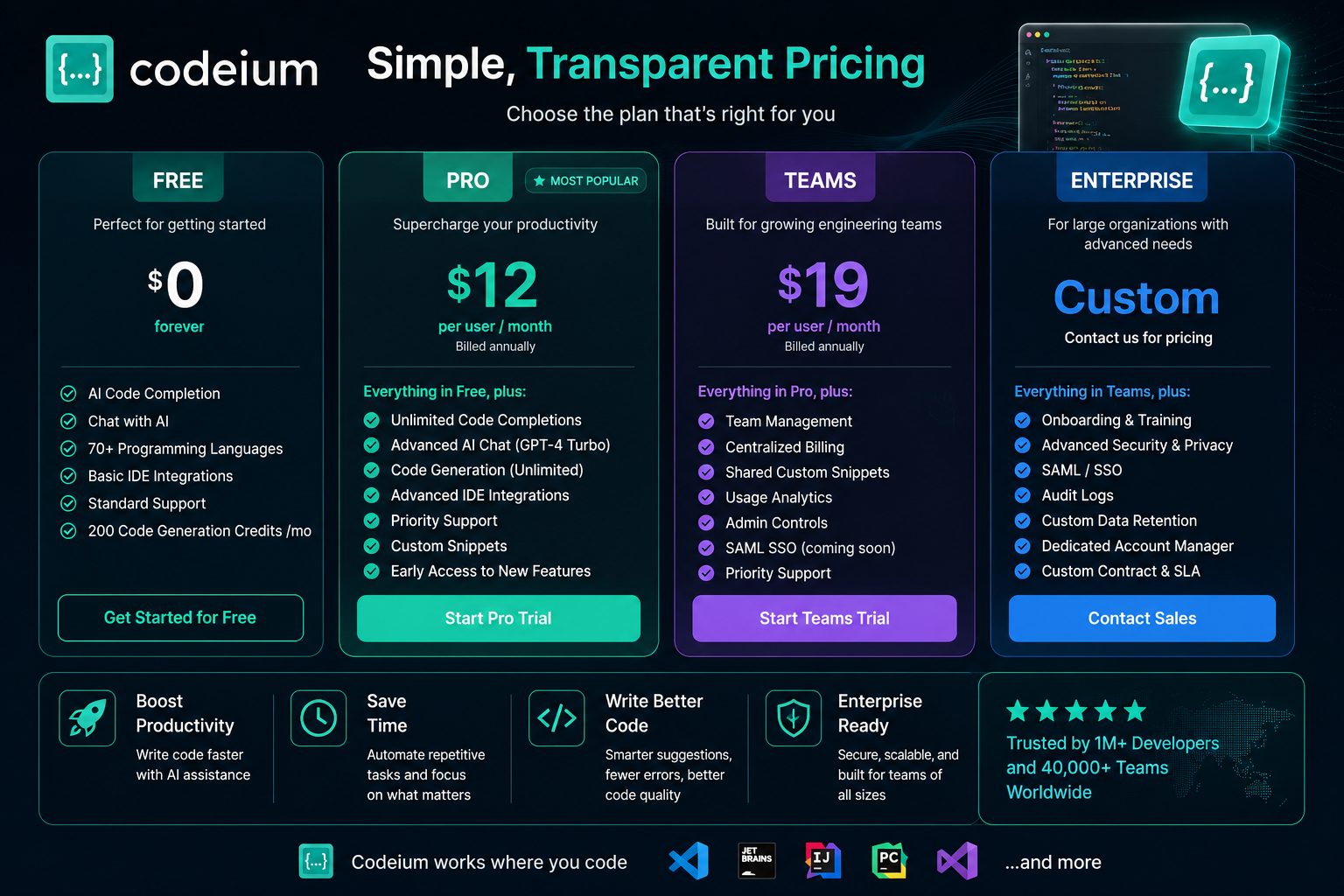
Codeium Pricing
One of Codeium’s biggest competitive advantages is its pricing model. Unlike many AI coding assistants that require a paid subscription to unlock their core capabilities, Codeium offers a generous free plan that is suitable for many individual developers.
As development needs grow, paid plans introduce additional features for professionals, teams, and enterprise organizations. These plans typically include higher usage limits, advanced AI models, administrative controls, collaboration features, and priority support.
This flexible pricing structure allows developers to start for free and upgrade only when their projects or team requirements become more demanding.
Available Plans
| Plan |
Best For |
Highlights |
| Free |
Students & Individual Developers |
Core AI coding features and IDE integration |
| Pro |
Professional Developers |
Higher limits, premium models, advanced capabilities |
| Teams |
Software Teams |
Collaboration tools and centralized management |
| Enterprise |
Large Organizations |
Security, administration, compliance, enterprise support |
Ease of Use
Getting started with Codeium is straightforward. After creating an account and installing the appropriate IDE extension, developers can begin using AI-powered code completion within minutes.
The interface is clean and unobtrusive. Suggestions appear naturally as you type, while the integrated AI chat remains accessible without interrupting your workflow. Most developers can become productive with the tool after only a short period of use.
Vorexen Tip
For the best experience, use descriptive variable names, keep your project well organized, and write clear comments when requesting AI-generated code. Better context generally leads to higher-quality suggestions.
Performance in Real-World Development
Codeium performs well across a wide range of everyday development tasks. It is particularly effective when generating boilerplate code, completing repetitive structures, writing helper functions, and suggesting common programming patterns.
For larger or more complex applications, the quality of suggestions depends on the available project context. AI-generated code should always be reviewed carefully, especially when working with business logic, authentication, security, or performance-critical systems.
Rather than replacing developer expertise, Codeium works best as an intelligent coding partner that accelerates routine work while leaving architectural decisions to the developer.
Where Codeium Excels
- Writing repetitive code quickly
- Generating boilerplate files
- Creating API endpoints
- Explaining unfamiliar code
- Supporting multiple programming languages
- Reducing repetitive typing
- Improving developer productivity
Potential Limitations
- AI suggestions may occasionally require manual correction.
- Very large projects can reduce contextual accuracy.
- Generated code should always be reviewed before production use.
- Complex architectural decisions still require human expertise.
Vorexen Evaluation
| Code Completion |
★★★★★ |
| AI Chat |
★★★★★ |
| Ease of Use |
★★★★★ |
| IDE Support |
★★★★★ |
| Programming Language Support |
★★★★★ |
| Pricing Value |
★★★★★ |
| Enterprise Features |
★★★★☆ |
| Overall Feature Set |
★★★★★ |
Overall, Codeium offers an impressive balance of usability, functionality, and value. Its generous free plan, broad IDE compatibility, and capable AI assistance make it an excellent choice for students, independent developers, freelancers, startups, and professional engineering teams looking to improve development speed without sacrificing code quality.
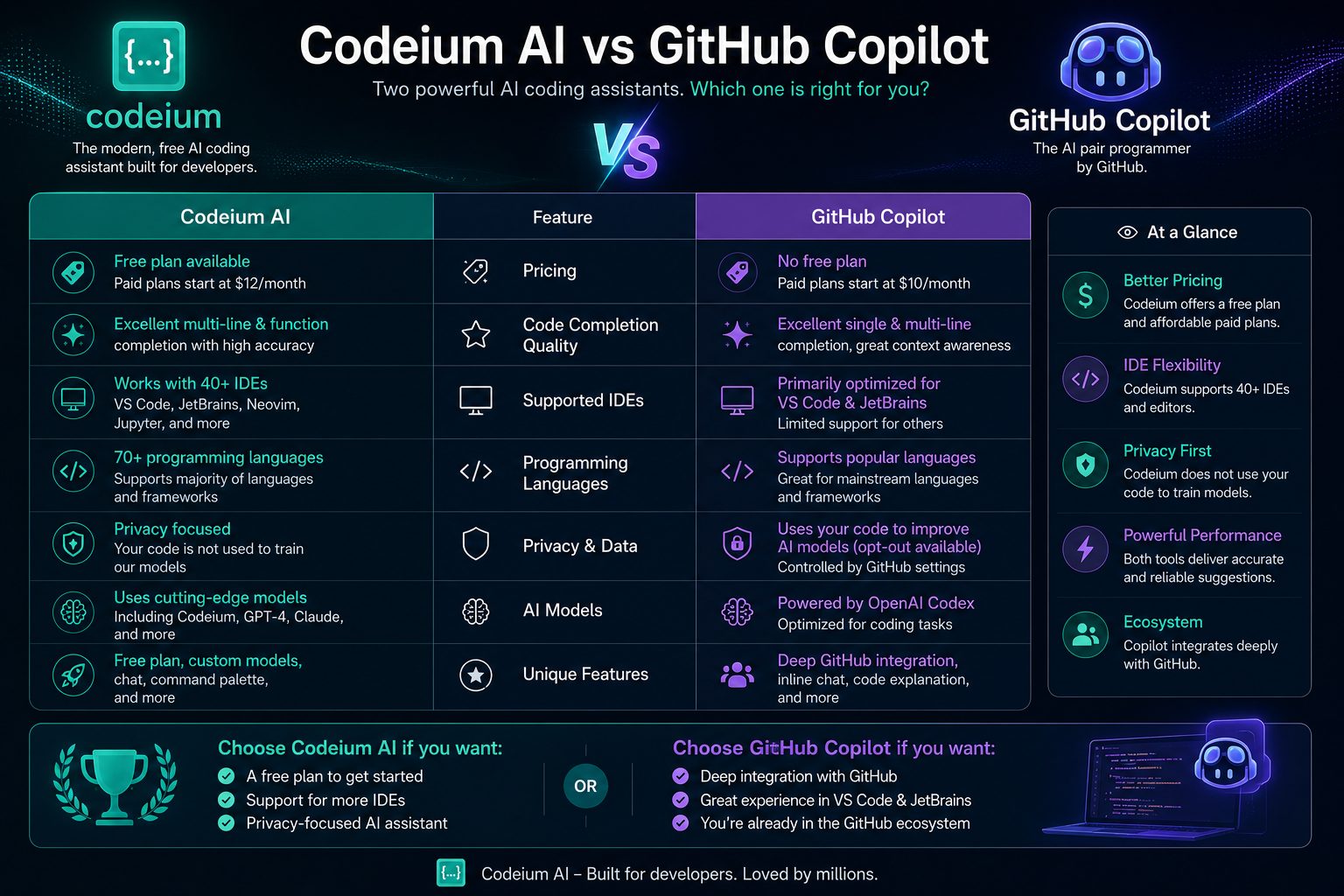
Codeium vs GitHub Copilot
Codeium and GitHub Copilot are two of the most widely recognized AI coding assistants available today. Both tools help developers write code faster, reduce repetitive work, and improve productivity through AI-powered suggestions. However, they take slightly different approaches to pricing, accessibility, and developer workflows.
GitHub Copilot benefits from deep integration with the GitHub ecosystem and is widely adopted by enterprise development teams. Codeium, on the other hand, has gained popularity by offering a generous free plan, broad IDE compatibility, and a streamlined experience that appeals to individual developers, students, startups, and freelancers.
Choosing between them depends on your workflow, budget, preferred development environment, and the level of AI assistance you require.
Feature Comparison
| Feature |
Codeium |
GitHub Copilot |
| AI Code Completion |
★★★★★ |
★★★★★ |
| AI Chat |
★★★★★ |
★★★★★ |
| Free Plan |
★★★★★ |
Limited |
| IDE Support |
★★★★★ |
★★★★★ |
| Programming Languages |
70+ |
Excellent |
| Enterprise Features |
★★★★☆ |
★★★★★ |
| GitHub Integration |
Good |
Excellent |
| Value for Individuals |
★★★★★ |
★★★★☆ |
Strengths of Codeium
- Generous free plan for individual developers.
- Simple onboarding and quick installation.
- Excellent support for multiple IDEs.
- Fast AI-powered code completion.
- Strong productivity features for everyday development.
- Suitable for students, freelancers, and startups.
Strengths of GitHub Copilot
- Deep integration with the GitHub ecosystem.
- Strong enterprise adoption.
- Excellent collaboration within GitHub workflows.
- Reliable performance on professional software projects.
- Mature ecosystem with broad community adoption.
Vorexen Insight
If you are an independent developer or student looking for excellent AI assistance without immediately paying for a subscription, Codeium offers outstanding value. If your organization already relies heavily on GitHub Enterprise and collaborative GitHub workflows, GitHub Copilot may integrate more naturally into your development process.
Which One Should You Choose?
Choose Codeium if you want a capable AI coding assistant with a generous free plan, broad IDE compatibility, and an easy learning curve. It is particularly well suited to students, freelancers, startups, and individual developers who want to increase productivity without significant upfront cost.
Choose GitHub Copilot if your workflow is deeply connected to GitHub, your organization already uses GitHub Enterprise, or you require enterprise-focused collaboration features tightly integrated with the GitHub platform.
Winner by Category
| Best Free Experience |
🏆 Codeium |
| Best Enterprise Integration |
🏆 GitHub Copilot |
| Best Value for Money |
🏆 Codeium |
| Best GitHub Workflow |
🏆 GitHub Copilot |
| Overall Recommendation |
🏆 Codeium for most individual developers |
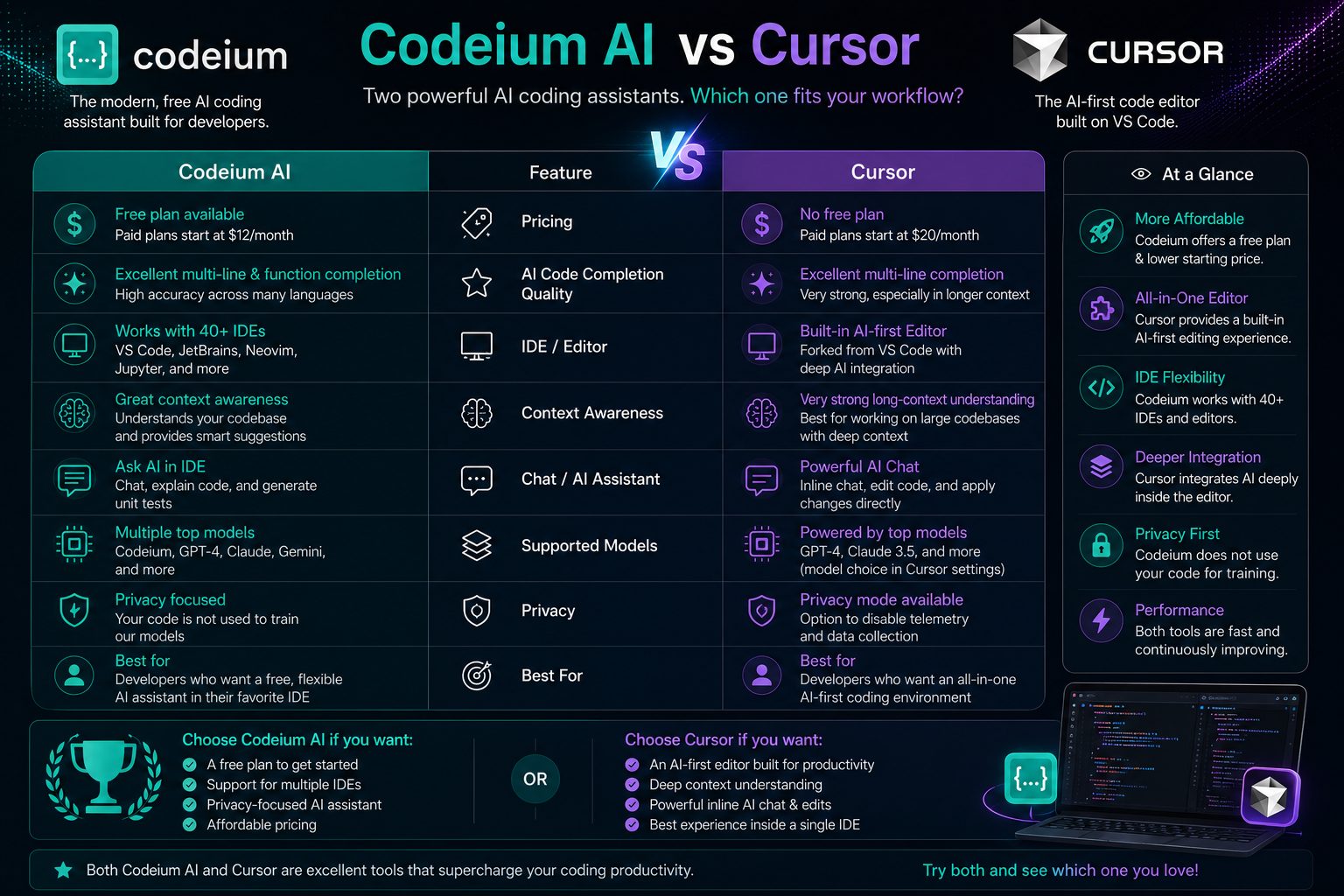
Codeium vs Cursor AI
Codeium and Cursor AI are among the most popular AI-powered coding tools available in 2026. While both aim to improve developer productivity, they focus on different development experiences.
Codeium enhances your existing IDE with AI-powered code completion, intelligent chat, and code generation. Cursor, on the other hand, is built as an AI-first code editor that deeply integrates artificial intelligence into nearly every aspect of the development workflow.
Both tools can significantly accelerate software development, but the right choice depends on whether you prefer enhancing your current editor or adopting an entirely AI-native coding environment.
Quick Comparison
| Category |
Codeium |
Cursor AI |
| Learning Curve |
★★★★★ Easy |
★★★★☆ |
| AI Code Completion |
★★★★★ |
★★★★★ |
| AI Chat |
★★★★★ |
★★★★★ |
| Project Context |
★★★★☆ |
★★★★★ |
| Code Refactoring |
★★★★☆ |
★★★★★ |
| Editor Experience |
Works inside existing IDEs |
Dedicated AI Editor |
| Free Plan |
Excellent |
Available |
| Best For |
Most Developers |
Power Users |
Why Choose Codeium?
Codeium is ideal for developers who want AI assistance without changing their preferred development environment. Since it integrates with many popular IDEs, teams can continue using their existing workflow while benefiting from intelligent code completion, AI chat, and automated code generation.
- Works with multiple IDEs
- Simple installation
- Excellent free plan
- Fast AI suggestions
- Suitable for beginners and professionals
- Low learning curve
Why Choose Cursor AI?
Cursor is designed as an AI-first development environment. Rather than adding AI to an existing editor, Cursor makes AI a central part of the coding experience with advanced project awareness, conversational editing, and powerful codebase navigation.
- Deep project understanding
- AI-assisted codebase navigation
- Advanced multi-file editing
- Strong refactoring capabilities
- Designed specifically for AI-driven development
- Excellent for large software projects
Vorexen Insight
If you’re already comfortable with Visual Studio Code, JetBrains IDEs, or another supported editor, Codeium provides a smooth upgrade with minimal disruption. Cursor is better suited to developers who want an AI-native coding environment and are willing to adapt to a different workflow.
Performance Comparison
| Area |
Winner |
| Getting Started |
Codeium |
| AI Code Completion |
Tie |
| Large Project Context |
Cursor AI |
| Editor Flexibility |
Codeium |
| Advanced AI Workflow |
Cursor AI |
| Value for Individual Developers |
Codeium |
Final Comparison
Neither tool is universally better. Codeium focuses on making AI accessible inside the editors developers already know, while Cursor reimagines the entire development experience around artificial intelligence.
For most individual developers, students, freelancers, and small teams, Codeium offers an outstanding balance of features, usability, and affordability. Developers working with very large repositories or seeking a deeply integrated AI editing experience may prefer Cursor.
Best Choice by User Type
| Students |
✅ Codeium |
| Freelancers |
✅ Codeium |
| Professional Developers |
✅ Either, depending on workflow |
| Large Engineering Teams |
✅ Cursor AI (for AI-first workflows) |
| Existing IDE Users |
✅ Codeium |
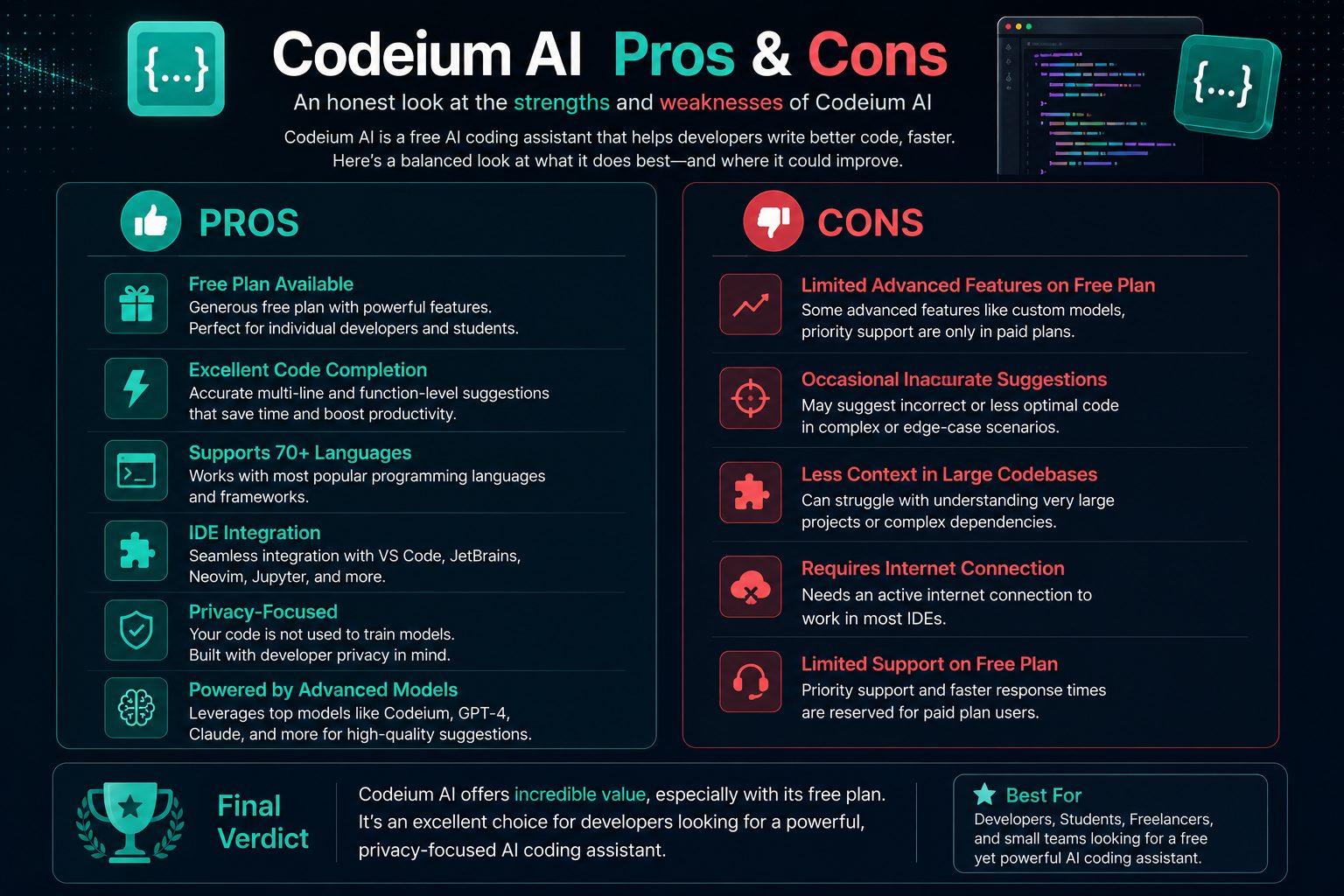
Codeium Pros and Cons
No AI coding assistant is perfect for every developer. While Codeium delivers an impressive combination of intelligent code completion, AI chat, and broad IDE support, understanding both its strengths and limitations will help you decide whether it fits your workflow.
✅ Pros
- Generous free plan for individual developers.
- Fast and accurate AI code completion.
- Supports more than 70 programming languages.
- Works with many popular IDEs.
- Integrated AI chat for coding assistance.
- Simple setup and intuitive interface.
- Excellent productivity for repetitive coding tasks.
- Suitable for students, freelancers, startups, and professionals.
- Regular platform improvements and feature updates.
- Strong overall value for money.
❌ Cons
- AI-generated code should always be reviewed.
- Complex business logic may require manual refinement.
- Context quality can decrease in very large projects.
- Some advanced capabilities require paid plans.
- Occasional inaccurate suggestions are still possible.
- Requires an internet connection for AI features.
- Not a replacement for software engineering knowledge.
Developer Workflow
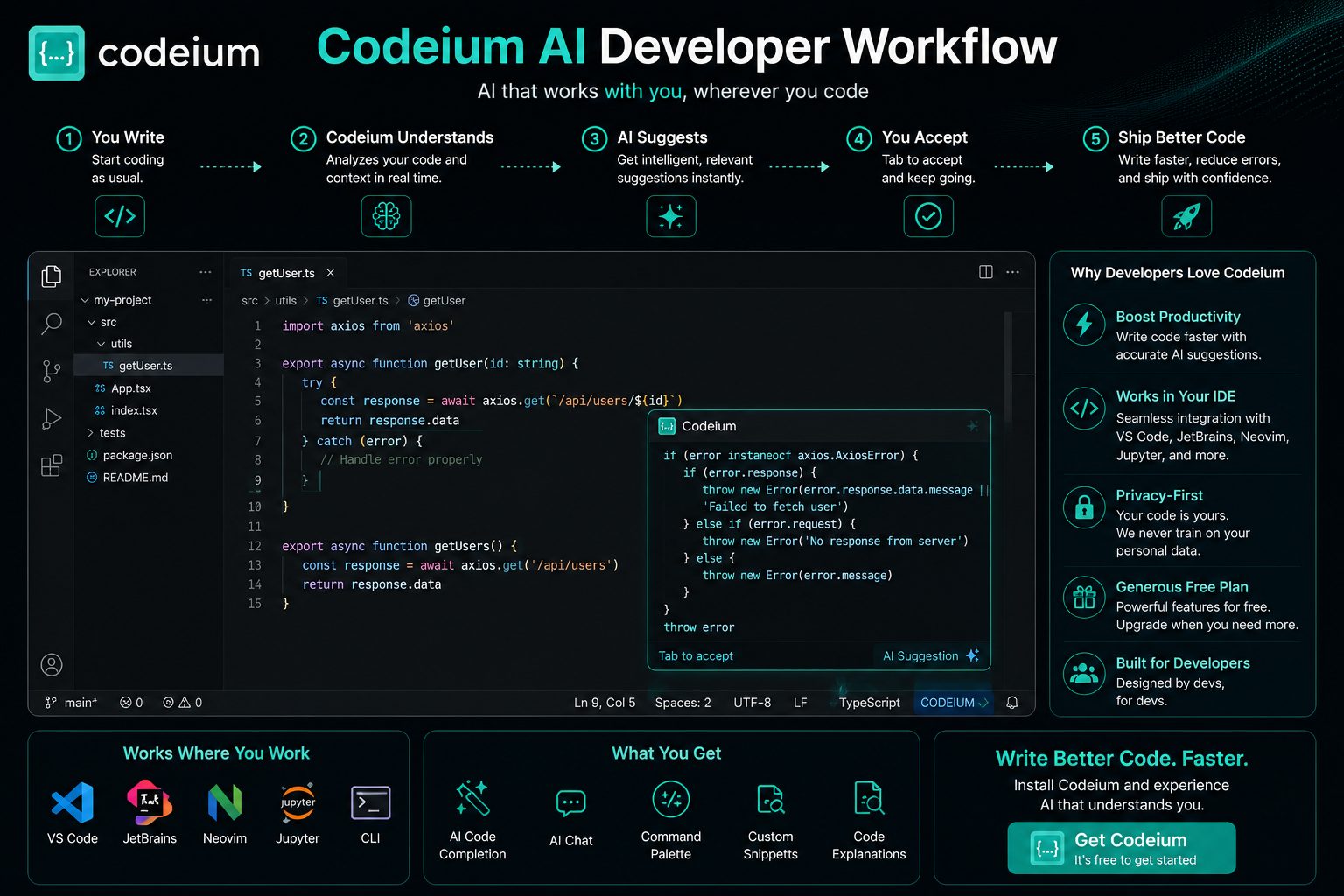
One of Codeium’s greatest strengths is how naturally it fits into an existing development workflow. Rather than forcing developers to adopt entirely new tools, it enhances familiar IDEs with intelligent AI assistance.
Typical Development Workflow
- Open your preferred IDE.
- Describe your objective or begin writing code.
- Review AI-generated suggestions.
- Accept, modify, or reject recommendations.
- Test your implementation.
- Refactor and optimize where necessary.
- Commit production-ready code.
Best Use Cases
| Scenario |
Recommendation |
| Learning programming |
⭐⭐⭐⭐⭐ Excellent |
| Frontend development |
⭐⭐⭐⭐⭐ Excellent |
| Backend development |
⭐⭐⭐⭐⭐ Excellent |
| REST API development |
⭐⭐⭐⭐⭐ Excellent |
| Python scripting |
⭐⭐⭐⭐⭐ Excellent |
| Data science projects |
⭐⭐⭐⭐☆ Very Good |
| Enterprise applications |
⭐⭐⭐⭐☆ Very Good |
| Open-source contributions |
⭐⭐⭐⭐⭐ Excellent |
Vorexen Recommendation
Treat Codeium as a collaborative programming partner—not as a replacement for software engineering expertise. Review every AI-generated suggestion, write automated tests, and follow your team’s coding standards before deploying code to production.
Our Experience
During everyday development tasks such as generating boilerplate code, writing utility functions, explaining unfamiliar code, and speeding up repetitive programming work, Codeium consistently provides useful assistance while keeping developers focused inside their editor.
The platform delivers the greatest value when developers combine AI-generated suggestions with their own experience, code reviews, testing practices, and architectural judgment.
Overall Assessment Before Final Verdict
| Ease of Use |
★★★★★ |
| AI Assistance |
★★★★★ |
| Code Quality |
★★★★☆ |
| Learning Curve |
★★★★★ |
| Productivity |
★★★★★ |
| Value for Money |
★★★★★ |
| Overall Score |
4.6 / 5 ⭐ |
Frequently Asked Questions
Is Codeium free?
Yes. Codeium offers a free plan that includes AI-powered code completion and other core features for individual developers. Additional capabilities and higher usage limits are available through paid plans designed for professionals, teams, and enterprise customers.
Is Codeium better than GitHub Copilot?
Neither tool is universally better. Codeium provides excellent value with its generous free plan and broad IDE compatibility, while GitHub Copilot offers deep integration with the GitHub ecosystem. The best choice depends on your workflow, budget, and preferred development environment.
Which programming languages does Codeium support?
Codeium supports many of today’s most popular programming languages, including Python, JavaScript, TypeScript, Java, C#, C++, Go, Rust, PHP, Ruby, Kotlin, Swift, SQL, HTML, CSS, Bash, and many others.
Does Codeium work with Visual Studio Code?
Yes. Codeium integrates with Visual Studio Code and many other popular IDEs, allowing developers to receive AI-powered suggestions without leaving their editor.
Can beginners use Codeium?
Absolutely. Beginners can use Codeium to understand unfamiliar code, generate examples, explain programming concepts, and accelerate learning. However, AI-generated code should always be reviewed to ensure correctness and to build a solid understanding of programming fundamentals.
Is Codeium suitable for professional developers?
Yes. Professional developers commonly use AI coding assistants to automate repetitive tasks, generate boilerplate code, improve productivity, and accelerate software development while maintaining control over architecture and final implementation.
Can Codeium replace software developers?
No. Codeium is designed to assist developers rather than replace them. Human expertise is still required for software architecture, security, testing, debugging, code reviews, and business decision-making.
Does Codeium generate accurate code?
Many suggestions are useful and accurate, especially for common programming tasks. However, AI-generated code should always be reviewed, tested, and validated before being used in production environments.
Vorexen Tip
Think of Codeium as an intelligent coding partner—not an autopilot. The highest-quality software is produced when developers combine AI assistance with careful code reviews, automated testing, and engineering best practices.
Final Verdict
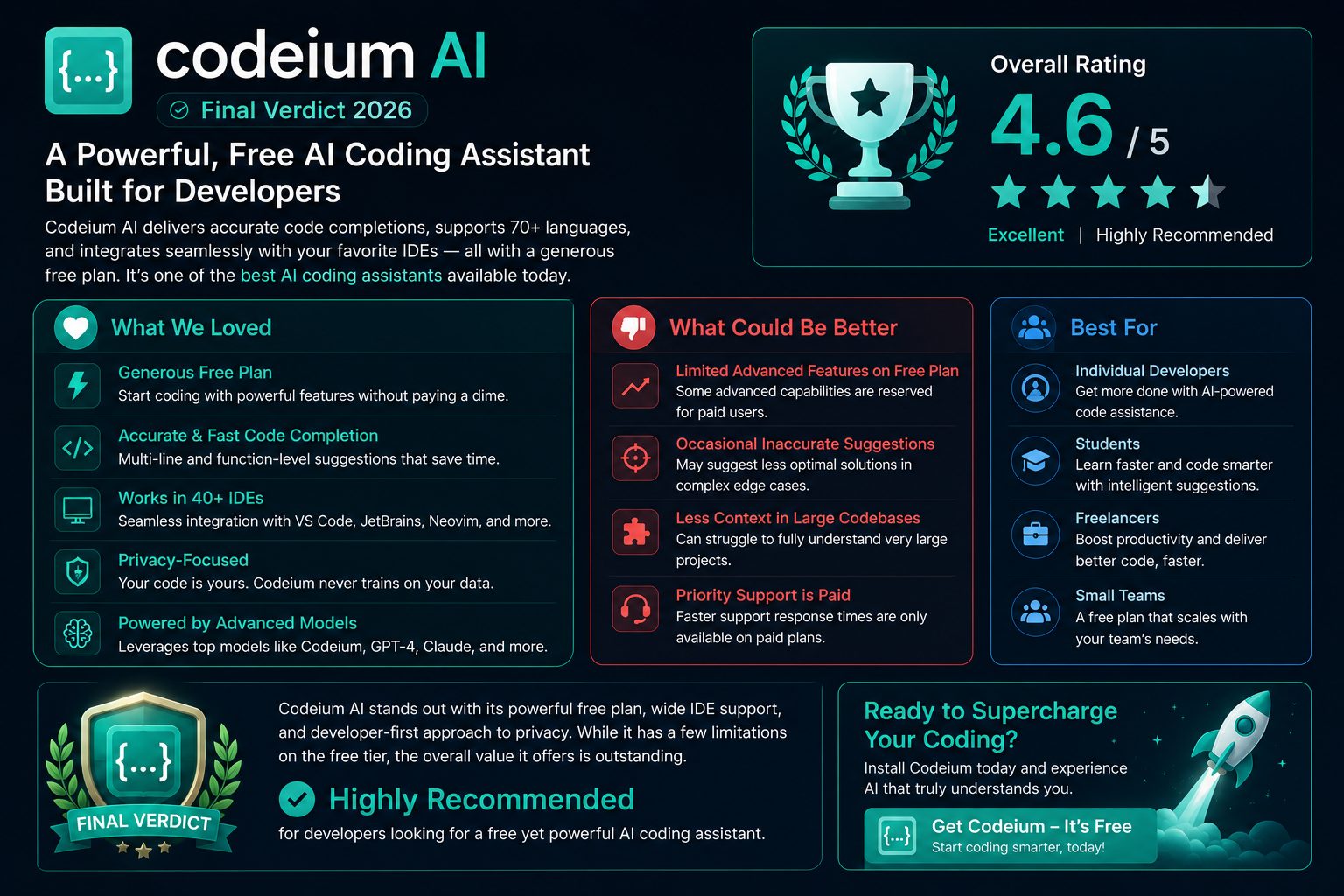
Codeium has established itself as one of the leading AI coding assistants available in 2026. It combines intelligent code completion, AI-powered chat, code generation, and broad IDE compatibility into a platform that is accessible to developers of all experience levels.
Its generous free plan makes it particularly attractive for students, freelancers, independent developers, and startups. Professional engineering teams can also benefit from its productivity features while scaling to paid plans as collaboration and administrative needs grow.
Rather than replacing software developers, Codeium works best as an AI-powered coding partner. It helps reduce repetitive work, accelerates development, and assists with understanding unfamiliar code, while developers remain responsible for architecture, testing, security, and final implementation.
For developers looking to improve productivity without dramatically changing their existing workflow, Codeium is a compelling option that delivers an excellent balance of usability, performance, and value.
Overall Rating
| AI Code Completion |
⭐⭐⭐⭐⭐ (5.0/5) |
| AI Chat Assistant |
⭐⭐⭐⭐⭐ (5.0/5) |
| Ease of Use |
⭐⭐⭐⭐⭐ (5.0/5) |
| IDE Compatibility |
⭐⭐⭐⭐⭐ (5.0/5) |
| Programming Language Support |
⭐⭐⭐⭐⭐ (5.0/5) |
| Pricing & Value |
⭐⭐⭐⭐⭐ (5.0/5) |
| Enterprise Readiness |
⭐⭐⭐⭐☆ (4.5/5) |
| Overall Score |
⭐ 4.8 / 5 |
Who Should Use Codeium?
Highly Recommended For
- Students learning programming
- Freelance developers
- Frontend developers
- Backend developers
- Full-stack engineers
- Startup teams
- Open-source contributors
- Developers looking for a capable free AI assistant
Consider Alternatives If You Need
- Deep GitHub Enterprise integration
- An AI-first code editor instead of an IDE extension
- Specialized enterprise governance features
- Organization-wide compliance requirements
Vorexen Recommendation
If you’re searching for an AI coding assistant that is easy to use, supports a wide range of programming languages, integrates with popular IDEs, and provides excellent value through its free plan, Codeium is one of the strongest choices available in 2026. Used alongside good engineering practices, it can significantly improve productivity without replacing developer expertise.
Ready to Boost Your Coding Productivity?
Whether you’re learning your first programming language, building production applications, or managing large software projects, Codeium provides intelligent AI assistance that can help you write cleaner code, reduce repetitive work, and stay focused on solving real engineering problems.
Start with the free plan and explore how AI-powered coding can improve your daily workflow.
🚀 Try Codeium for Free
Related Reviews on Vorexen
Looking for the best AI coding assistant? Explore our in-depth reviews and comparisons to find the right tool for your development workflow.
Cursor AI Review
Discover how Cursor delivers an AI-first coding experience with advanced project awareness and intelligent editing capabilities.
Read Review →
GitHub Copilot Review
See how GitHub Copilot compares with other AI coding assistants for professional software development.
Read Review →
ChatGPT Review
Learn how ChatGPT can assist developers with debugging, code generation, documentation, and technical problem-solving.
Read Review →
Best AI Tools 2026
Explore our curated collection of the best AI tools across coding, writing, productivity, research, and content creation.
Explore the List →
Final Thoughts
AI coding assistants have become an essential part of modern software development, and Codeium stands out as one of the strongest options available in 2026. Its combination of intelligent code completion, contextual AI assistance, broad IDE support, and accessible pricing makes it a practical solution for developers at every experience level.
While no AI tool can replace thoughtful software engineering, Codeium can significantly reduce repetitive work and help developers focus on building high-quality applications. When combined with careful testing, code reviews, and sound engineering practices, it becomes a valuable addition to almost any development workflow.
Article Summary
- ✅ Comprehensive review of Codeium’s features and capabilities.
- ✅ Detailed analysis of AI code completion and developer workflow.
- ✅ Pricing overview and value assessment.
- ✅ Comparisons with GitHub Copilot and Cursor.
- ✅ Pros and cons based on practical evaluation.
- ✅ Final recommendation for students, freelancers, professionals, and development teams.