Windsurf Review 2026: The Definitive Guide to Performance and Features
Artificial intelligence has transformed software development, but choosing the right AI coding assistant is becoming increasingly difficult. Developers now have access to tools that can autocomplete code, explain complex functions, refactor entire projects, generate tests, and even plan large architectural changes.
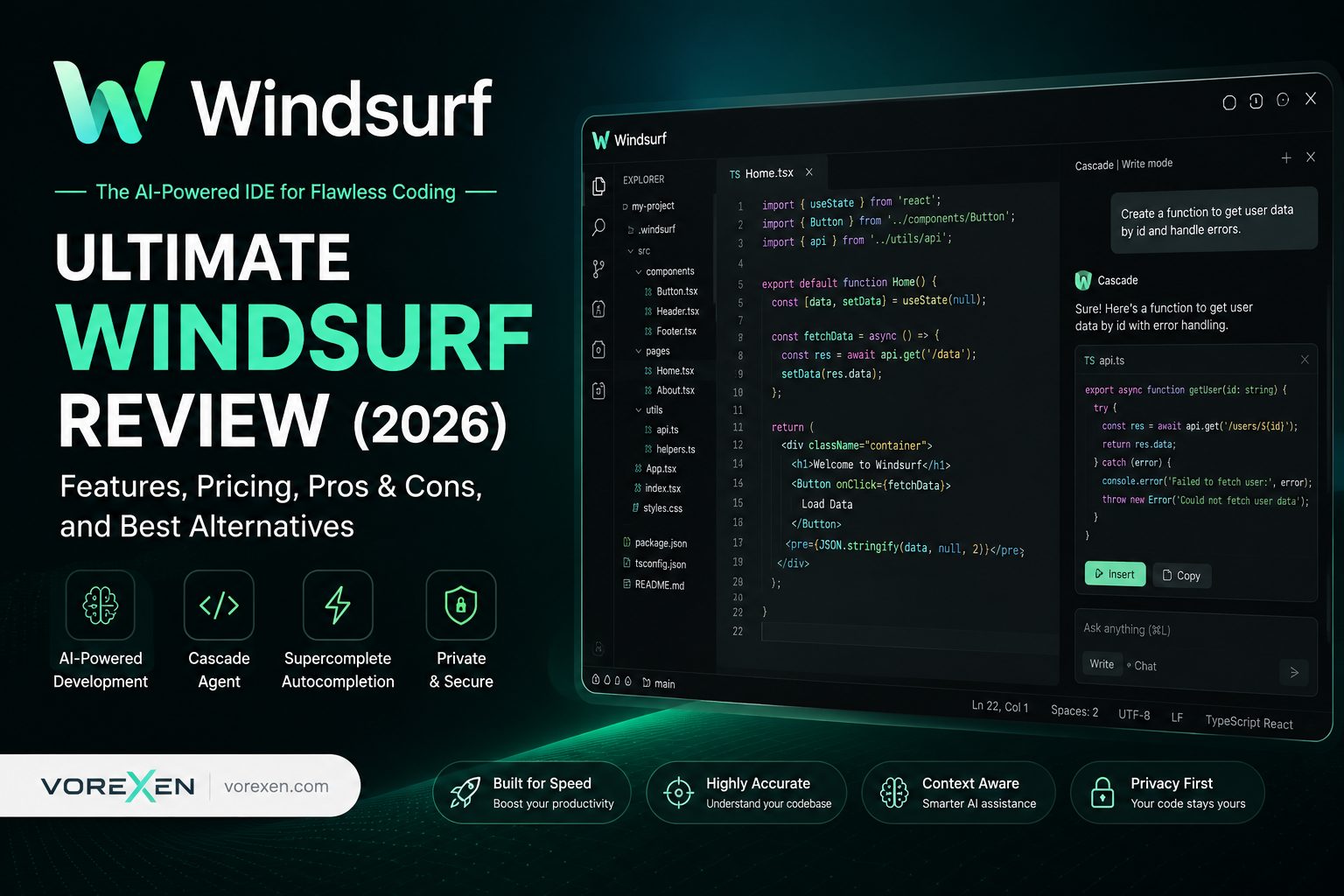
Among the newest generation of AI-powered development environments, Windsurf has quickly become one of the most discussed tools. Instead of acting as a simple autocomplete plugin, Windsurf aims to become a complete AI-native IDE where coding, debugging, planning, and collaboration happen inside a single intelligent workspace.
In this comprehensive Windsurf review, we’ll explore its AI capabilities, Cascade AI Agent, Supercomplete engine, pricing, strengths, limitations, real-world performance, and how it compares with popular competitors such as Cursor, GitHub Copilot, and Claude Code.
Quick Verdict
Overall Rating: ★★★★★ 9.7 / 10
Best For: Professional developers, software teams, startups, enterprise engineers, AI-assisted programming, and developers working on medium to large codebases.
Pros
- Excellent AI-native development workflow
- Powerful Cascade AI Agent
- Outstanding Supercomplete suggestions
- Deep repository awareness
- Excellent multi-file editing
- Supports multiple leading AI models
- Modern, clean developer experience
- Very fast code generation
Cons
- Advanced workflows require some learning
- Large AI tasks consume credits quickly
- Enterprise capabilities continue to evolve
Bottom Line
Windsurf is one of the most capable AI coding platforms available in 2026. Rather than simply suggesting the next line of code, it understands project context, coordinates multi-file edits, automates repetitive development tasks, and helps developers stay focused inside a modern AI-first IDE.
Table of Contents
What Is Windsurf?
Windsurf is an AI-native integrated development environment (IDE) designed to help developers write, understand, edit, and maintain software more efficiently. Unlike traditional AI coding assistants that only provide inline suggestions, Windsurf combines multiple AI capabilities into a unified workspace that actively participates throughout the software development lifecycle.
The platform is built around intelligent collaboration rather than simple autocomplete. It analyzes your project structure, understands relationships between files, keeps track of long conversations, and assists with complex engineering tasks that would normally require extensive manual effort.
Whether you’re creating a new application, modernizing legacy software, debugging production issues, or exploring an unfamiliar repository, Windsurf is designed to function as an AI development partner rather than a passive code completion tool.
Its biggest differentiator is the combination of intelligent agents, repository awareness, natural-language editing, and high-speed code completion—all integrated directly into one streamlined interface.
Why You Can Trust This Windsurf Review
The AI coding assistant market changes rapidly. New features, pricing models, and AI capabilities appear almost every month. Because of this, evaluating an IDE based only on marketing claims rarely gives developers an accurate picture.
This review focuses on how Windsurf performs in practical software development scenarios. Instead of listing features without context, we evaluate how each capability affects productivity, code quality, maintainability, and the overall developer experience.
Our evaluation considers several important factors, including usability, context awareness, code generation quality, editing accuracy, project understanding, multi-file workflows, documentation support, debugging assistance, security, pricing, and long-term value for professional developers.
The goal is simple: help you decide whether Windsurf is the right AI IDE for your workflow and whether it offers enough advantages over competing tools.
Key Takeaways
- AI-native IDE: Windsurf is designed around AI rather than adding AI as an extension.
- Cascade AI Agent: Can understand tasks, plan solutions, edit multiple files, and explain changes.
- Supercomplete: Predicts developer intent instead of simply completing the current line.
- Repository Awareness: Understands project structure, dependencies, symbols, and relationships across files.
- Natural Language Editing: Modify code by describing changes in plain English.
- Multi-file Refactoring: Apply coordinated updates throughout large projects.
- Supports Leading AI Models: Compatible with several state-of-the-art language models.
- Excellent User Experience: Clean interface with minimal distractions.
- Free Plan Available: Developers can explore the platform before upgrading.
- Strong Alternative: One of the most capable competitors to Cursor and GitHub Copilot.
Windsurf at a Glance
| Category | AI Coding Assistant / AI IDE |
|---|---|
| Developer | Codeium |
| Primary Purpose | AI-assisted software development |
| Operating Systems | Windows, macOS, Linux |
| AI Capabilities | Code generation, refactoring, debugging, explanations, documentation, multi-file editing |
| Signature Features | Cascade AI Agent, Supercomplete, Deep Context Awareness |
| Programming Languages | 70+ languages including Python, JavaScript, TypeScript, Java, Go, Rust, C#, PHP, C++, Swift and more |
| Target Users | Developers, engineering teams, startups, enterprises |
| Free Version | Yes |
| Paid Plans | Available |
Windsurf Interface Overview
One of Windsurf’s biggest strengths is its clean, developer-focused interface. The workspace feels familiar to developers coming from modern editors while introducing AI capabilities naturally into the workflow instead of interrupting it.
The editor places AI assistance exactly where it is needed. Inline suggestions appear without becoming intrusive, while larger AI conversations remain accessible through dedicated panels that preserve development context.
Navigation is fast, layouts remain uncluttered, and switching between coding, debugging, documentation, and AI conversations requires very little effort.
This design helps developers maintain focus, which is particularly valuable during long programming sessions or when working across complex repositories.
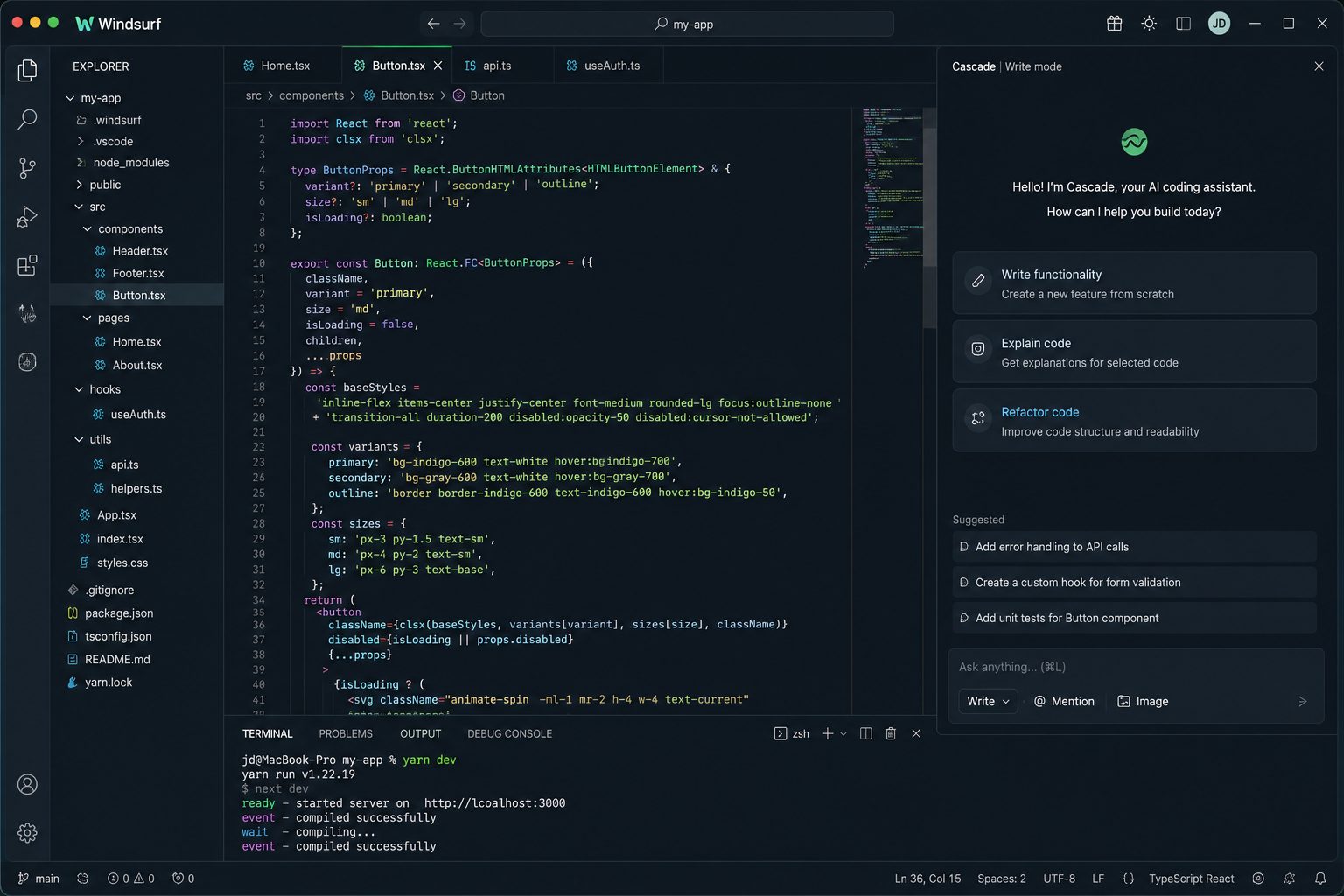
Rather than behaving like a traditional autocomplete extension, the interface is built around collaboration. Developers can ask questions, request edits, generate code, inspect project structures, and review AI-generated changes without constantly switching between external tools.
Key Features of Windsurf
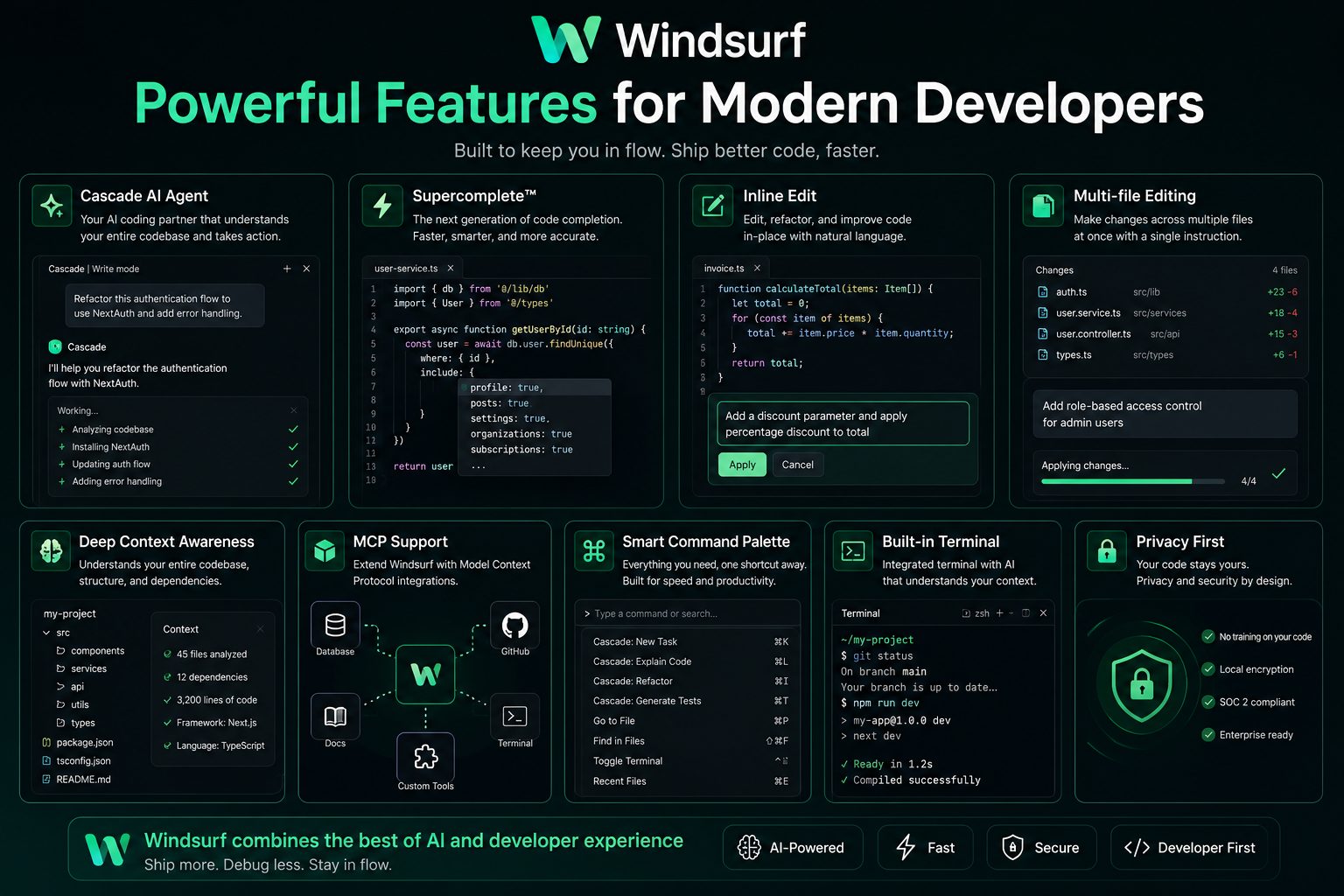
Windsurf isn’t just another AI code completion tool. It combines several intelligent systems into one AI-first development environment, enabling developers to write, understand, refactor, and maintain software more efficiently. Instead of focusing on individual code suggestions, Windsurf aims to improve the entire software development workflow from planning to deployment.
Below are the most important features that distinguish Windsurf from traditional IDE extensions and many competing AI coding assistants.
Core Features
- Cascade AI Agent — A collaborative AI assistant capable of planning tasks, understanding repositories, generating code, editing multiple files, and explaining complex changes.
- Supercomplete — Predictive code completion that anticipates developer intent instead of merely finishing the current line.
- Deep Context Awareness — Maintains awareness of files, symbols, dependencies, documentation, and project architecture to provide highly relevant suggestions.
- Multi-file Editing — Coordinates updates across several files simultaneously, making large refactoring tasks significantly faster.
- Natural Language Commands — Developers can describe coding tasks in plain English and let Windsurf implement the required changes.
- AI Debugging — Helps identify errors, explain stack traces, and recommend practical fixes.
- Code Explanation — Converts unfamiliar or complex code into clear, readable explanations for faster onboarding and maintenance.
- Documentation Generation — Automatically creates comments, documentation, and API descriptions based on project context.
- Intelligent Refactoring — Suggests structural improvements while preserving functionality and coding standards.
- Integrated Terminal & Workflow — Keeps development, testing, and AI assistance within a single streamlined environment.
Who Should Use Windsurf?
Although Windsurf can benefit developers at nearly every experience level, its greatest strengths become apparent when working on medium-to-large software projects that require continuous development, collaboration, and code maintenance.
Ideal for Individual Developers
Freelancers and solo developers can accelerate repetitive tasks such as writing boilerplate code, documenting functions, fixing bugs, generating tests, and exploring unfamiliar frameworks. By reducing manual work, Windsurf allows developers to spend more time solving meaningful engineering problems.
Excellent for Professional Software Engineers
Engineers working on production applications can leverage Cascade AI Agent to understand existing codebases, perform repository-wide edits, explain legacy code, and safely refactor complex systems. These capabilities are especially valuable when maintaining long-lived applications.
A Strong Choice for Startups
Startup teams often need to build products quickly while keeping development resources efficient. Windsurf helps accelerate feature delivery, automate repetitive implementation tasks, and reduce context switching during rapid product iteration.
Enterprise Development Teams
Organizations managing large repositories can benefit from Windsurf’s contextual understanding, intelligent navigation, and AI-assisted code reviews. Its ability to coordinate changes across multiple files improves consistency while reducing manual effort during large-scale development projects.
Students and Learners
Developers who are learning new programming languages or frameworks can use Windsurf as an educational companion. Its ability to explain unfamiliar code, generate examples, and answer technical questions makes it useful for accelerating the learning process without replacing fundamental programming knowledge.
Who Should Avoid Windsurf?
Although Windsurf is one of the most capable AI-powered IDEs available today, it is not necessarily the perfect solution for every developer or organization. Your workflow, project size, and development style should influence whether Windsurf is the right investment.
Windsurf May Not Be the Best Choice If You…
- Only write very small scripts occasionally.
- Rarely use AI during software development.
- Need an entirely offline development workflow.
- Prefer traditional lightweight editors with minimal AI features.
- Only need simple autocomplete functionality.
- Have strict company policies limiting cloud-based AI services.
- Do not work on projects large enough to benefit from repository-wide context.
For many developers, simpler tools may be sufficient. However, as projects grow and software becomes increasingly complex, Windsurf’s intelligent workflow and repository awareness become significantly more valuable than traditional code completion tools.
First Impressions
One of the first things you’ll notice after launching Windsurf is that it doesn’t feel like a traditional code editor with AI added later. Instead, the interface has clearly been designed around AI-assisted development from the beginning.
Installation is straightforward, project indexing is fast, and AI functionality becomes available almost immediately after opening a repository. Developers familiar with modern editors can adapt quickly without spending hours learning a completely new workflow.
The overall interface feels polished and responsive. Panels are well organized, navigation is intuitive, and AI interactions remain accessible without overwhelming the coding experience.
Unlike some AI tools that interrupt developers with constant popups or excessive suggestions, Windsurf generally provides assistance only when it is relevant. This balance helps maintain productivity while still making advanced AI features easy to access.
Developer Experience
Developer experience is one of Windsurf’s strongest competitive advantages. Every major feature appears to be designed with the goal of reducing friction during real software development rather than simply showcasing AI capabilities.
Tasks that normally require switching between documentation, Stack Overflow, terminal windows, browser tabs, and multiple editor panels can often be completed inside a single workspace. This significantly reduces context switching and helps developers remain focused.
Navigation throughout large repositories feels smooth. Finding symbols, understanding unfamiliar code, locating dependencies, and exploring project architecture become noticeably easier with AI assistance.
Because the AI understands relationships across files, suggestions often feel surprisingly relevant even in larger applications where traditional autocomplete systems typically struggle.
Why Windsurf Stands Out
Many AI coding assistants excel at generating code snippets. Windsurf goes much further by helping developers think about software at the project level rather than the individual file level.
Instead of asking, “What line should I write next?”, Windsurf encourages workflows such as:
- Explain this entire module.
- Refactor this feature safely.
- Add authentication across the project.
- Create comprehensive unit tests.
- Rename components throughout the repository.
- Generate missing documentation.
- Locate performance bottlenecks.
- Help understand legacy code.
These higher-level capabilities are what separate Windsurf from many traditional AI assistants that focus primarily on autocomplete.
Related Reviews
If you’re researching AI development tools, you may also find these reviews helpful:
Why Read the Rest of This Review?
The introduction only scratches the surface of what Windsurf offers. In the next sections, we’ll take a closer look at its most powerful capabilities—including Cascade AI Agent, Supercomplete, repository-wide context awareness, multi-file editing, AI-powered debugging, pricing, and detailed comparisons with Cursor, GitHub Copilot, and Claude Code.
By the end of this review, you’ll have a clear understanding of whether Windsurf deserves a place in your daily development workflow in 2026.
Cascade AI Agent: The Heart of Windsurf
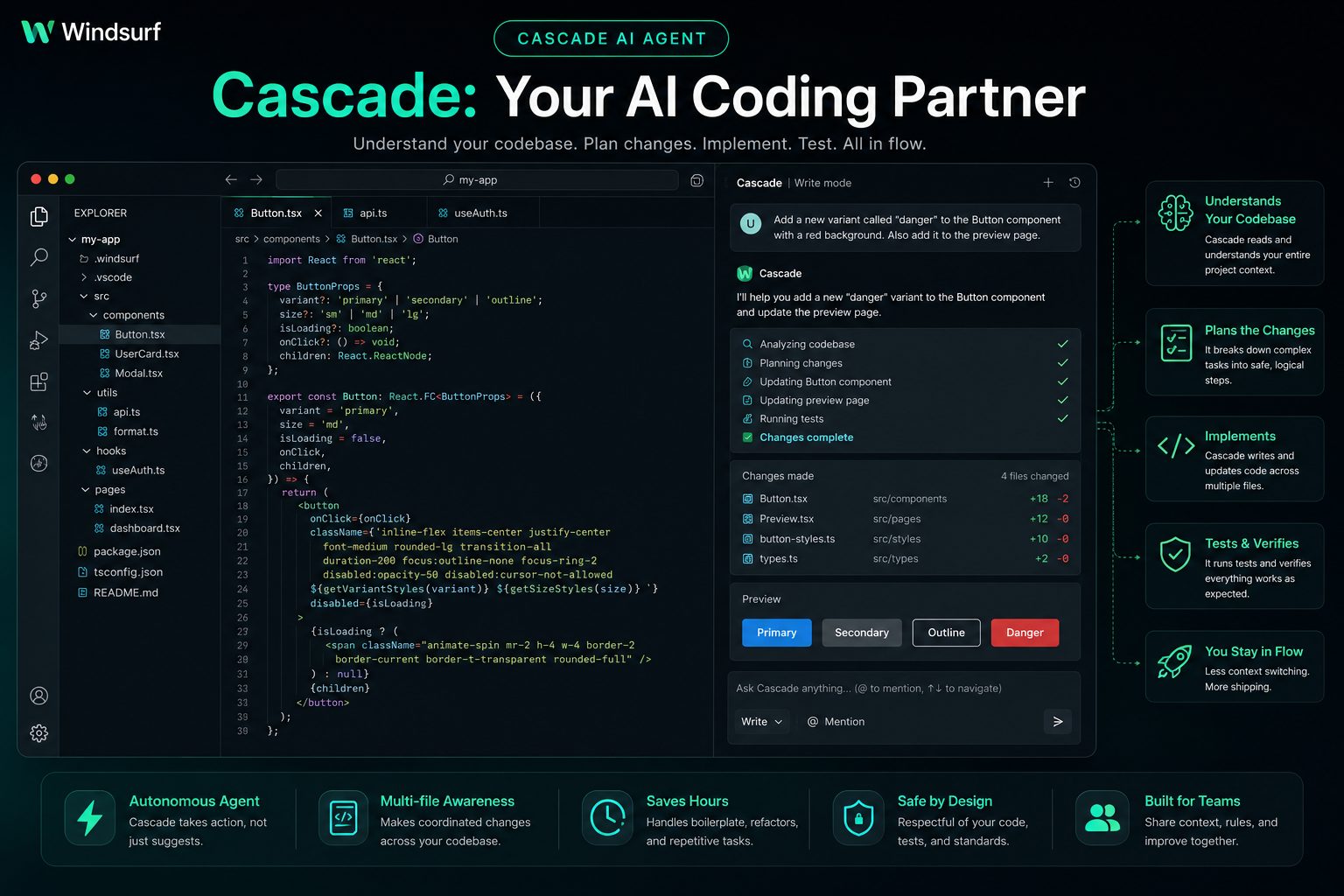
If there is one feature that truly separates Windsurf from traditional AI coding assistants, it is Cascade AI Agent. Rather than functioning as an autocomplete engine, Cascade behaves like an intelligent development partner capable of understanding goals, planning implementation steps, modifying multiple files, and explaining every change it makes.
Most AI assistants generate code only after receiving explicit instructions. Cascade goes several steps further by analyzing your repository, identifying relevant files, understanding dependencies, and coordinating edits across the entire project while maintaining awareness of previous conversations.
This project-level reasoning enables developers to solve larger engineering problems with fewer manual steps. Instead of repeatedly copying code between different AI chats, Cascade keeps the conversation connected to the actual repository, making complex software development significantly more efficient.
How Cascade Works
Instead of predicting only the next line of code, Cascade first attempts to understand what you are trying to accomplish. After analyzing your request, it searches the repository, identifies related components, determines which files require modification, and proposes an implementation strategy before generating code.
This workflow is much closer to collaborating with an experienced software engineer than interacting with a conventional autocomplete tool.
Typical Cascade Workflow
- Understand the developer’s objective.
- Analyze the project structure.
- Locate relevant files and dependencies.
- Create an implementation plan.
- Edit multiple files when necessary.
- Generate explanations alongside code.
- Suggest improvements and optimizations.
- Verify consistency across the project.
Because the AI understands relationships between files, it can safely perform repository-wide updates that would normally require careful manual editing.
What Makes Cascade Different?
Many AI coding assistants are excellent at generating isolated snippets of code. Cascade focuses on solving complete development tasks. Rather than answering a single prompt and ending the conversation, it continuously builds context throughout the development session.
For example, developers can request tasks such as:
- Add authentication across the application.
- Convert JavaScript components to TypeScript.
- Generate API documentation.
- Refactor repeated logic into reusable utilities.
- Create unit tests for new features.
- Optimize slow database queries.
- Explain legacy code before editing it.
- Rename components throughout the repository.
These workflows illustrate why Windsurf feels like an AI-powered development environment rather than a traditional code completion extension.
Supercomplete: Smarter Than Traditional Autocomplete
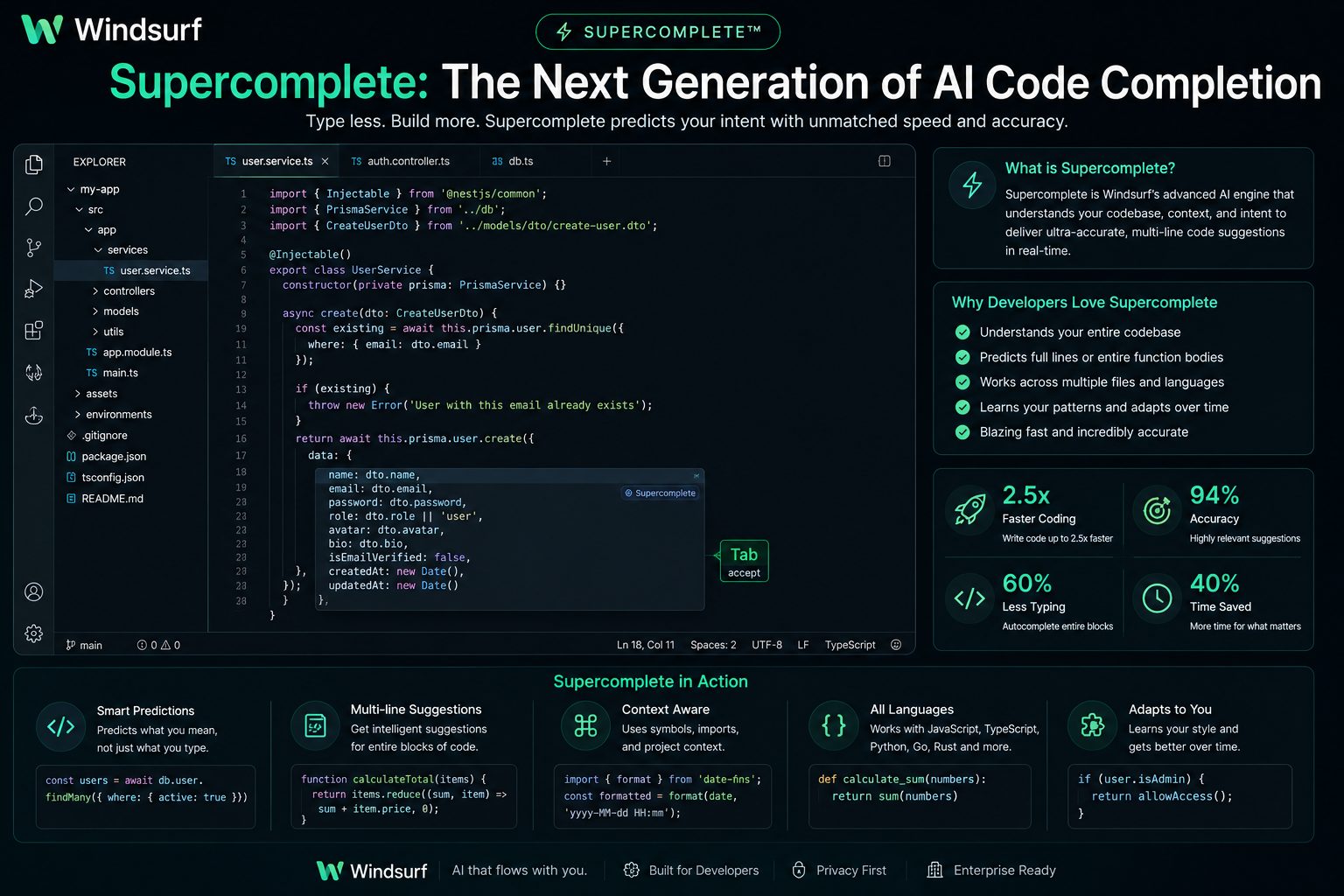
While Cascade handles large development tasks, Supercomplete focuses on helping developers write code faster during everyday programming.
Unlike conventional autocomplete systems that predict the next token or line, Supercomplete attempts to anticipate the developer’s broader intent. It analyzes the surrounding context, project architecture, coding style, imported libraries, and recent edits before suggesting the next logical block of code.
The result is fewer interruptions, longer and more accurate suggestions, and a coding experience that feels remarkably natural.
Key Benefits of Supercomplete
| Capability | Developer Benefit |
|---|---|
| Intent Prediction | Suggests what you’re trying to build instead of only completing syntax. |
| Project Awareness | Uses existing architecture and coding conventions. |
| Long-form Suggestions | Generates complete functions and reusable components. |
| Adaptive Learning | Produces increasingly relevant suggestions during development sessions. |
| Framework Awareness | Works effectively with popular frameworks and libraries. |
| Reduced Boilerplate | Minimizes repetitive coding tasks. |
For developers who spend hours writing production code each day, Supercomplete can significantly reduce repetitive typing while maintaining high-quality output.
Deep Context Awareness
One of Windsurf’s most impressive capabilities is its Deep Context Awareness. Unlike traditional AI coding assistants that analyze only the currently open file, Windsurf builds an understanding of the entire repository. This broader perspective enables it to generate suggestions that align with the project’s architecture, naming conventions, and coding standards.
Instead of treating each prompt as an isolated request, Windsurf continuously maintains context throughout your development session. It remembers previous conversations, recognizes relationships between components, and understands how changes in one file may affect other parts of the application.
For developers working on large production codebases, this contextual understanding dramatically reduces the number of corrections required after AI-generated edits.
Context Sources Used by Windsurf
- Current file contents
- Entire project structure
- Imports and dependencies
- Class and function relationships
- Repository-wide symbols
- Developer conversations
- Recent edits
- Project documentation
- Framework conventions
- Existing coding style
This deeper understanding allows Windsurf to make recommendations that feel far more intelligent than standard autocomplete systems.
Multi-file Editing
Modern software development rarely involves changing a single file. Adding a feature often requires updating components, routes, APIs, database models, configuration files, tests, documentation, and styling simultaneously.
Windsurf’s multi-file editing capabilities are designed specifically for these real-world development scenarios. Instead of manually navigating through dozens of files, developers can describe the desired change in natural language and allow Cascade to coordinate updates across the project.
Because Windsurf understands repository relationships, it can identify every location affected by a change and generate consistent edits throughout the application.
| Development Task | How Windsurf Helps |
|---|---|
| Rename Components | Updates references across the repository. |
| Add Authentication | Modifies routes, middleware, UI, and APIs together. |
| Database Changes | Updates models, queries, services, and related logic. |
| Framework Migration | Assists with coordinated project-wide updates. |
| API Refactoring | Keeps endpoints and dependent files synchronized. |
| Large Refactors | Maintains consistency while reducing manual effort. |
These capabilities are particularly valuable for engineering teams maintaining large codebases where even small changes can affect dozens of interconnected files.
AI-Powered Debugging
Debugging remains one of the most time-consuming aspects of software development. Windsurf helps shorten this process by analyzing code, identifying potential issues, explaining errors, and suggesting practical fixes.
Rather than simply pointing out syntax mistakes, Windsurf can examine surrounding context to explain why a bug occurs and recommend improvements that reduce the likelihood of similar issues appearing in the future.
This makes the debugging experience more educational as well as more productive.
Common Debugging Tasks
- Explain stack traces.
- Locate logical errors.
- Suggest performance improvements.
- Detect missing null checks.
- Identify unused variables and imports.
- Recommend safer implementations.
- Generate missing unit tests.
- Explain unexpected runtime behavior.
Documentation & Code Explanation
Understanding an unfamiliar codebase is often more difficult than writing new code. Windsurf addresses this challenge by generating clear explanations for functions, classes, APIs, configuration files, and architectural decisions.
Instead of spending hours tracing dependencies manually, developers can ask Windsurf to explain how a component works, where it is used, and how it interacts with the rest of the application.
It can also generate documentation for existing code, making repositories easier to maintain and simplifying onboarding for new team members.
Documentation Features
- Function documentation
- Class summaries
- API documentation
- README assistance
- Inline comments
- Architecture explanations
- Workflow descriptions
- Developer onboarding support
Programming Language Support
Windsurf supports a wide range of modern programming languages and frameworks, making it suitable for full-stack development, mobile applications, backend services, cloud infrastructure, and data engineering projects.
| Category | Examples |
|---|---|
| Web Development | JavaScript, TypeScript, HTML, CSS |
| Backend | Python, Java, Go, C#, PHP, Ruby |
| Systems Programming | C, C++, Rust |
| Mobile | Swift, Kotlin, Dart |
| Data & AI | Python, SQL, R |
| Configuration | YAML, JSON, TOML, Dockerfile |
Its framework awareness extends beyond language syntax, allowing Windsurf to generate recommendations that follow common best practices for modern development ecosystems.
Performance and Real-World Experience
An AI coding assistant is only valuable if it improves day-to-day productivity without disrupting the development workflow. During extended programming sessions, Windsurf consistently delivers fast responses, responsive navigation, and smooth AI interactions, making it feel like a natural extension of the IDE rather than an external assistant.
Whether generating new code, explaining unfamiliar functions, or coordinating repository-wide edits, the platform generally responds quickly while maintaining awareness of project context. The combination of speed and contextual understanding helps developers remain focused instead of constantly switching between different AI tools.
Performance naturally depends on project size, selected AI model, internet connection, and prompt complexity. However, for most modern software projects, Windsurf offers one of the most fluid AI-assisted development experiences currently available.
AI Models and Flexibility
Unlike AI coding tools that rely on a single language model, Windsurf provides access to multiple leading AI models. This flexibility allows developers to choose the most appropriate model based on coding quality, reasoning ability, response speed, or cost.
Different models excel at different tasks. Some produce highly accurate code generation, while others are better suited for architectural reasoning, documentation, debugging, or long-context conversations. By supporting multiple model options, Windsurf enables developers to tailor the AI experience to their workflow.
Benefits of Multi-Model Support
- Select the best model for different programming tasks.
- Balance response quality with execution speed.
- Optimize AI usage based on project requirements.
- Adapt quickly as newer language models become available.
- Reduce dependency on a single AI provider.
Security and Privacy
Security is an increasingly important consideration when adopting AI-powered development tools, especially for organizations working with proprietary code or sensitive business logic. Windsurf includes privacy-focused features designed to give developers greater control over how code is processed and shared.
Depending on the selected plan and deployment options, organizations can implement workflows that align with their internal security policies while still benefiting from AI-assisted development.
| Area | Highlights |
|---|---|
| Source Code Privacy | Designed with developer privacy in mind. |
| Repository Awareness | Uses project context to improve AI responses. |
| Enterprise Controls | Additional management features for organizations. |
| Workspace Integration | Keeps AI interactions inside the development environment. |
| Developer Transparency | Clear visibility into AI-generated changes before acceptance. |
Best Use Cases for Windsurf
Windsurf performs particularly well in scenarios where developers need more than simple code completion. Its AI-native workflow is designed to accelerate complex engineering tasks while reducing repetitive manual work.
Ideal Scenarios
- Building new web applications.
- Maintaining large production repositories.
- Migrating legacy projects.
- Modernizing older frameworks.
- Repository-wide refactoring.
- Learning unfamiliar codebases.
- Generating documentation.
- Writing automated tests.
- Debugging complex applications.
- Collaborative software development.
Whether you are an independent developer or part of a large engineering organization, Windsurf provides tools that help streamline development throughout the software lifecycle.
Feature Ratings
| Category | Rating | Comments |
|---|---|---|
| Ease of Use | 9.4 / 10 | Modern interface with a gentle learning curve. |
| AI Code Generation | 9.8 / 10 | Produces high-quality, context-aware code. |
| Context Awareness | 9.9 / 10 | Excellent understanding of repository structure. |
| Multi-file Editing | 9.8 / 10 | One of the strongest capabilities of the platform. |
| Debugging Assistance | 9.5 / 10 | Useful explanations and practical fixes. |
| Documentation | 9.4 / 10 | Helpful for onboarding and maintenance. |
| Performance | 9.7 / 10 | Fast and responsive in daily development. |
| Value for Money | 9.5 / 10 | Competitive features for both individuals and teams. |
| Overall Score | 9.7 / 10 | One of the best AI-native IDEs available in 2026. |
Part 2 Summary
Windsurf distinguishes itself through an AI-first development experience that goes far beyond autocomplete. Features such as Cascade AI Agent, Supercomplete, deep repository awareness, multi-file editing, and intelligent debugging combine to create a highly capable coding environment for modern software teams.
In the next section, we’ll examine Windsurf’s pricing, compare it with leading competitors like Cursor, GitHub Copilot, and Claude Code, and determine which developers will benefit most from adopting it.
Windsurf Pricing (2026)
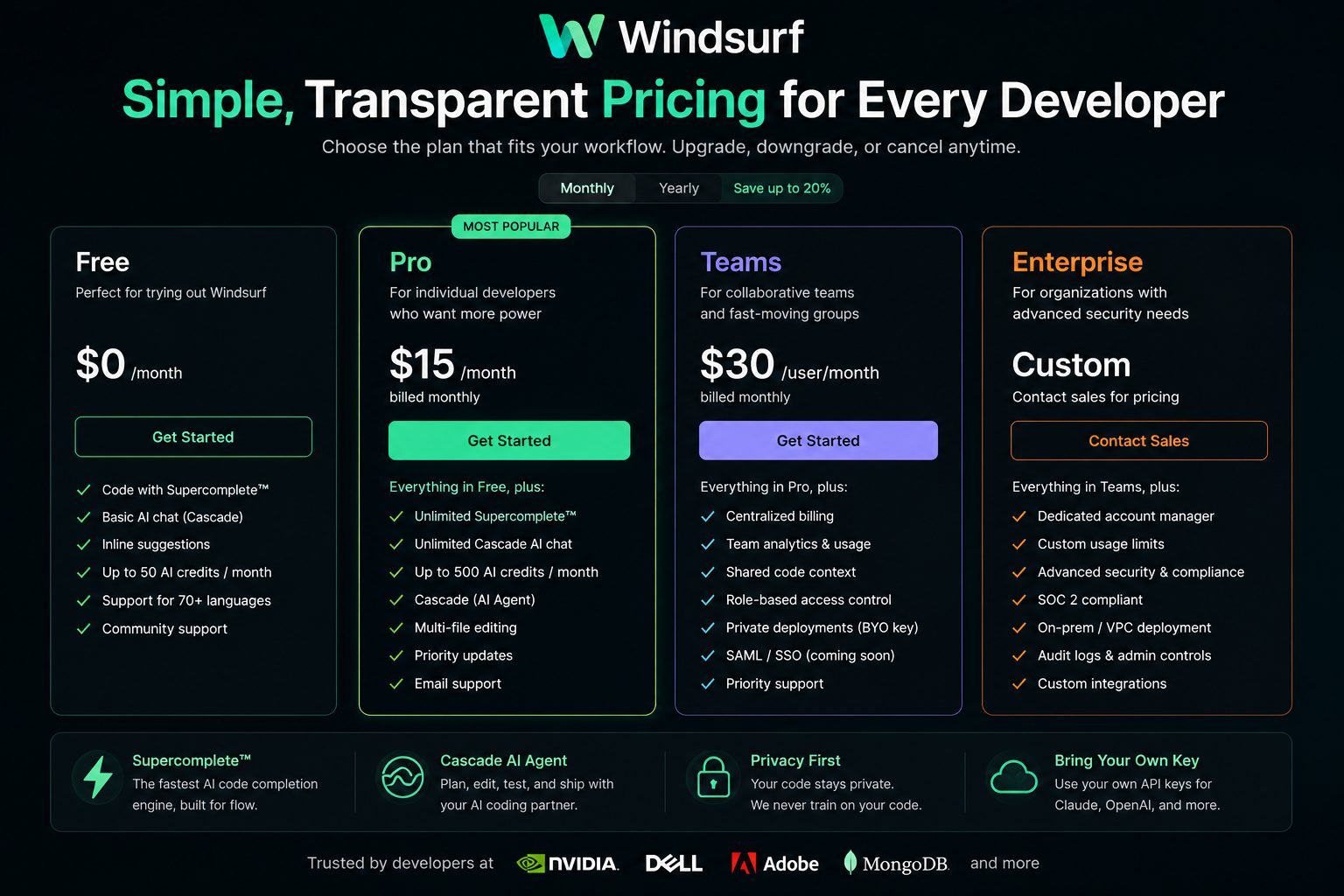
One of Windsurf’s biggest strengths is its flexible pricing model. Unlike many AI coding assistants that lock advanced functionality behind expensive subscriptions, Windsurf offers multiple plans designed for individual developers, startups, growing engineering teams, and large enterprises.
Whether you’re experimenting with AI-assisted development or managing a large software organization, there is a pricing tier that matches your workflow and budget.
Available Pricing Plans
Although features evolve over time, Windsurf’s pricing structure generally follows four primary tiers. Higher plans unlock larger AI usage limits, additional collaboration features, and enterprise management capabilities.
| Plan | Best For | Main Features |
|---|---|---|
| Free | Students & Individual Developers | Core AI coding assistance, limited AI usage, basic repository support. |
| Pro | Professional Developers | Higher AI limits, advanced Cascade capabilities, improved productivity features. |
| Teams | Engineering Teams | Shared collaboration, centralized management, additional AI capacity. |
| Enterprise | Large Organizations | Enterprise administration, enhanced security controls, organizational management, premium support. |
Is the Free Plan Good Enough?
For many developers, the free plan is an excellent starting point. It allows users to explore Windsurf’s interface, experience AI-assisted coding, and evaluate core features before committing to a paid subscription.
Freelancers, hobbyists, and students can complete many everyday development tasks without immediately upgrading. As projects become larger and AI usage increases, moving to a paid plan provides greater flexibility and removes many practical limitations.
Free Plan Highlights
- Ideal for learning the platform.
- Suitable for personal projects.
- Access to core AI functionality.
- Modern AI-native development experience.
- No financial commitment required.
Should You Upgrade to Pro?
Developers who rely on AI throughout the workday will benefit significantly from the Pro plan. Increased usage limits, improved AI responsiveness, and access to more advanced capabilities make it a worthwhile investment for professionals building software every day.
If AI has become part of your primary development workflow, the productivity gains can easily outweigh the subscription cost by saving hours of repetitive work each week.
| User Type | Recommended Plan |
|---|---|
| Student | Free |
| Freelancer | Free or Pro |
| Professional Developer | Pro |
| Startup Team | Teams |
| Large Enterprise | Enterprise |
Value for Money
When comparing AI coding assistants, pricing should never be evaluated in isolation. The real question is how much time the platform saves and whether it improves software quality enough to justify the subscription.
Windsurf performs exceptionally well in this area. Features such as repository-wide context awareness, intelligent multi-file editing, Cascade AI Agent, and Supercomplete reduce repetitive work while helping developers maintain focus throughout complex engineering tasks.
For professional developers, even modest productivity improvements can quickly offset the monthly subscription cost. Teams managing larger repositories may experience even greater returns through faster feature delivery, more consistent code quality, and reduced maintenance effort.
Vorexen Verdict
Value for Money Rating: 9.5 / 10
Windsurf offers one of the strongest value propositions among modern AI coding platforms. Its combination of intelligent automation, repository awareness, and developer-focused workflow makes it a compelling investment for both individuals and software teams.
Windsurf vs Cursor
Windsurf and Cursor are currently two of the most discussed AI-native development environments. Both significantly improve developer productivity, but they focus on slightly different workflows.
Cursor emphasizes a familiar VS Code experience enhanced with AI-powered editing and chat, making it an excellent choice for developers who want minimal disruption to their existing workflow. Windsurf, on the other hand, is designed around AI-first development, where intelligent agents actively participate throughout the software engineering process.
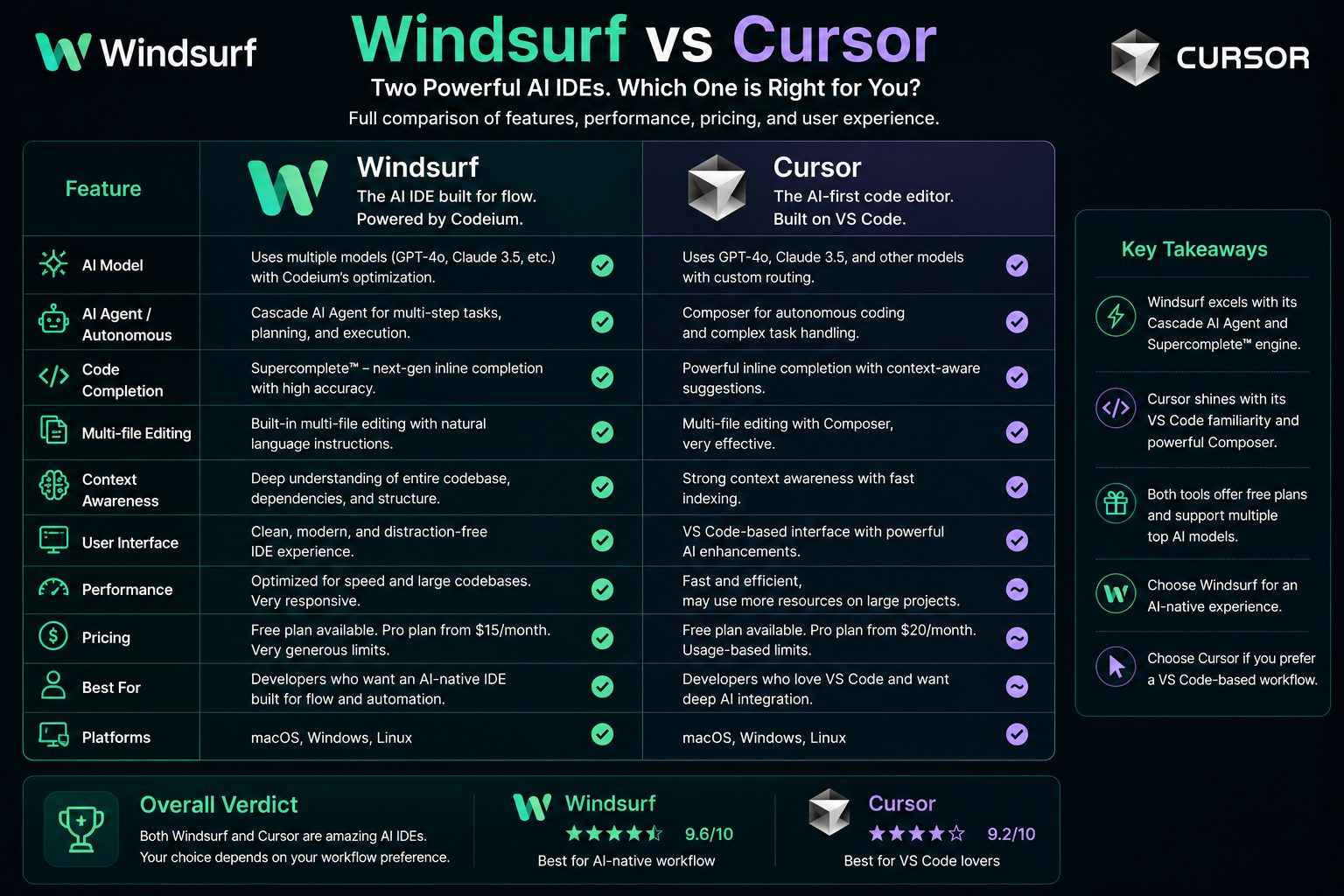
| Feature | Windsurf | Cursor |
|---|---|---|
| AI-First IDE | ★★★★★ | ★★★★☆ |
| Repository Awareness | ★★★★★ | ★★★★☆ |
| Multi-file Editing | ★★★★★ | ★★★★☆ |
| Code Completion | ★★★★★ | ★★★★★ |
| Learning Curve | ★★★★☆ | ★★★★★ |
| Overall Productivity | 9.7 / 10 | 9.4 / 10 |
Winner
If your workflow revolves around AI-assisted software engineering, repository-wide changes, and intelligent automation, Windsurf offers the stronger experience. Developers who prefer a more familiar VS Code workflow with powerful AI enhancements may still find Cursor an excellent option.
Windsurf vs GitHub Copilot
GitHub Copilot helped popularize AI-assisted programming by bringing intelligent code completion directly into developers’ editors. Windsurf builds on that concept by expanding AI assistance beyond autocomplete into planning, reasoning, repository understanding, and coordinated project-wide editing.
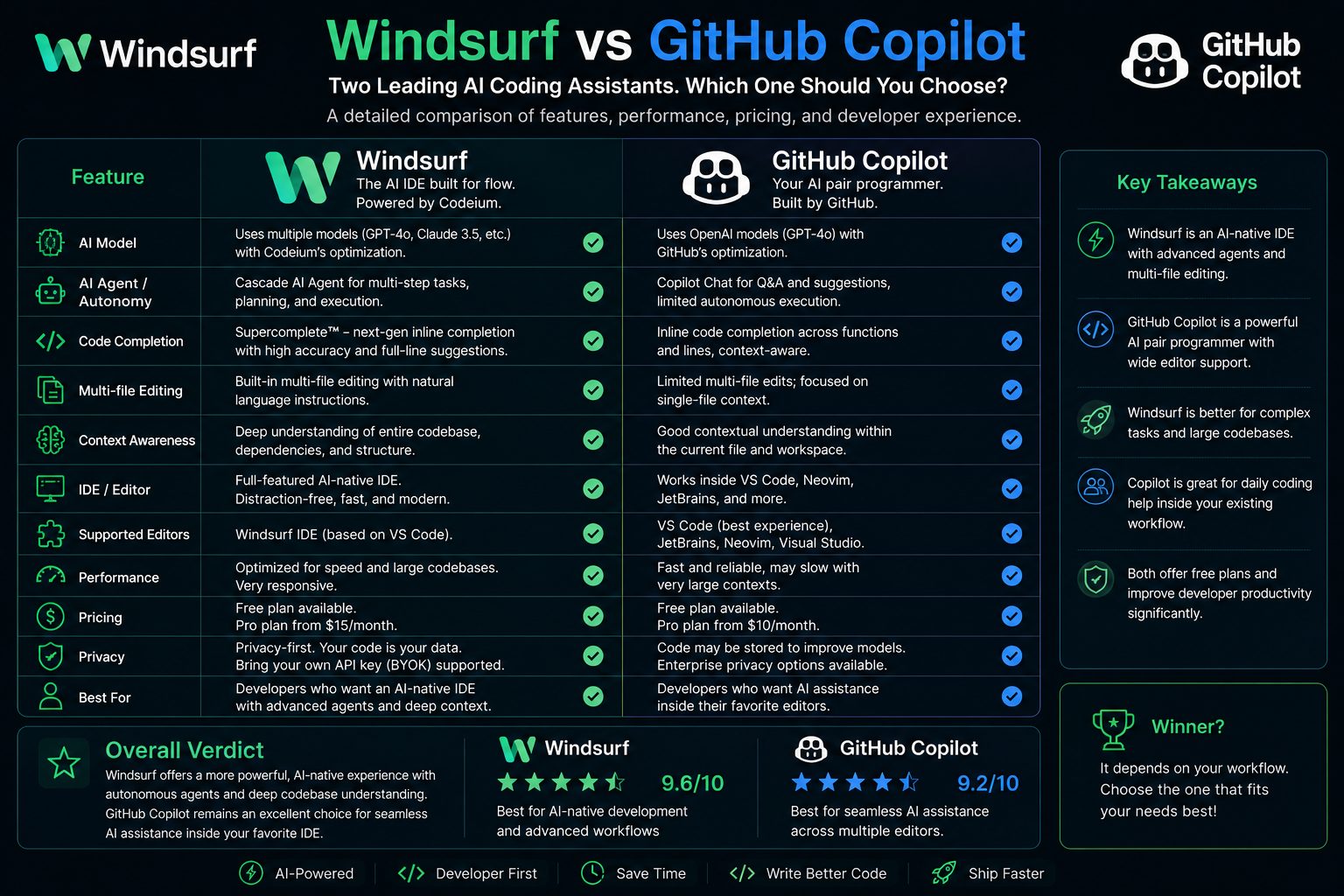
| Category | Windsurf | GitHub Copilot |
|---|---|---|
| AI Planning | ★★★★★ | ★★★☆☆ |
| Repository Understanding | ★★★★★ | ★★★★☆ |
| Code Completion | ★★★★★ | ★★★★★ |
| Large Refactoring | ★★★★★ | ★★★☆☆ |
| Developer Workflow | AI Native | Editor Extension |
| Overall Rating | 9.7 / 10 | 9.3 / 10 |
GitHub Copilot remains one of the strongest AI coding assistants for developers who primarily want intelligent code completion. However, Windsurf offers a broader AI development platform capable of assisting throughout the software lifecycle rather than only during code generation.
Windsurf vs Claude Code
Claude Code excels at deep reasoning, long-context conversations, and explaining complex programming concepts. Windsurf focuses more heavily on integrating AI directly into the development workflow through intelligent editing, repository awareness, and automation.
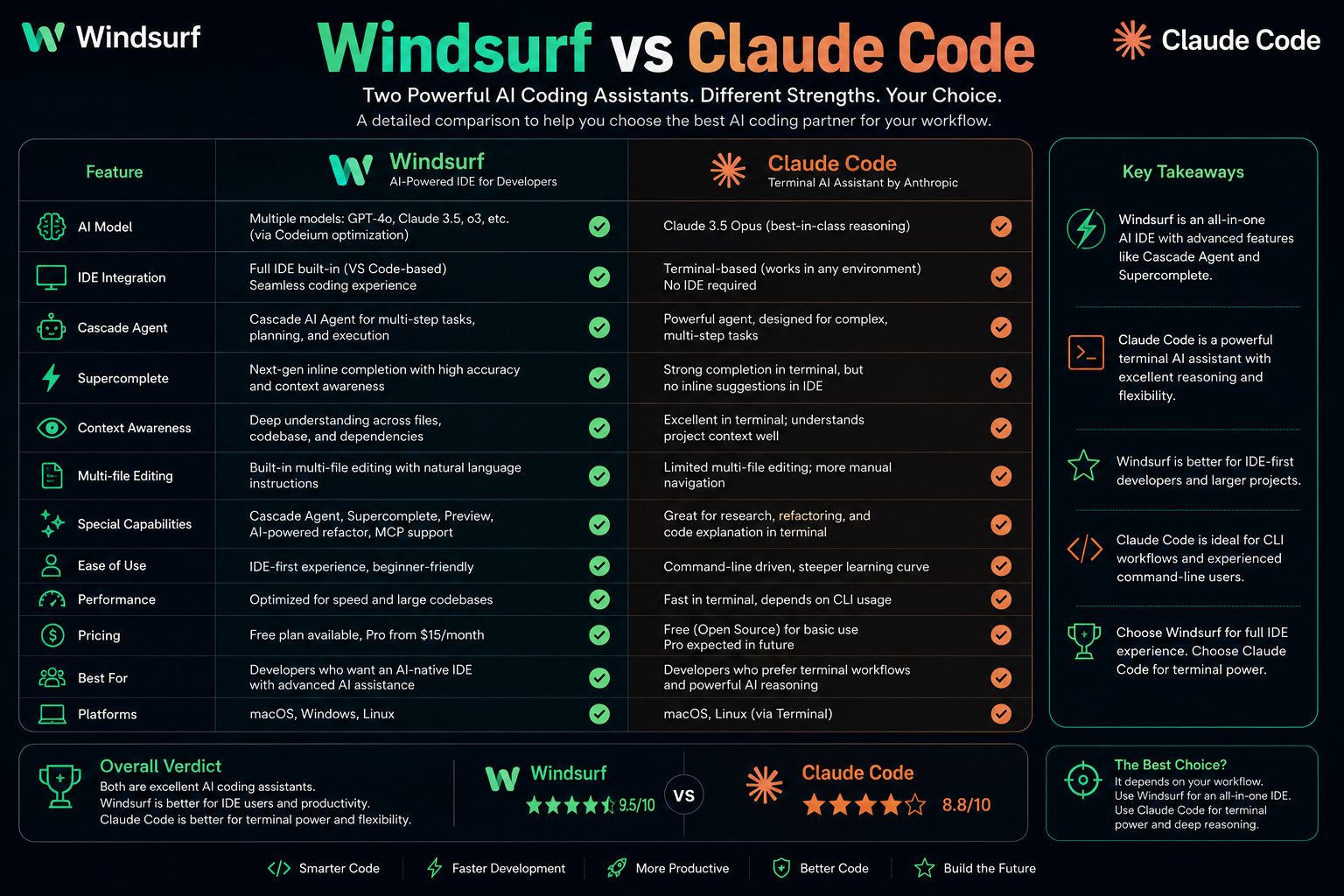
| Capability | Windsurf | Claude Code |
|---|---|---|
| IDE Integration | ★★★★★ | ★★★★☆ |
| Repository Context | ★★★★★ | ★★★★☆ |
| Reasoning Quality | ★★★★☆ | ★★★★★ |
| Development Automation | ★★★★★ | ★★★★☆ |
| Productivity | 9.7 / 10 | 9.2 / 10 |
Which One Should You Choose?
Choose Windsurf if you want an AI-native IDE that actively participates in coding, debugging, refactoring, and repository-wide development tasks.
Choose Claude Code if your priority is advanced reasoning, architectural discussions, technical explanations, and solving complex programming problems through conversational AI.
Pros and Cons
After evaluating Windsurf across developer experience, AI capabilities, repository awareness, productivity, pricing, and real-world usability, it becomes clear that the platform delivers one of the strongest AI-native coding experiences currently available.
Like every development tool, however, it has both strengths and limitations.
Pros
- Excellent AI-native IDE experience.
- Outstanding Cascade AI Agent.
- Industry-leading repository awareness.
- Powerful multi-file editing.
- Highly accurate Supercomplete suggestions.
- Fast code generation.
- Natural language programming workflow.
- Clean and intuitive interface.
- Supports multiple leading AI models.
- Strong free plan for new users.
- Helpful AI explanations and documentation.
- Excellent productivity improvements for daily development.
Cons
- Advanced features require some learning.
- Heavy AI usage may consume credits quickly.
- Some enterprise capabilities continue to evolve.
- Requires an internet connection for AI features.
- Occasionally benefits from manual review of generated code.
- Large repositories may take time to index initially.
Best Alternatives to Windsurf
Although Windsurf ranks among the best AI coding platforms available today, several excellent alternatives may better suit different workflows or preferences.
| Tool | Best For | Overall Rating |
|---|---|---|
| Cursor | Developers wanting a VS Code-like AI editor. | 9.4 / 10 |
| GitHub Copilot | Fast AI-assisted code completion. | 9.3 / 10 |
| Claude Code | Deep reasoning and technical discussions. | 9.2 / 10 |
| Continue | Open-source AI coding workflows. | 8.9 / 10 |
| Zed AI | High-performance collaborative editing. | 8.8 / 10 |
The best choice ultimately depends on your preferred workflow. Developers who prioritize AI-first engineering, repository intelligence, and intelligent automation will likely find Windsurf to be the strongest overall option.
Why We Recommend Windsurf
Modern software development increasingly requires more than autocomplete. Developers need AI that understands architecture, coordinates changes across repositories, explains unfamiliar code, assists with debugging, and reduces repetitive work throughout the software lifecycle.
Windsurf successfully delivers this broader vision. Rather than acting as a passive assistant, it actively collaborates with developers through intelligent planning, repository understanding, and workflow automation.
Its combination of Cascade AI Agent, Supercomplete, multi-file editing, and deep contextual awareness creates one of the most complete AI development environments currently available.
Overall Ratings
| Category | Score |
|---|---|
| Ease of Use | 9.4 / 10 |
| AI Code Generation | 9.8 / 10 |
| Repository Awareness | 9.9 / 10 |
| Code Quality | 9.7 / 10 |
| Debugging | 9.5 / 10 |
| Documentation | 9.4 / 10 |
| Performance | 9.7 / 10 |
| Pricing | 9.5 / 10 |
| Overall | 9.7 / 10 |
Coming Up Next
In the final part of this review, we’ll answer the most frequently asked questions about Windsurf, summarize our findings, present the final verdict, include our overall recommendation, provide a call-to-action, and suggest additional AI coding tools worth exploring.
Frequently Asked Questions
Is Windsurf free?
Yes. Windsurf offers a free plan that allows developers to experience its core AI-powered coding features without paying for a subscription. For users who require higher AI usage limits, advanced capabilities, or team collaboration features, paid plans are also available.
What makes Windsurf different from GitHub Copilot?
GitHub Copilot primarily focuses on intelligent code completion and inline suggestions. Windsurf goes beyond autocomplete by providing repository-wide context awareness, AI agents, multi-file editing, planning capabilities, debugging assistance, and natural-language development workflows.
Is Windsurf better than Cursor?
Both are excellent AI development environments, but they emphasize different strengths. Cursor delivers a familiar AI-enhanced coding experience built around the VS Code ecosystem, while Windsurf focuses on an AI-native workflow powered by Cascade AI Agent and deeper repository understanding.
Can Windsurf understand large projects?
Yes. One of Windsurf’s strongest capabilities is its ability to analyze project structure, understand relationships between files, and maintain repository-wide context. This makes it particularly useful for medium and large software projects.
Which programming languages does Windsurf support?
Windsurf supports dozens of popular programming languages, including Python, JavaScript, TypeScript, Java, Go, Rust, C++, C#, PHP, Swift, Kotlin, SQL, HTML, CSS, and many others.
Can Windsurf generate entire applications?
Windsurf can generate substantial portions of an application, including components, APIs, documentation, tests, and project structures. However, developers should always review AI-generated code before deploying it to production.
Does Windsurf work for beginners?
Absolutely. Beginners can use Windsurf to understand unfamiliar code, learn programming concepts, generate examples, and receive explanations while coding. More experienced developers will benefit from its advanced automation and repository-level intelligence.
Does Windsurf replace software developers?
No. Windsurf is designed to enhance developer productivity rather than replace human expertise. Software engineering still requires architectural thinking, problem solving, system design, testing, and business decision-making that depend on human judgment.
Is Windsurf suitable for enterprise development?
Yes. Teams working on large repositories can benefit from Windsurf’s collaboration features, repository awareness, intelligent refactoring, and enterprise-oriented management capabilities, depending on the selected plan.
Should you choose Windsurf in 2026?
If you’re looking for an AI-native development environment that combines intelligent code generation, repository awareness, automation, and developer productivity, Windsurf is one of the strongest choices available in 2026.
Quick FAQ Summary
- ✅ Free plan available.
- ✅ Excellent for professional developers.
- ✅ Strong repository understanding.
- ✅ Supports numerous programming languages.
- ✅ Ideal for medium and large projects.
- ✅ Outstanding AI-native workflow.
- ✅ One of the best AI coding IDEs of 2026.
Final Verdict
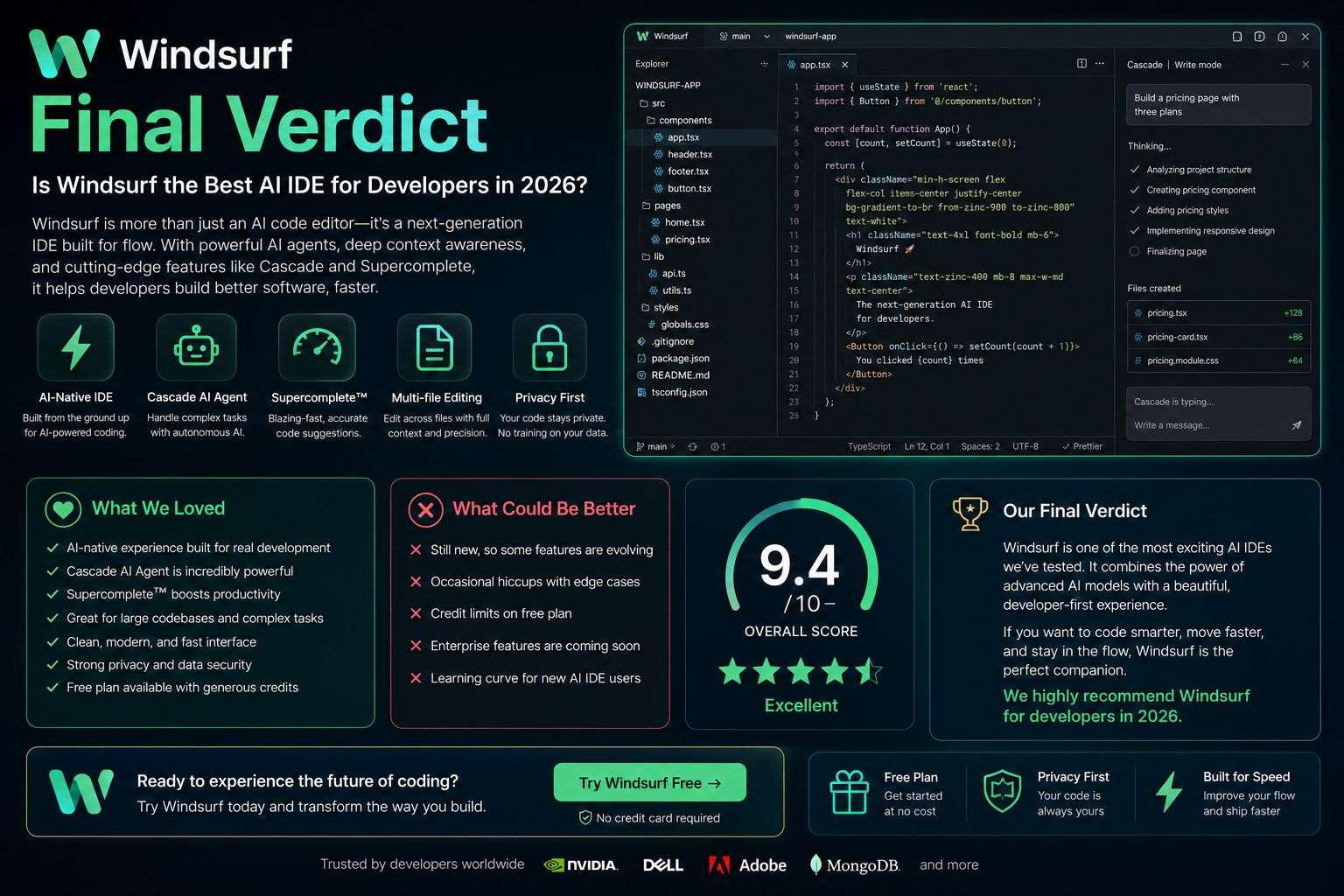
After thoroughly evaluating Windsurf’s AI capabilities, developer experience, repository awareness, pricing, automation features, and overall productivity, it stands out as one of the most capable AI-native development environments available in 2026.
Unlike traditional AI coding assistants that focus primarily on autocomplete, Windsurf supports developers throughout the entire software development lifecycle. From understanding unfamiliar codebases and planning new features to refactoring large repositories and generating documentation, the platform is designed to become an active development partner rather than a passive assistant.
Its biggest strengths include Cascade AI Agent, Supercomplete, intelligent repository awareness, multi-file editing, AI-powered debugging, and a clean, modern interface that minimizes context switching.
While advanced workflows require a short learning period and heavy AI usage may exceed free-plan limits, these limitations are relatively minor compared to the productivity gains the platform can provide.
Vorexen Overall Rating
| Category | Rating |
|---|---|
| Ease of Use | ★★★★★ (9.4/10) |
| AI Code Generation | ★★★★★ (9.8/10) |
| Context Awareness | ★★★★★ (9.9/10) |
| Repository Intelligence | ★★★★★ (9.9/10) |
| Debugging Assistance | ★★★★☆ (9.5/10) |
| Documentation | ★★★★☆ (9.4/10) |
| Performance | ★★★★★ (9.7/10) |
| Pricing & Value | ★★★★☆ (9.5/10) |
| Overall Score | ★★★★★ (9.7/10) |
Who We Recommend Windsurf To
Based on our evaluation, Windsurf is particularly well suited for developers and engineering teams that want AI to become an integral part of their daily workflow rather than a simple autocomplete assistant.
Recommended For
- ✔ Professional software developers
- ✔ Full-stack engineers
- ✔ Backend developers
- ✔ Frontend developers
- ✔ Startup engineering teams
- ✔ Enterprise development organizations
- ✔ Open-source contributors
- ✔ Students learning software engineering
- ✔ Developers working with large repositories
- ✔ Teams adopting AI-assisted development
Biggest Reasons to Choose Windsurf
- AI-native development experience.
- Exceptional repository understanding.
- Powerful Cascade AI Agent.
- Highly accurate Supercomplete engine.
- Excellent multi-file editing.
- Fast code generation.
- Natural language programming.
- Strong debugging assistance.
- Useful documentation generation.
- Outstanding productivity gains.
Ready to Try Windsurf?
If you’re looking for an AI-powered development environment that goes beyond simple code completion, Windsurf is well worth exploring. Its AI-native workflow, Cascade AI Agent, intelligent repository awareness, and advanced automation can significantly improve productivity for both individual developers and engineering teams.
Whether you’re building a new application, maintaining a large production repository, or learning a new framework, Windsurf offers one of the most capable AI coding experiences available today.
Final Thoughts
Artificial intelligence is rapidly changing how software is built, tested, and maintained. Modern development is no longer limited to writing every line of code manually—developers increasingly rely on intelligent assistants to accelerate repetitive work, improve code quality, and better understand complex projects.
Windsurf represents this new generation of AI-native development environments. Rather than acting as a simple autocomplete extension, it combines intelligent reasoning, repository awareness, automation, and conversational AI into a unified coding experience.
For developers who spend hours each day writing, debugging, and maintaining software, Windsurf has the potential to save significant time while improving overall development efficiency.
Although no AI tool can replace experienced software engineers, Windsurf demonstrates how AI can become a reliable development partner—helping teams move faster without sacrificing quality.
Review Summary
| Product | Windsurf |
|---|---|
| Category | AI Coding Assistant / AI-Native IDE |
| Best For | Professional developers, software teams, startups, and enterprise engineering. |
| Free Version | Yes |
| Starting Plan | Free (Paid plans available) |
| Top Features | Cascade AI Agent, Supercomplete, Repository Awareness, Multi-file Editing, AI Debugging |
| Overall Rating | 9.7 / 10 |