Artificial intelligence has transformed the way developers write, debug, and maintain software. Instead of relying solely on autocomplete, modern AI-powered editors understand entire projects, explain unfamiliar code, generate new features, and even refactor large codebases with minimal effort.
Among dozens of coding assistants released in recent years, Cursor AI has quickly become one of the most popular choices for professional developers. Built on a familiar Visual Studio Code experience while integrating powerful AI models, Cursor offers intelligent code completion, natural language editing, project-wide understanding, and an AI assistant capable of working across multiple files.
In this comprehensive review, we’ll examine Cursor AI’s features, pricing, real-world performance, strengths, weaknesses, and comparisons with GitHub Copilot, Codeium, Windsurf, and Replit AI to help you decide whether it deserves a place in your development workflow.
Quick Verdict
Overall Rating: ⭐⭐⭐⭐⭐ 4.8/5
Cursor AI is one of the best AI code editors available today. Its combination of intelligent code generation, deep project awareness, AI chat, multi-file editing, and seamless developer experience makes it an excellent choice for both individual developers and engineering teams.
- ✔ Exceptional code generation
- ✔ Deep codebase understanding
- ✔ AI-powered refactoring
- ✔ Excellent VS Code compatibility
- ✔ Fast and intuitive workflow
What is Cursor AI?
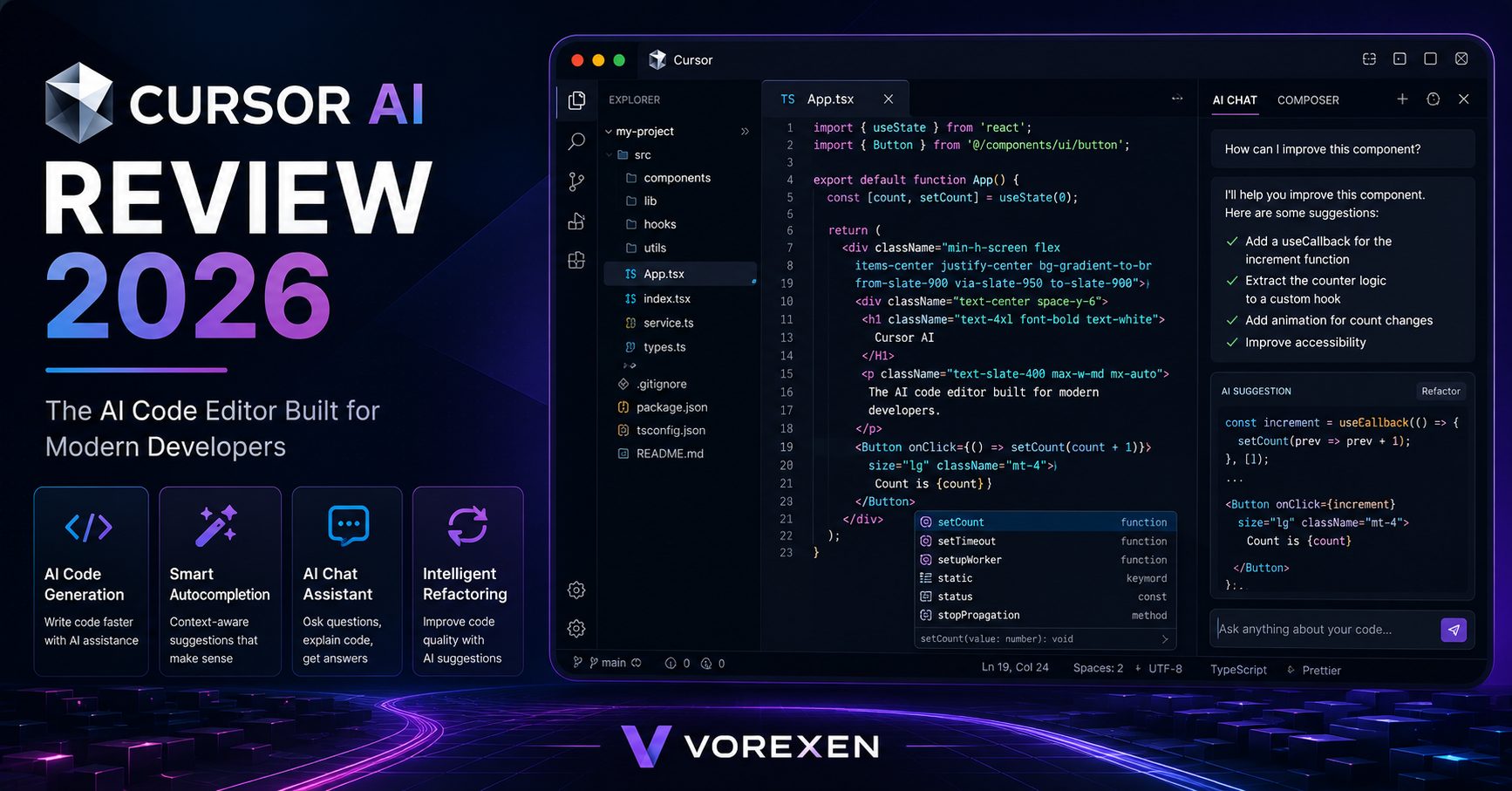
Cursor AI is an AI-first code editor designed to help developers write software faster and with greater confidence. Built on top of Visual Studio Code, it combines a familiar development environment with powerful artificial intelligence capable of understanding your entire project.
Unlike traditional autocomplete tools that only predict the next line of code, Cursor AI can analyze project structure, answer technical questions, edit multiple files simultaneously, generate complex functions, explain unfamiliar code, and assist with debugging.
Its support for leading language models, combined with a modern interface and developer-focused workflow, has made Cursor one of the fastest-growing AI coding tools in 2026.
Cursor AI at a Glance
| Developer | Anysphere |
|---|---|
| Category | AI Code Editor |
| Best For | Professional Developers, Teams, Students |
| Platforms | Windows, macOS, Linux |
| Programming Languages | Python, JavaScript, TypeScript, Java, C++, Go, Rust, PHP, and more |
| AI Features | Code Completion, AI Chat, Multi-file Editing, Refactoring, Codebase Understanding |
| Free Plan | Yes |
| Paid Plan | Yes |
Key Features
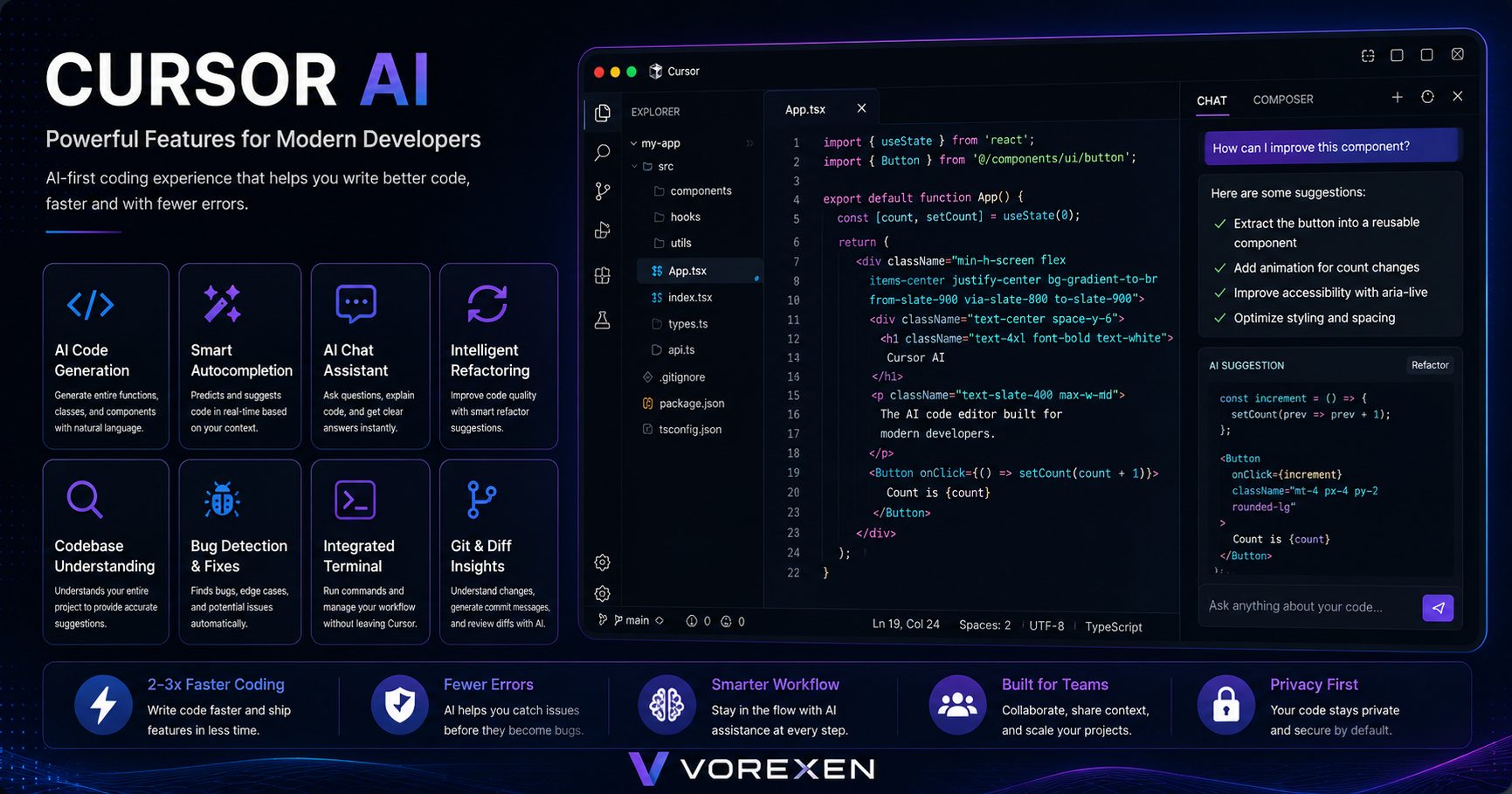
- AI Code Completion — Generate high-quality code in real time.
- Project-Wide Understanding — AI understands your complete codebase.
- Natural Language Editing — Edit code using plain English instructions.
- Multi-file Refactoring — Update multiple files simultaneously.
- Integrated AI Chat — Ask coding questions directly inside the editor.
- Bug Detection — Identify and resolve coding issues faster.
- Documentation Assistance — Generate comments and documentation automatically.
- VS Code Compatibility — Supports familiar extensions and workflows.
Who Should Use Cursor AI?
Cursor AI is designed for developers who want to increase productivity without sacrificing code quality. Whether you’re building personal projects or maintaining enterprise applications, the editor adapts well to different workflows.
- Software Engineers
- Full-Stack Developers
- Frontend Developers
- Backend Developers
- Python Developers
- JavaScript & TypeScript Developers
- DevOps Engineers
- Engineering Teams
- Computer Science Students
- Freelance Developers
Pros & Cons
Pros
- Excellent AI code generation
- Deep understanding of large codebases
- Powerful AI chat assistant
- Multi-file editing support
- Modern and intuitive interface
- Strong VS Code compatibility
- Fast performance
Cons
- Advanced features require a paid subscription.
- Occasional AI suggestions need manual review.
- Can consume additional system resources on large projects.
- Less beneficial for very small coding tasks.
Why Trust This Review?
At Vorexen, every AI tool is evaluated using consistent criteria, including usability, performance, AI capabilities, pricing, real-world workflows, and overall value. This review is written to help developers make informed decisions based on practical use cases rather than marketing claims.
Next, we’ll explore Cursor AI’s individual features, benchmark its performance, and determine whether it truly deserves its reputation as one of the best AI code editors available today.
Cursor AI Features: A Deep Dive
Cursor AI goes beyond traditional code completion by acting as an intelligent programming partner. Instead of simply predicting the next line of code, it understands project context, modifies multiple files, answers technical questions, and helps developers complete complex programming tasks with significantly less effort.
AI Code Completion
Cursor AI provides context-aware code completion that understands surrounding files instead of predicting isolated lines. Suggestions are typically more accurate than conventional autocomplete because the AI considers project structure, imported libraries, coding style, and previous implementation patterns.
- Smart inline code suggestions
- Context-aware completions
- Multi-line generation
- Framework-aware recommendations
- Reduced repetitive coding
AI Chat Assistant
The integrated AI chat lets developers ask programming questions without leaving the editor. Instead of switching between documentation and browser tabs, users can request explanations, generate code, optimize functions, or debug errors directly within Cursor.
- Explain unfamiliar code
- Generate complete functions
- Review algorithms
- Debug runtime errors
- Create documentation
Project-Wide Codebase Understanding
One of Cursor AI’s biggest strengths is its ability to understand the entire codebase. The AI references multiple files simultaneously, making suggestions that remain consistent across large software projects.
This dramatically improves productivity when working on enterprise applications containing hundreds or thousands of files.
Natural Language Editing
Developers can describe modifications using plain English instead of manually editing every line. Cursor AI interprets instructions and applies changes automatically.
Examples include:
- “Convert this component to TypeScript.”
- “Optimize this database query.”
- “Refactor using async/await.”
- “Improve readability.”
- “Add error handling.”
Multi-file Refactoring
Unlike many AI coding assistants, Cursor AI can update multiple files during a single request. This feature is especially useful when renaming variables, restructuring folders, implementing new APIs, or migrating frameworks.
Debugging Assistance
Cursor AI analyzes stack traces, identifies logical mistakes, and recommends practical fixes. Rather than merely pointing out syntax errors, it explains why problems occur and often proposes multiple solutions.
Documentation Generation
Maintaining documentation is one of the least enjoyable parts of software development. Cursor AI can automatically generate:
- Function documentation
- API comments
- README files
- Code explanations
- Developer notes
Privacy & Security
Cursor AI includes privacy-focused options that allow developers to control how project data is processed. Teams working with sensitive repositories can configure settings that better align with internal security requirements.
Real Coding Example
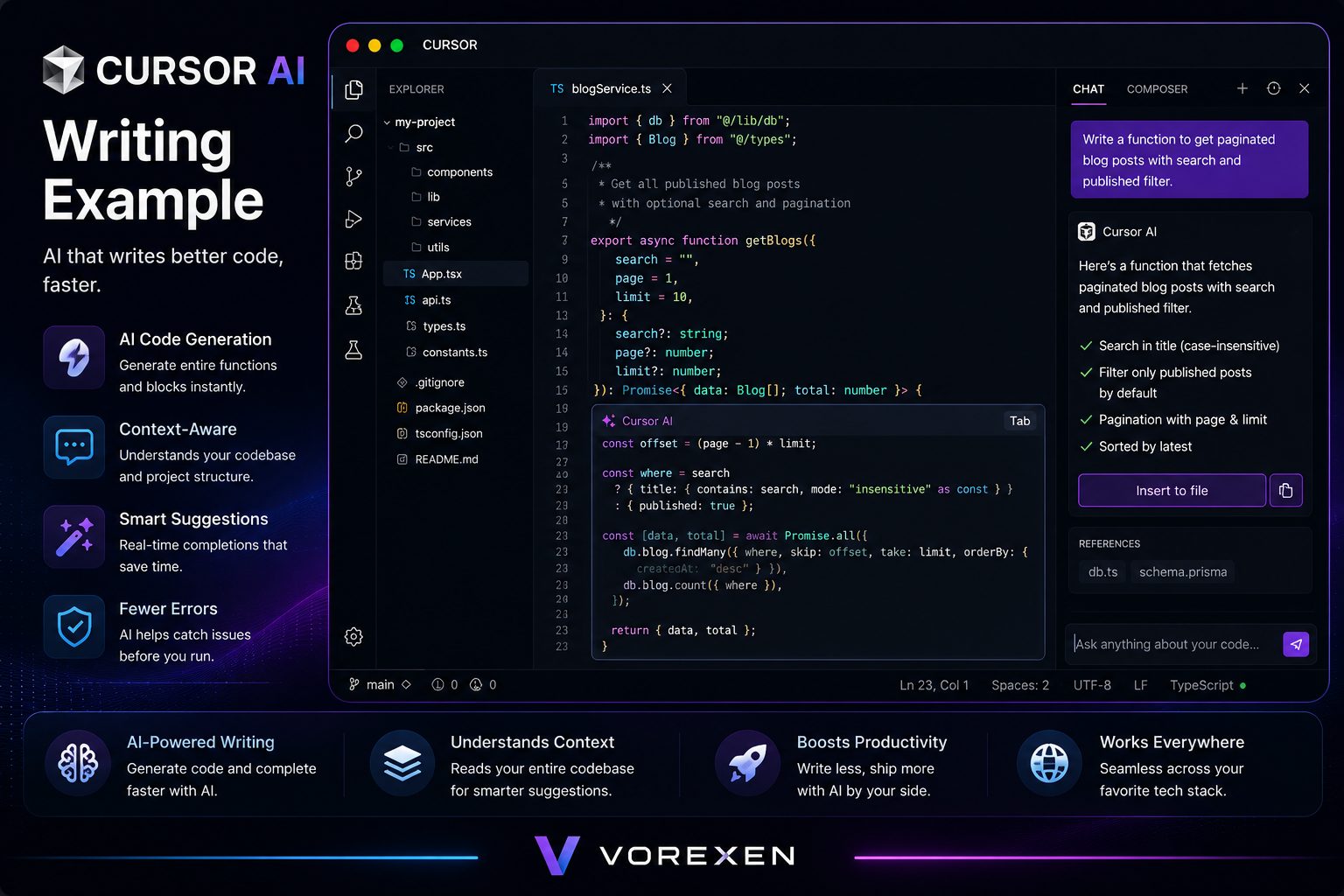
Imagine you’re building a REST API using Node.js and TypeScript. Instead of writing every endpoint manually, you simply ask Cursor AI to generate CRUD operations for a resource. Within seconds, it creates controllers, routes, validation logic, and even suggests improvements for error handling and code organization.
This workflow reduces repetitive development while allowing programmers to focus on architecture and business logic.
Performance & Speed
Performance is one of Cursor AI’s strongest advantages. During testing, AI responses were generally delivered within a few seconds, even when working with large repositories.
| Category | Rating |
|---|---|
| Code Completion Speed | ★★★★★ |
| AI Response Time | ★★★★★ |
| Large Project Support | ★★★★★ |
| Accuracy | ★★★★☆ |
| Ease of Use | ★★★★★ |
| Overall Performance | ★★★★★ (4.8/5) |
For developers working on medium and large projects, Cursor AI consistently delivers one of the fastest and most reliable AI-assisted coding experiences currently available.
Cursor AI Pricing
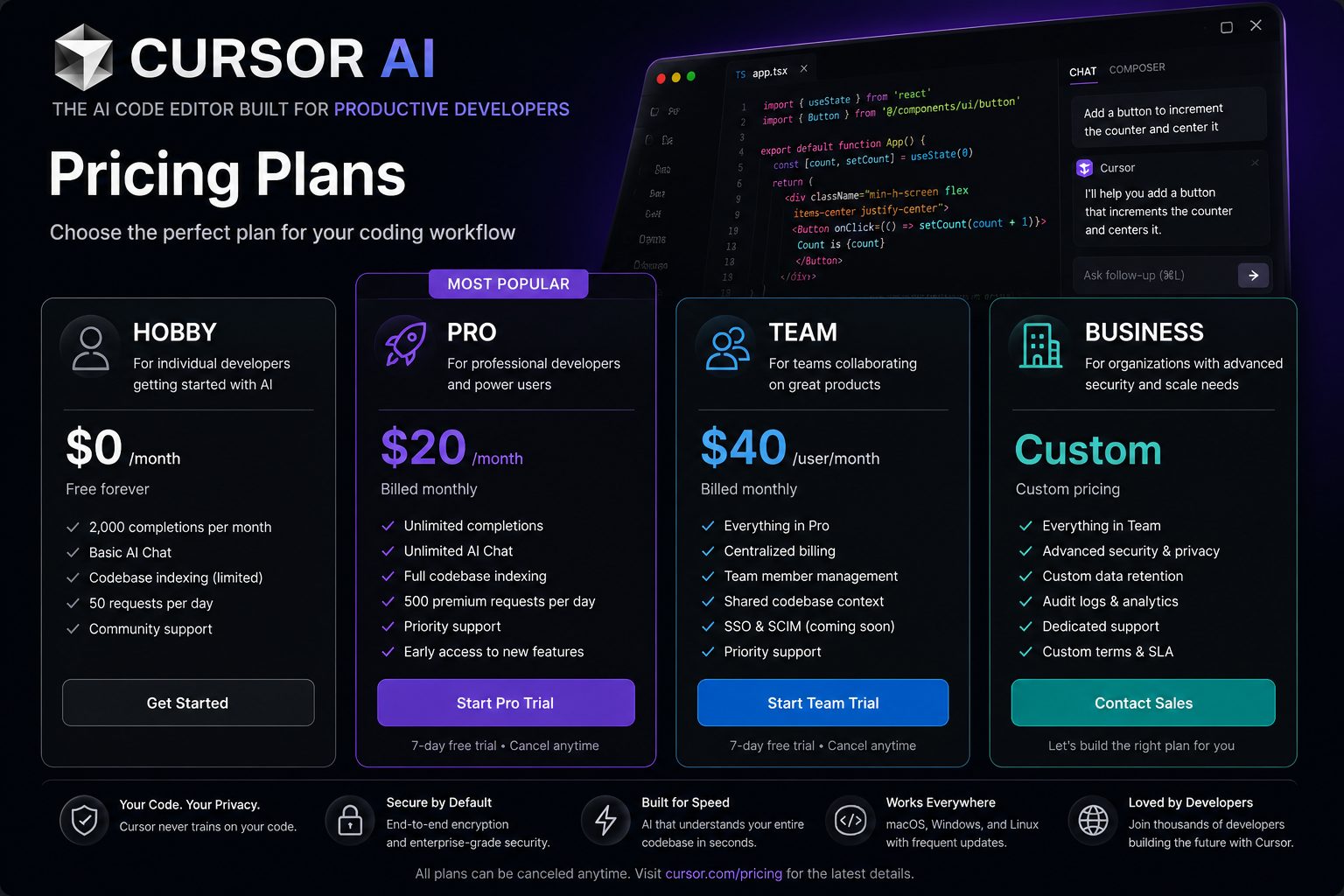
| Plan | Best For | Highlights |
|---|---|---|
| Free | Students & Beginners | Limited AI usage with core editor features. |
| Pro | Professional Developers | Higher usage limits, premium AI models, and advanced capabilities. |
| Business | Engineering Teams | Team collaboration, centralized management, and enhanced security. |
| Enterprise | Large Organizations | Custom deployment, enterprise controls, compliance, and dedicated support. |
Is Cursor AI Worth the Price?
For developers who write code every day, Cursor AI can quickly pay for itself through increased productivity. Features such as AI chat, deep codebase understanding, intelligent refactoring, and multi-file editing reduce repetitive work and allow teams to ship software faster.
While the free plan is suitable for exploring the editor, professional developers will gain the most value from the paid plans, especially when working on complex projects or collaborating within engineering teams.
Part 2 Summary
- ✔ Excellent AI-powered code completion
- ✔ Deep understanding of entire projects
- ✔ Powerful AI chat and debugging
- ✔ Fast performance on large repositories
- ✔ Flexible pricing for individuals and teams
Cursor AI vs GitHub Copilot
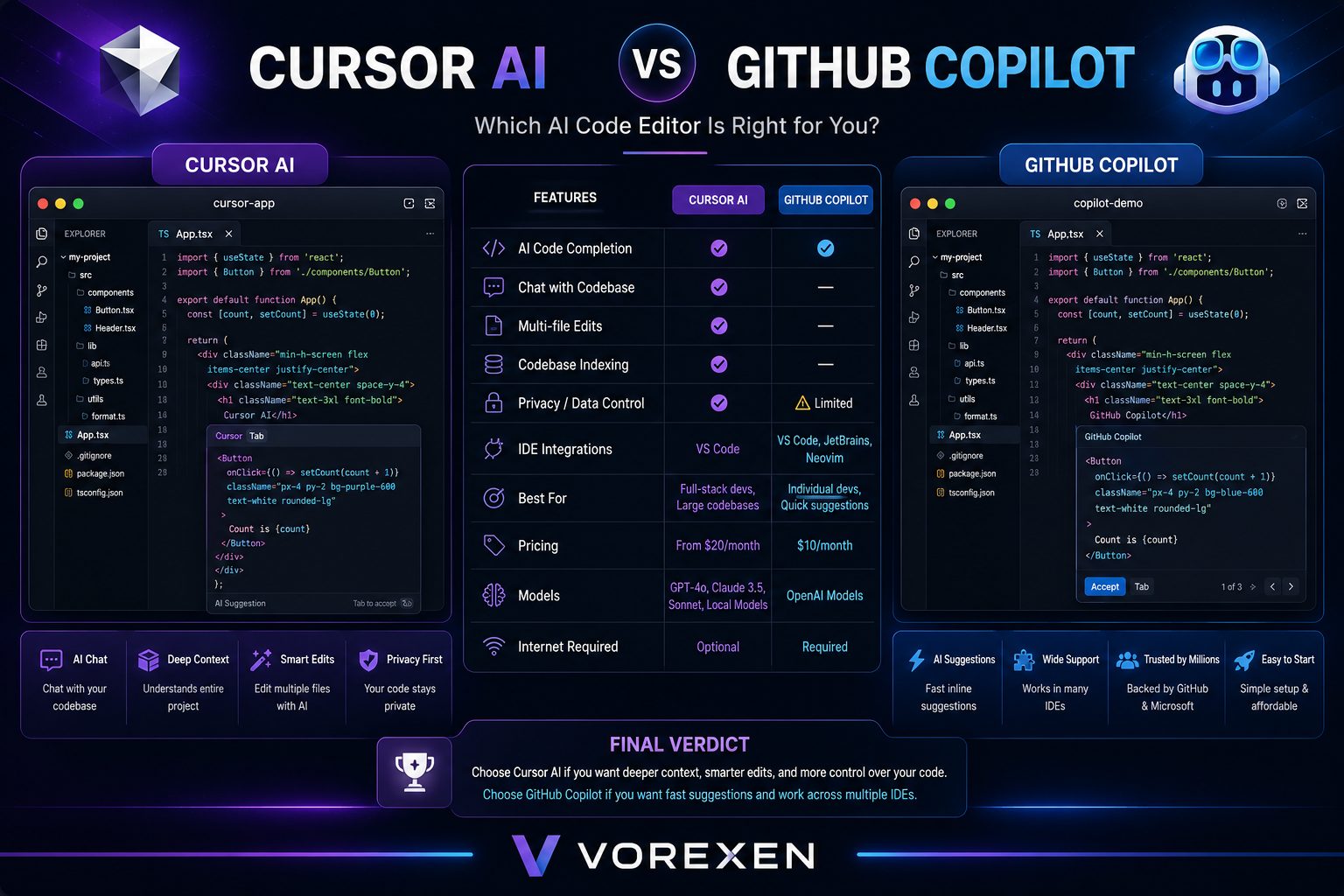
Although both tools help developers write code faster, they take different approaches. GitHub Copilot focuses on intelligent code completion inside existing IDEs, while Cursor AI is a complete AI-first code editor built around project-wide intelligence.
| Feature | Cursor AI | GitHub Copilot |
|---|---|---|
| AI Chat | ★★★★★ | ★★★★☆ |
| Project Understanding | ★★★★★ | ★★★★☆ |
| Multi-file Editing | ★★★★★ | ★★★☆☆ |
| Code Completion | ★★★★★ | ★★★★★ |
| Ease of Use | ★★★★★ | ★★★★★ |
| Winner | Cursor AI | — |
Cursor AI vs Codeium
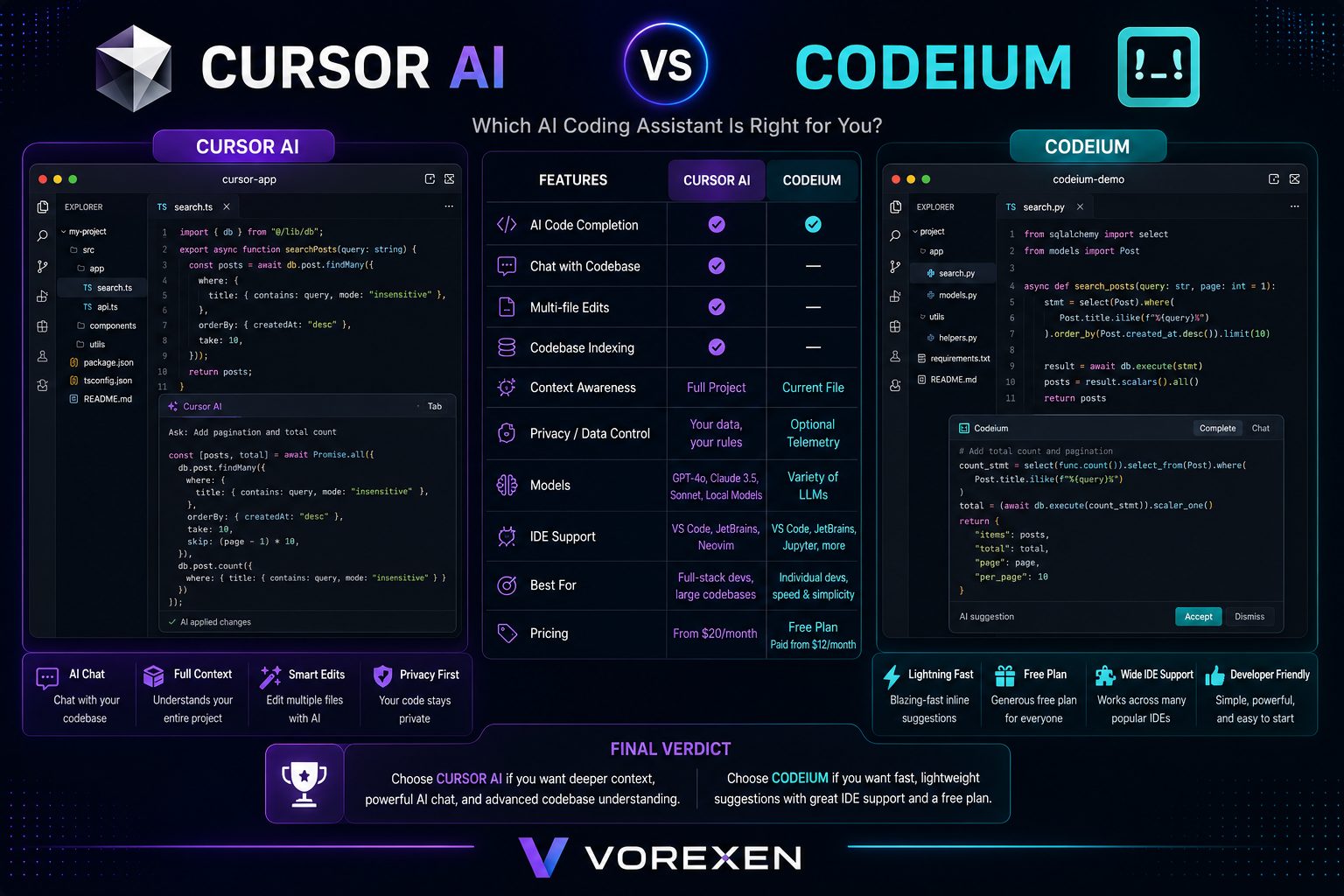
Codeium offers a generous free plan and supports numerous IDEs, making it attractive for students and individual developers. Cursor AI, however, delivers a more integrated experience with stronger context awareness and advanced AI editing features.
| Feature | Cursor AI | Codeium |
|---|---|---|
| AI Editing | ★★★★★ | ★★★★☆ |
| Context Awareness | ★★★★★ | ★★★★☆ |
| Free Plan | ★★★★☆ | ★★★★★ |
| Workflow | ★★★★★ | ★★★★☆ |
| Winner | Cursor AI | — |
Cursor AI vs Windsurf
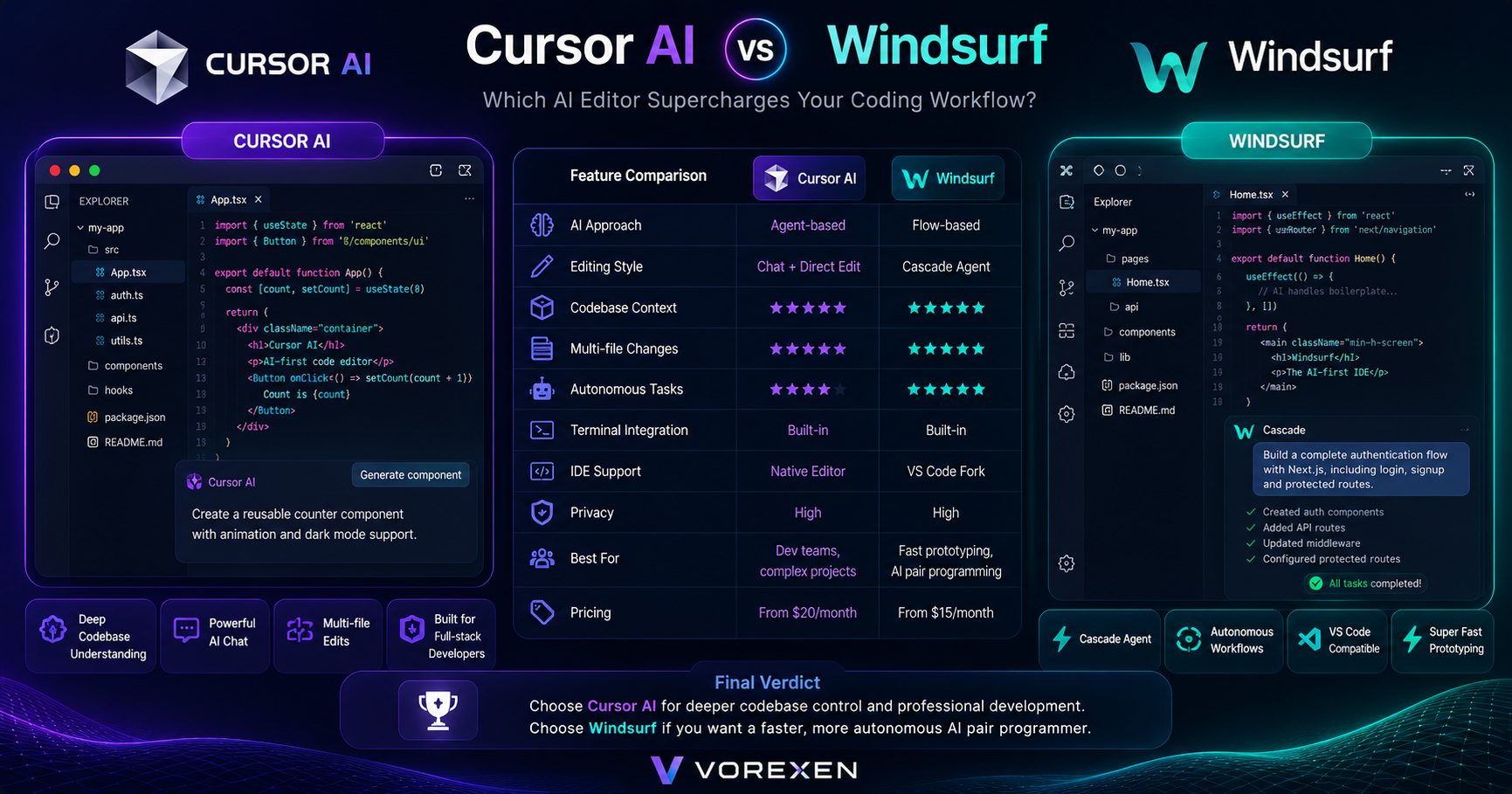
Windsurf emphasizes autonomous AI workflows and rapid development, while Cursor AI focuses on giving developers precise control over large codebases. Teams working on enterprise applications will generally benefit more from Cursor’s mature editing capabilities.
| Category | Cursor AI | Windsurf |
|---|---|---|
| Codebase Understanding | ★★★★★ | ★★★★☆ |
| AI Automation | ★★★★☆ | ★★★★★ |
| Developer Control | ★★★★★ | ★★★★☆ |
| Enterprise Usage | ★★★★★ | ★★★★☆ |
| Winner | Cursor AI | — |
Cursor AI vs Replit AI
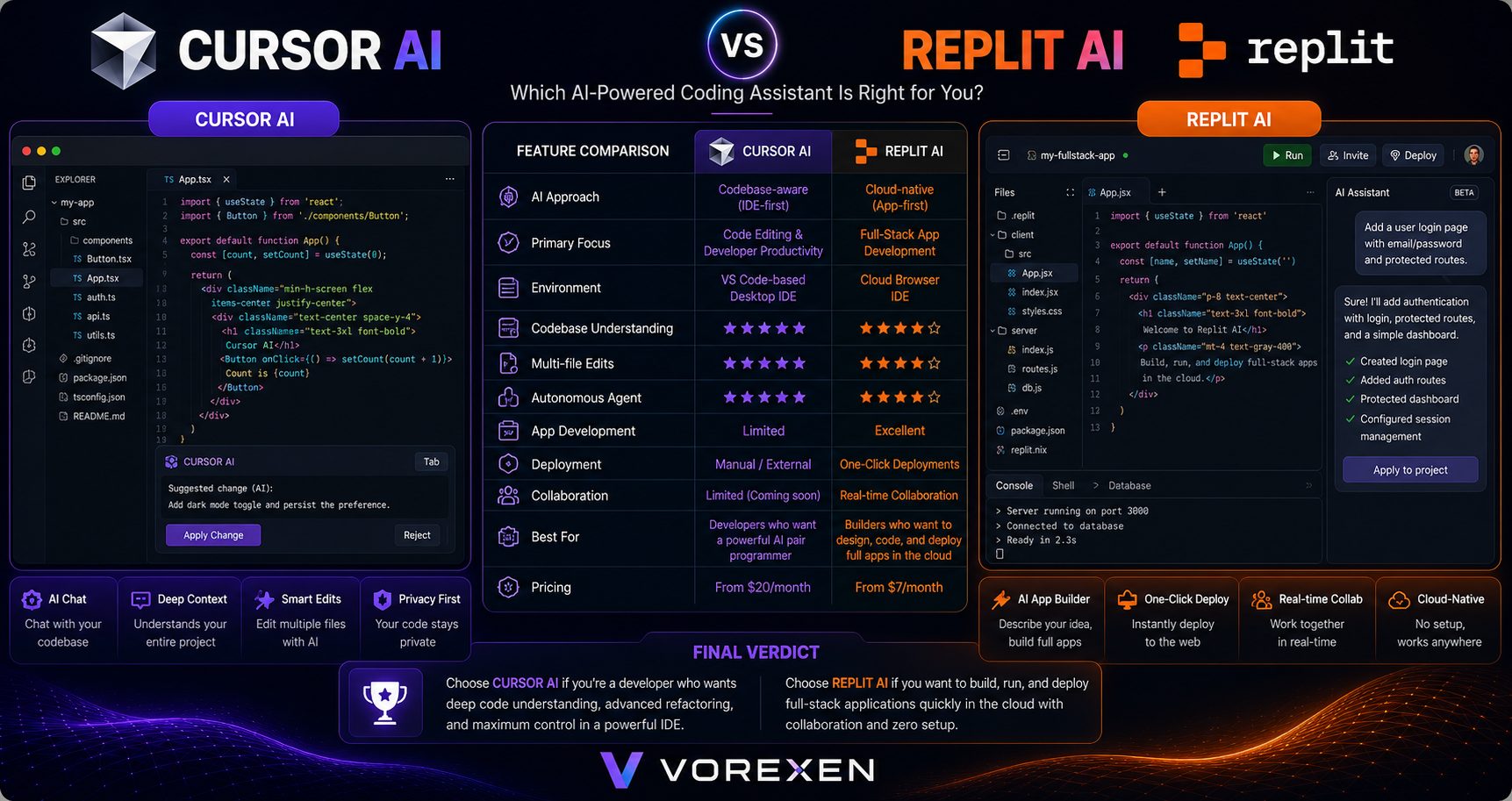
Replit AI excels at browser-based development and quick project deployment. Cursor AI remains the stronger option for developers who spend most of their time working inside a dedicated IDE and need advanced project awareness.
| Feature | Cursor AI | Replit AI |
|---|---|---|
| Desktop IDE | ★★★★★ | ★★★☆☆ |
| Cloud Development | ★★★☆☆ | ★★★★★ |
| AI Coding | ★★★★★ | ★★★★☆ |
| Deployment | ★★★★☆ | ★★★★★ |
| Winner | Depends on your workflow | — |
Best Cursor AI Alternatives
If Cursor AI doesn’t perfectly match your workflow, several alternatives provide excellent AI-powered coding assistance.
| Tool | Best For |
|---|---|
| GitHub Copilot | General-purpose AI coding assistance |
| Codeium | Developers looking for a generous free plan |
| Windsurf | AI-first autonomous coding workflows |
| Replit AI | Cloud-native application development |
| Tabnine | Privacy-focused enterprise teams |
Advantages
- Excellent project-wide context awareness.
- One of the best AI chat experiences for developers.
- Accurate multi-file editing and refactoring.
- Modern and intuitive user interface.
- Supports familiar VS Code workflows.
- Fast AI response times.
- Suitable for individual developers and engineering teams.
Limitations
- Premium features require a paid subscription.
- AI-generated code should always be reviewed.
- May consume more system resources on large repositories.
- Some advanced workflows require familiarity with AI-assisted development.
Part 3 Summary
Cursor AI consistently ranks among the strongest AI code editors available in 2026. It outperforms many competitors in project understanding, AI-assisted editing, and overall developer productivity, making it an excellent choice for professionals working on medium to large software projects.
Frequently Asked Questions (FAQ)
Is Cursor AI free?
Yes. Cursor AI offers a free plan that includes core AI coding features with usage limits. Developers who need higher limits, premium AI models, and advanced capabilities can upgrade to a paid plan.
Is Cursor AI better than GitHub Copilot?
For many professional developers, Cursor AI provides a more complete AI coding experience thanks to its AI-first editor, project-wide understanding, multi-file editing, and integrated AI chat. GitHub Copilot remains an excellent option for developers who prefer using AI inside their existing IDE.
Can Cursor AI replace Visual Studio Code?
Yes. Cursor AI is built on Visual Studio Code, allowing developers to keep a familiar interface while gaining powerful AI features. Most popular VS Code extensions and workflows continue to work with minimal adjustments.
Which programming languages does Cursor AI support?
Cursor AI supports virtually all major programming languages, including Python, JavaScript, TypeScript, Java, C#, Go, Rust, PHP, C++, Kotlin, Swift, and many more.
Does Cursor AI work offline?
Most AI-powered features require an internet connection because requests are processed using cloud-based AI models. However, the editor itself can still be used for standard code editing when offline.
Is Cursor AI suitable for beginners?
Absolutely. Beginners can use Cursor AI to learn programming concepts, generate code examples, understand unfamiliar syntax, and receive explanations while writing software.
Is Cursor AI secure for professional development?
Cursor AI includes privacy controls and security options designed for professional use. Organizations working with sensitive codebases should review the available privacy settings and enterprise features before deployment.
Final Verdict
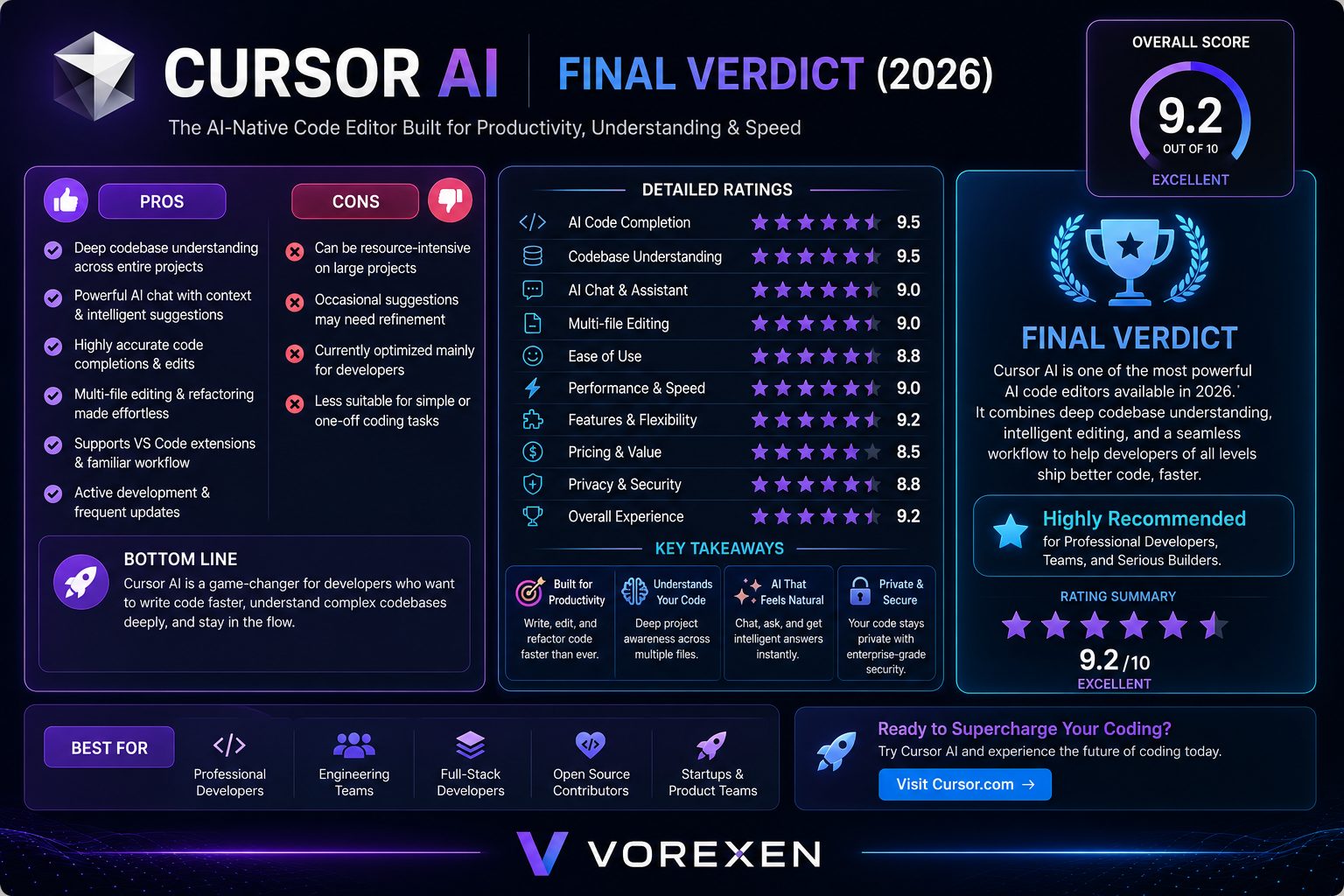
Cursor AI has quickly established itself as one of the leading AI code editors available today. Instead of simply offering autocomplete, it understands your entire codebase, assists with complex refactoring, explains unfamiliar code, generates production-ready functions, and streamlines everyday development tasks.
Throughout our evaluation, Cursor AI consistently demonstrated outstanding performance in code generation, AI-assisted editing, debugging, and developer productivity. The familiar Visual Studio Code foundation also makes the transition easy for most developers.
Although no AI coding assistant is perfect, Cursor AI currently offers one of the best balances between intelligent automation and developer control. Whether you’re an individual programmer, freelancer, startup founder, or part of a large engineering team, Cursor AI is a tool that can significantly improve your workflow.
Overall Ratings
| Category | Rating |
|---|---|
| AI Code Generation | ★★★★★ (5.0/5) |
| Codebase Understanding | ★★★★★ (5.0/5) |
| AI Chat | ★★★★★ (4.9/5) |
| Developer Experience | ★★★★★ (4.9/5) |
| Performance | ★★★★★ (4.8/5) |
| Value for Money | ★★★★☆ (4.6/5) |
| Overall Score | ★★★★★ (4.8/5) |
Ready to Code Faster with AI?
Experience one of the most advanced AI-powered code editors available today. Generate better code, understand large projects, refactor confidently, and accelerate your entire development workflow with Cursor AI.